Battery Management Studio Software
www.ti.com
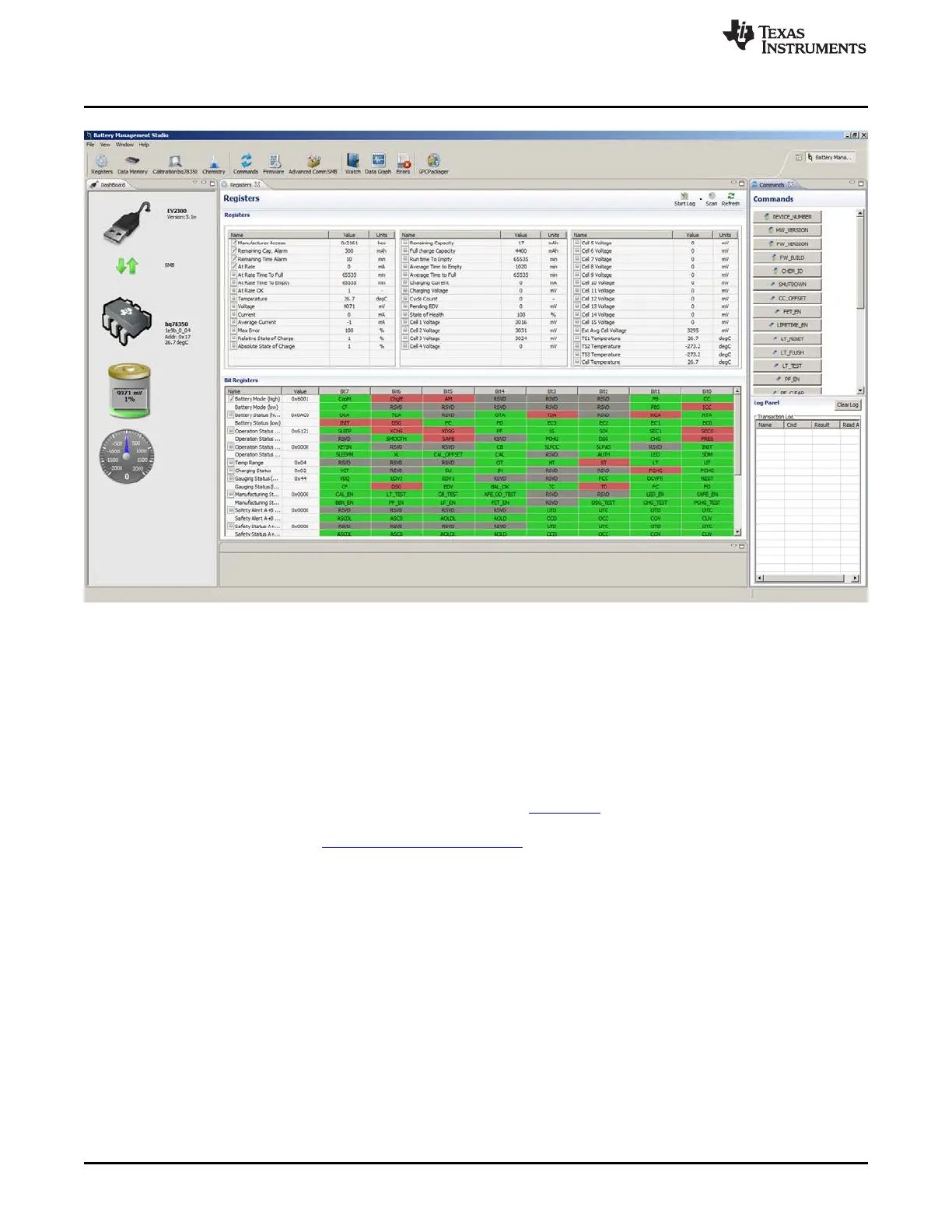
Figure 11. Register View After Restart
5.6 Data Memory Configuration
Most of the configuration of the bq78350 is accomplished through setting values in data memory. The data
memory is accessed using the Data Memory view. Configuration values are orgainized in functional
groups selected by buttons on the left side of the view. Data values may be changed by selecting and
entering a value. Parameter registers which are bit fields may be changed by selecting the bit in the pop
up when the register or its value is selected. Figure 12 shows the bit field for the AFE Cell Map which is
one of the most basic settings that must typically be changed with the EVM. The AFE Cell Map is a
physical location of the cells. Refer to the bq78350 TRM (SLUUAN7) for information on this and other
configuration parameters. Data Memory must be written after change. See other technical documents in
the bq78350 product folder www.ti.com/product/bq78350,
The Export tool in the Data Memory view allows saving the configuration data to a comma-separated-
value file format which can be accessed by a spreadsheet program. Reading data before export will save
the data from the part rather than values which may be only in the view. The Import tool allows loading
such a file into the view so that it can be written to the device.
22
bq76930 and bq76940 Evaluation Module User's Guide SLVU925B–April 2014–Revised July 2014
Submit Documentation Feedback
Copyright © 2014, Texas Instruments Incorporated








 To Next Page