Electrical Maintenance
68
Zone 2 Evaporator Will Not Terminate
Defrost
If the defrost termination switch does not
terminate Defrost less than 45 minutes after
Defrost was initiated, the TG-V Controller should
terminate Defrost.
The Multi-Temp TG-V Controller will record
alarm code 47 if the R11 circuit stays grounded
and the defrost termination on time limit is
unsuccessful.
Zone 2 Evaporator Sticks In Defrost
Indefinitely
If the unit remains stuck in Defrost indefinitely,
check the Zone 2 defrost relays, the R11 circuit
and the TG-V Controller.
NOTE: If the Multi-Temp TG-V Controller has
recorded Alarm Code 47, check the R11 circuit
for a ground first.
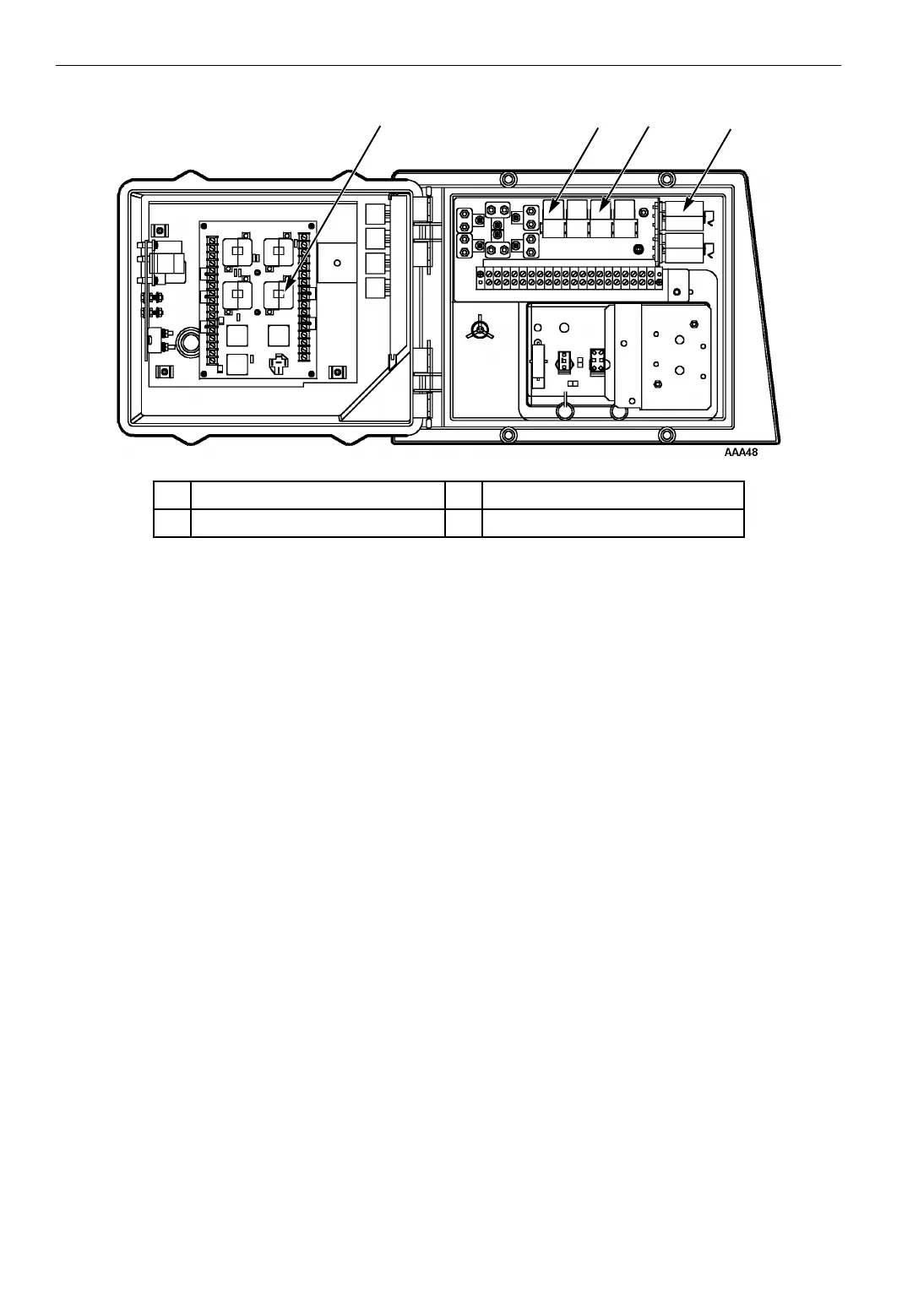
1. Check the Zone 2 defrost relays:
If the unit remains on Defrost indefinitely,
remove the jumper from between the R8N and
R8NN terminals on the relay board. The Zone
2 defrost relays should open (de-energize)
immediately. If the relays open (de-energizes),
move to step 2. If a relay fails to open, replace
the relay.
2. Disconnect the cab box harness and check the
R11 circuit:
If the defrost relays opened (de-energized)
when the jumper was removed, disconnect the
cab box harness from the back of the TG-V
Controller and check the R11 circuit for
continuity to CH (ground). If the R11 circuit is
grounded, repair it. If not, move to step 3.
3. Check the TG-V Controller:
The integral defrost timer in the TG-V
Controller should terminate the Defrost cycle
after 45 minutes regardless of the evaporator
temperature or amount of frost or ice on the
evaporator coil. If not, test the TG-V
Controller. See “Field Test Procedure for
Multi-Temperature In-Cab TG-V Controllers”
on page 75.
1 23 4
1. Zone 2 Defrost Relay (RD) 3. Zone 1 Fan Relay (FR)
2. Zone 2 Fan Relay (RFR) 4. Zone 1 Defrost Relay (DR)
Figure 23: Defrost Relay Locations



 To Next Page