Wiring
Serial Communications
Optional RS485
Wiring
Connecting a PC serial port (COM) to the optional RS485 port on the
gauge requires an RS485/RS232 converter (p/n 670045). The J6 connector
on the transmitter CPU is for the RS485 connections. Refer to installation
wiring drawing 868680-2 and make the RS485 connections as follows.
1. Connect +DATA and –DATA on the RS485 connector (J6) to the
corresponding connections on the RS485/RS232 converter.
2. Connect the RS485/RS232 converter to the PC using a standard DB9
serial cable.
RS485 Termination
If you are having trouble using another device on the RS485 chain, verify
that it is properly terminated for its position on the chain. To terminate a
device, connect a 120 resistor between its RS485 +/– data terminals.
Never terminate more than the first and last device in the chain.
The transmitter includes a three-pin header (W4), located near the bottom-
front edge of the CPU board next to the RS485 connector (J6), to
terminate the RS485 connection.
For a single unit installation or for a multiple unit installation where the
transmitter is the last unit in line, the W4 jumper should be placed on pins
1 and 2 to terminate the RS485 line.
For a multiple unit installation where the transmitter is the not last unit in
line, the W4 jumper should be placed on pins 2 and 3 so that the RS485
line is not terminated at the transmitter.
RS232 Wiring
COM1 or COM2 on a PC can be connected directly to the transmitter
RS232 port. This connection requires five wires: ground, TX, RX, RTS,
and CTS. The RS232 port connector (J8) is located on the transmitter
CPU board. Connections for standard DB9 and DB25 PC serial port
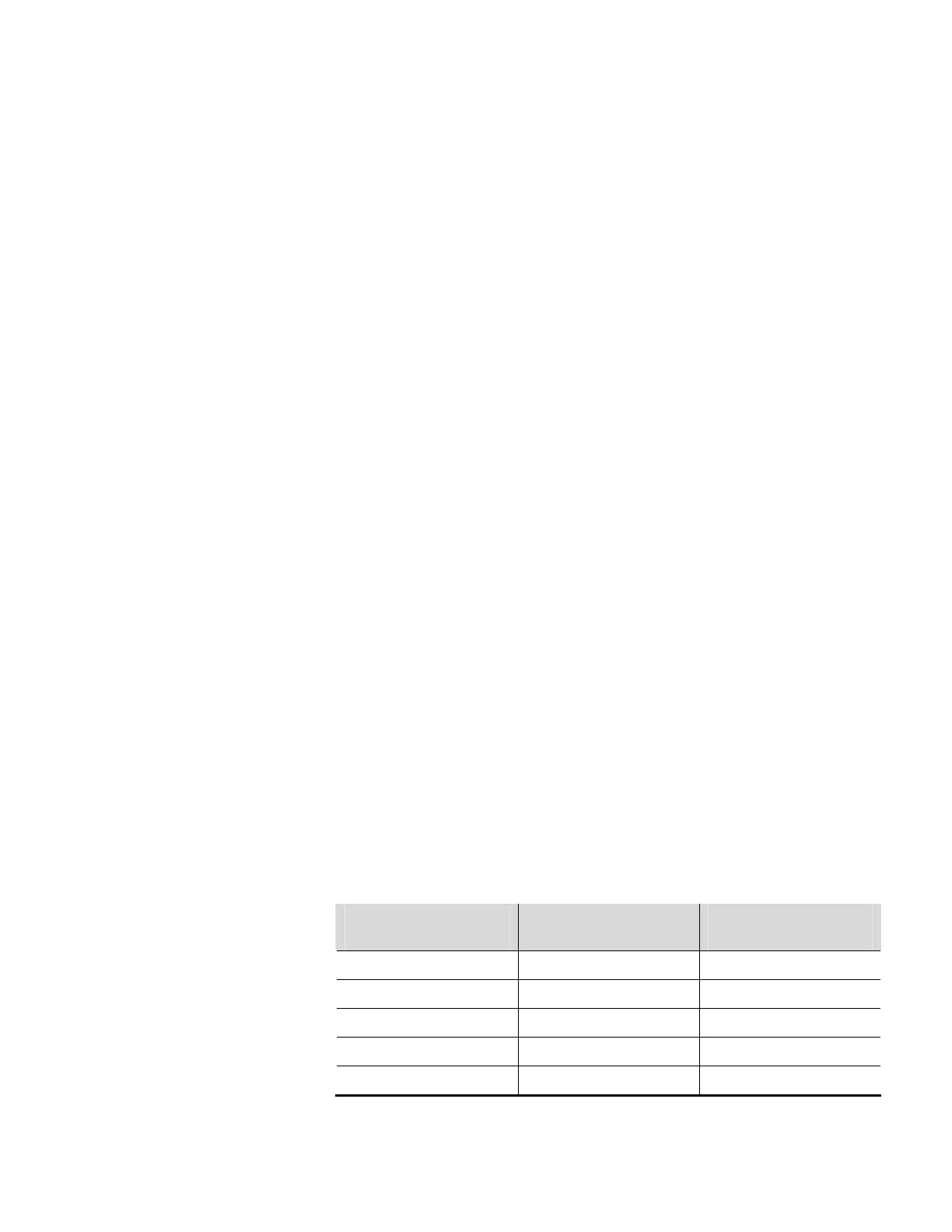
connectors are listed in the table below.
Table 4–8. RS232 connections
RS232 Connector (J8) on
Transmitter CPU
PC Serial Port DB9
Connector
PC Serial Port DB25
Connector
J8-1 (RTS) Pin 8 Pin 5
J8-2 (TX) Pin 2 Pin 3
J8-3 (CTS) Pin 7 Pin 4
J8-4 (RX) Pin 3 Pin 2
J8-5 (GND) Pin 5 Pin 7
4-14 DensityPRO+ Installation Guide Thermo Fisher Scientific








 To Next Page