•Donotapplypressuretothecoverofthedrive.
•Donottouchtheconnector.
•Beforeremovingthestoragedrive,makeabackupcopyofalltheinformationonitandthenturnoffthe
computer.
•Neverremovethedrivewhilethecomputerisoperating,insleepmode,orinhibernationmode.
Toreplacethestoragedrive,dothefollowing:
1.Turnoffthecomputer;thendisconnecttheacpoweradapterandallcablesfromthecomputer.Wait
severalminutestoletthecomputercool.
2.Closethecomputerdisplayandturnthecomputerover.
3.Removethebattery.See“Replacingthebattery”onpage113.
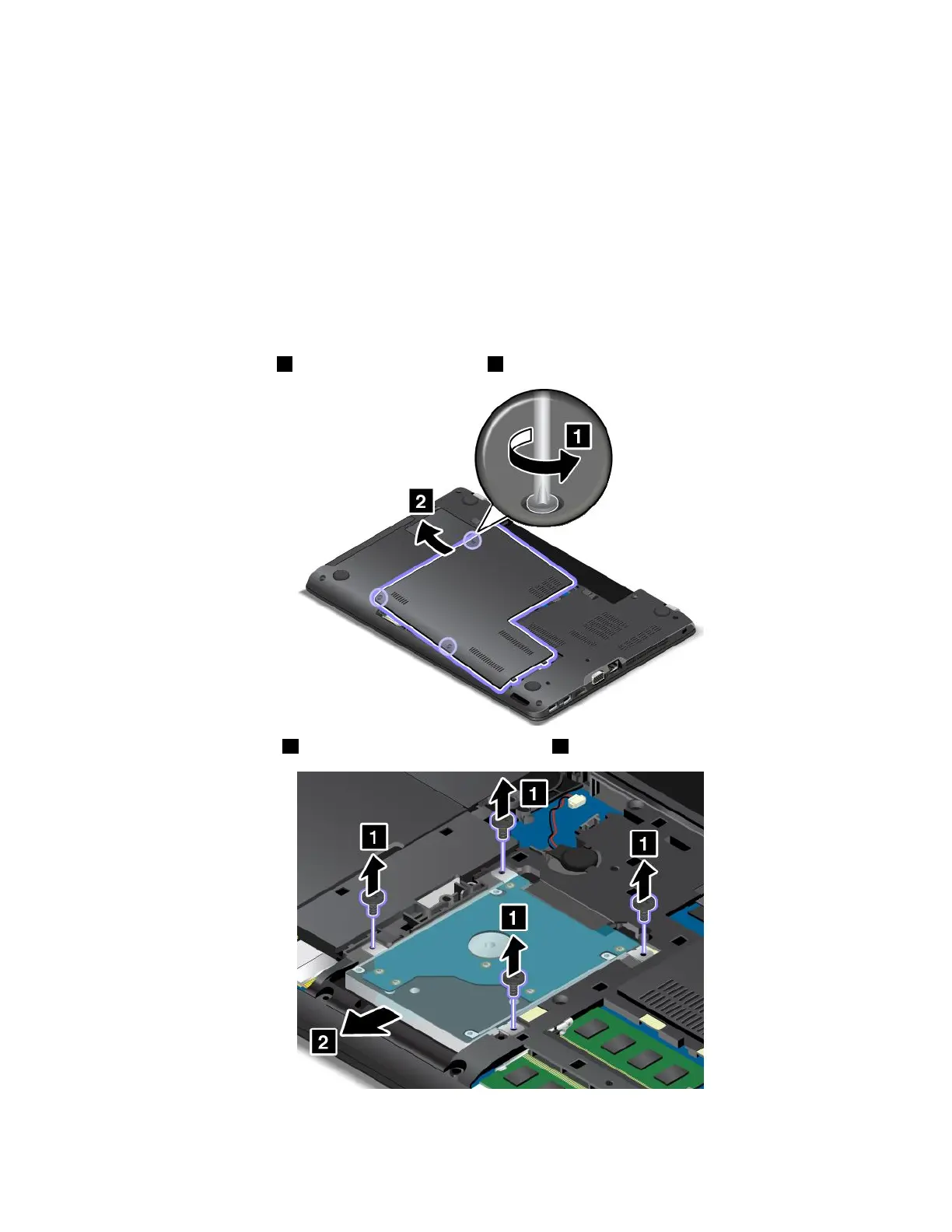
4.Loosenthescrews1andthenremovethecover2.
5.Removethescrews1andthenslideoutthestoragedrive2.
Chapter10.Replacingdevices121



 To Next Page