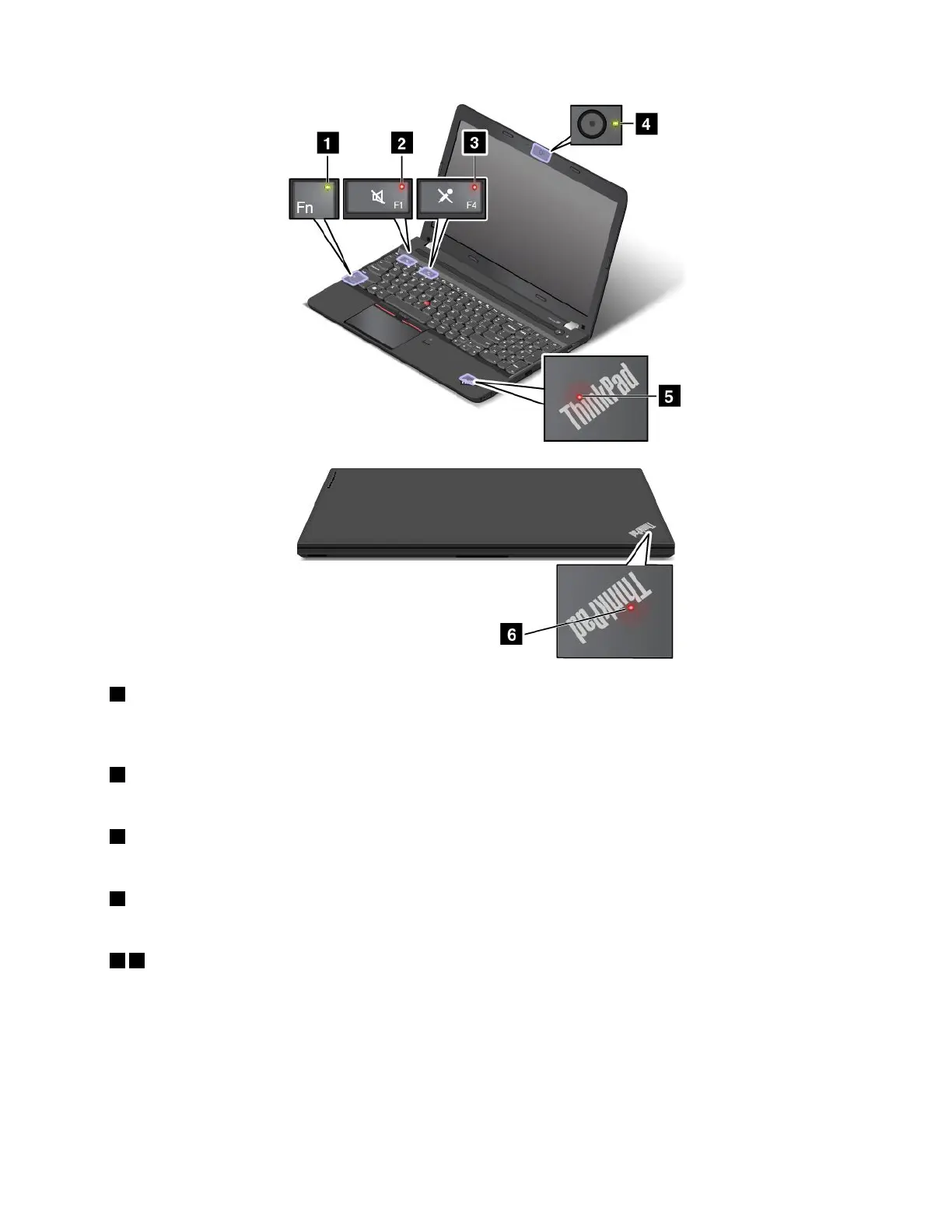
1FnLockindicator
TheFnLockindicatorshowsthestatusofFnLockfunction.Formoreinformation,see“Specialkeys”
onpage21.
2Speaker-muteindicator
Whenthespeaker-muteindicatorison,thespeakersaremuted.
3Microphone-muteindicator
Whenthemicrophone-muteindicatorison,themicrophonesaremuted.
4Camera-statusindicator
Whenthecamera-statusindicatorison,thecameraisinuse.
56System-statusindicators
Theilluminateddots,oneintheThinkPadlogoontheouterlidofyourcomputerandtheotheronthepalm
rest,showthesystemstatusofyourcomputer:
•Blinksforthreetimes:Thecomputerisinitiallyconnectedtopower.
•On:Thecomputerison(innormalmode).
•Off:Thecomputerisofforinhibernationmode.
•Blinksfast:Thecomputerisenteringhibernationmode.
Chapter1.Productoverview9



 To Next Page