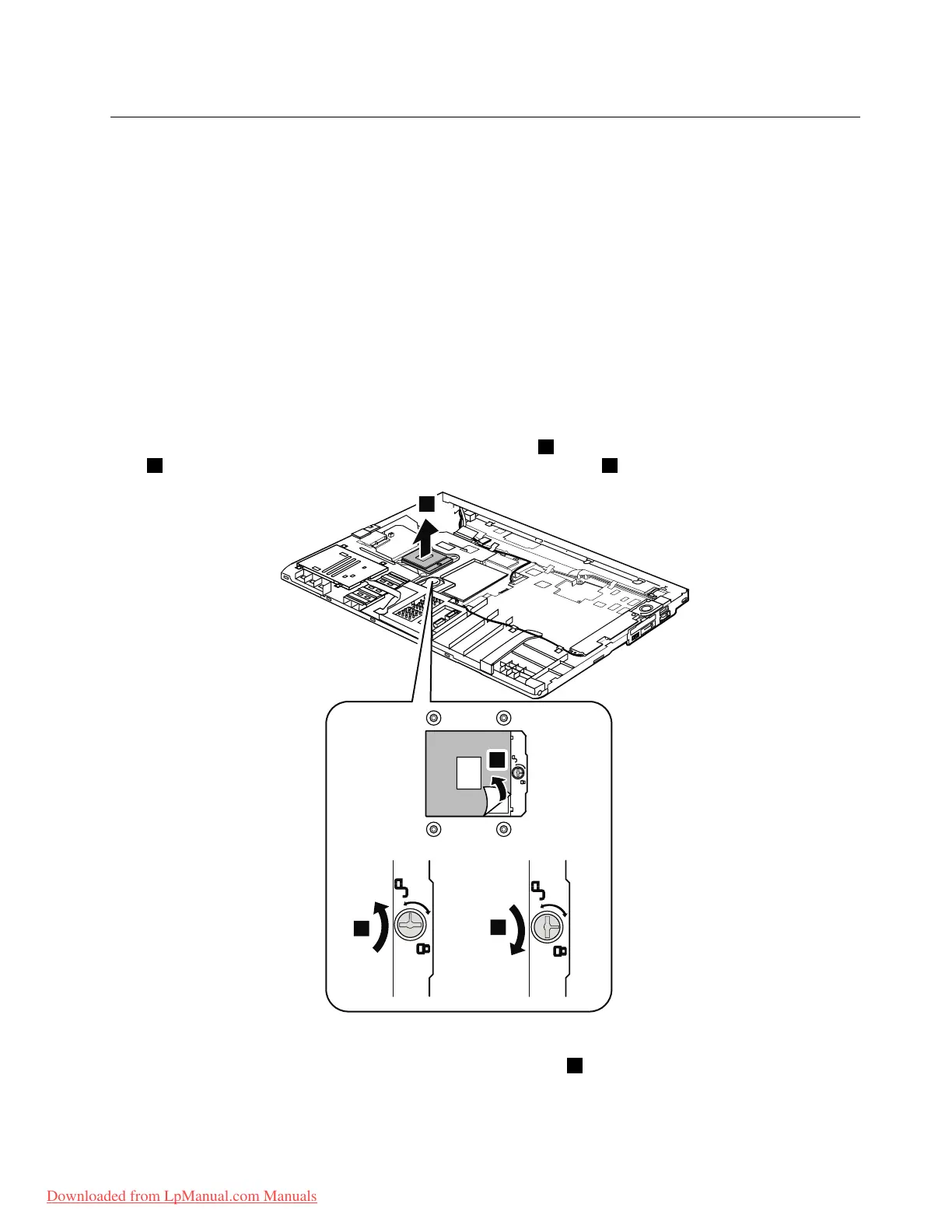
1180CPU
Foraccess,removetheseFRUsinorder:
•“1010Batterypack”onpage67
•“1020ExpressCardblankbezel”onpage68
•“1050DIMMslotcover”onpage73
•“1070PCIExpressMiniCardforwirelessWAN”onpage75
•“1080Keyboard”onpage77
•“1110PCIExpressMiniCardforwirelessLAN”onpage85
•“1120Keyboardbezelassembly,FPCcable,andBluethoothdaughtercard”onpage87
•“1150Speakerassembly”onpage95
•“1160LCDunit”onpage97
•“1170Fanassembly”onpage101
Attention:TheCPUisextremelysensitive.WhenyouservicetheCPU,avoidanykindofroughhandling.
RemovalstepsofCPU
Rotatetheheadofthescrewinthedirectionshownbyarrow1toreleasethelock,andthenremovethe
CPU2.AfterthatpeelthemylarofffromtheCPUasshownbyarrow4.
Wheninstalling:MakesurethatthemylarisattachedtotheCPU.PlacetheCPUontheCPUsocket,and
thenrotatetheheadofthescrewinthedirectionshownbyarrow3tosecuretheCPU.
Chapter8.RemovingandreplacingaFRU105
Downloaded from LpManual.com Manuals



 To Next Page