1010Batterypack
Importantnoticeforreplacingabatterypack:
TheLenovoThinkVantageT oolboxandLenovoSolutionCenter(inWindows7)haveanautomaticbattery
diagnosticcomponentthatdeterminesifthebatterypackisdefective.AbatterypackFRUshouldnotbe
replacedunlessthisdiagnostictestshowsthatthebatteryisdefective.
Theonlyexceptiontothisisifthebatterypackisphysicallydamagedoracustomerisreportingapossible
safetyissue.
IfLenovoThinkVantageToolboxisnotinstalledinthecomputer,thecustomershoulddownloadthisprogram
beforeanon-physicallydamagedbatterypackisreplaced.Notethatthereplacementofaphysically
damagedbatterypackisnotcoveredbythewarranty.
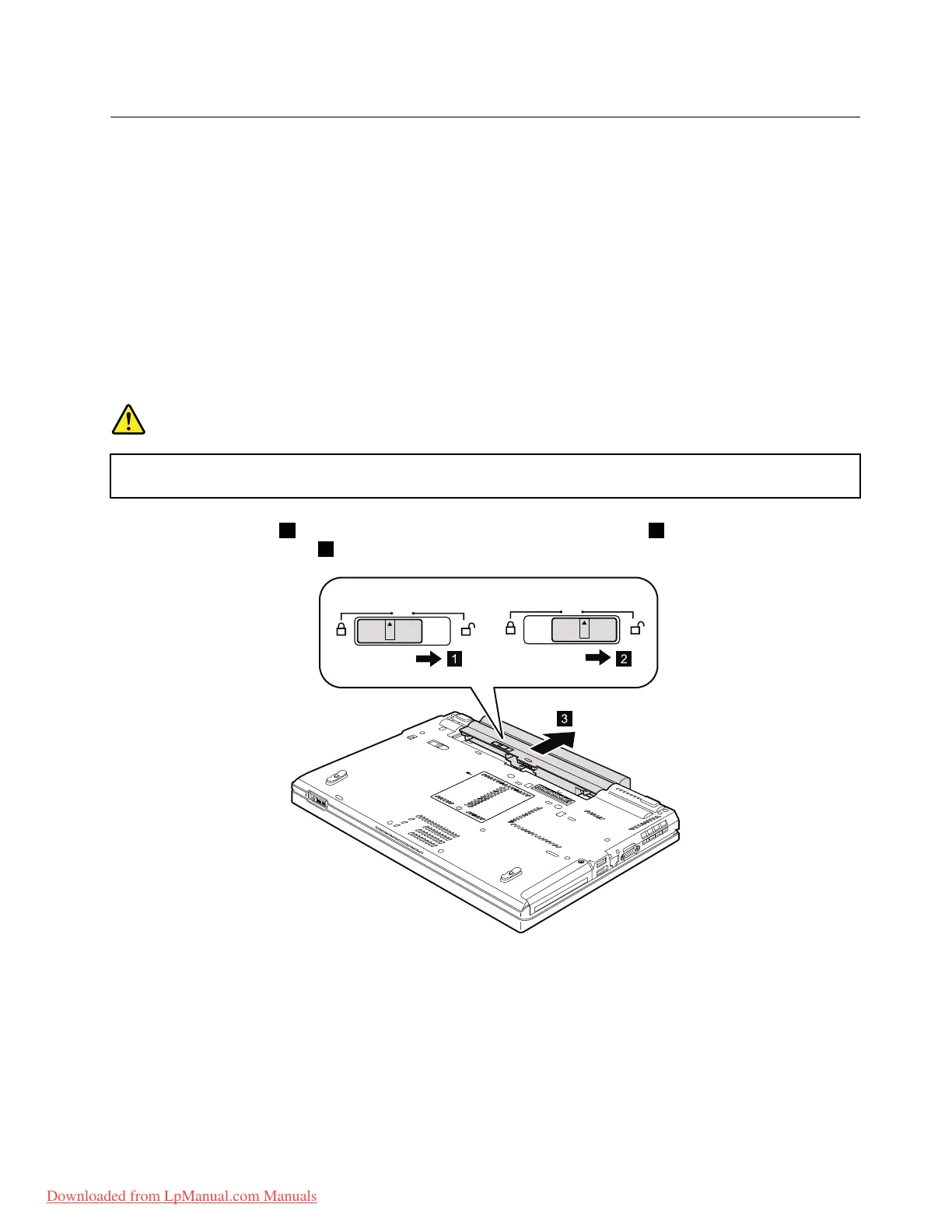
Removalstepsofbatterypack
DANGER
Useonlythebatteryspeciedinthepartslistforyourcomputer.Anyotherbatterycouldignite
orexplode.
Unlockthebatterylatch1.Holdingthebatterylatchintheunlockedposition2,removethebatterypackin
thedirectionshownbyarrow3.
Wheninstalling:Installthebatterypackintheslot.Makesurethatthebatterylatchisinthelockedposition.
Chapter8.RemovingandreplacingaFRU67
Downloaded from LpManual.com Manuals



 To Next Page