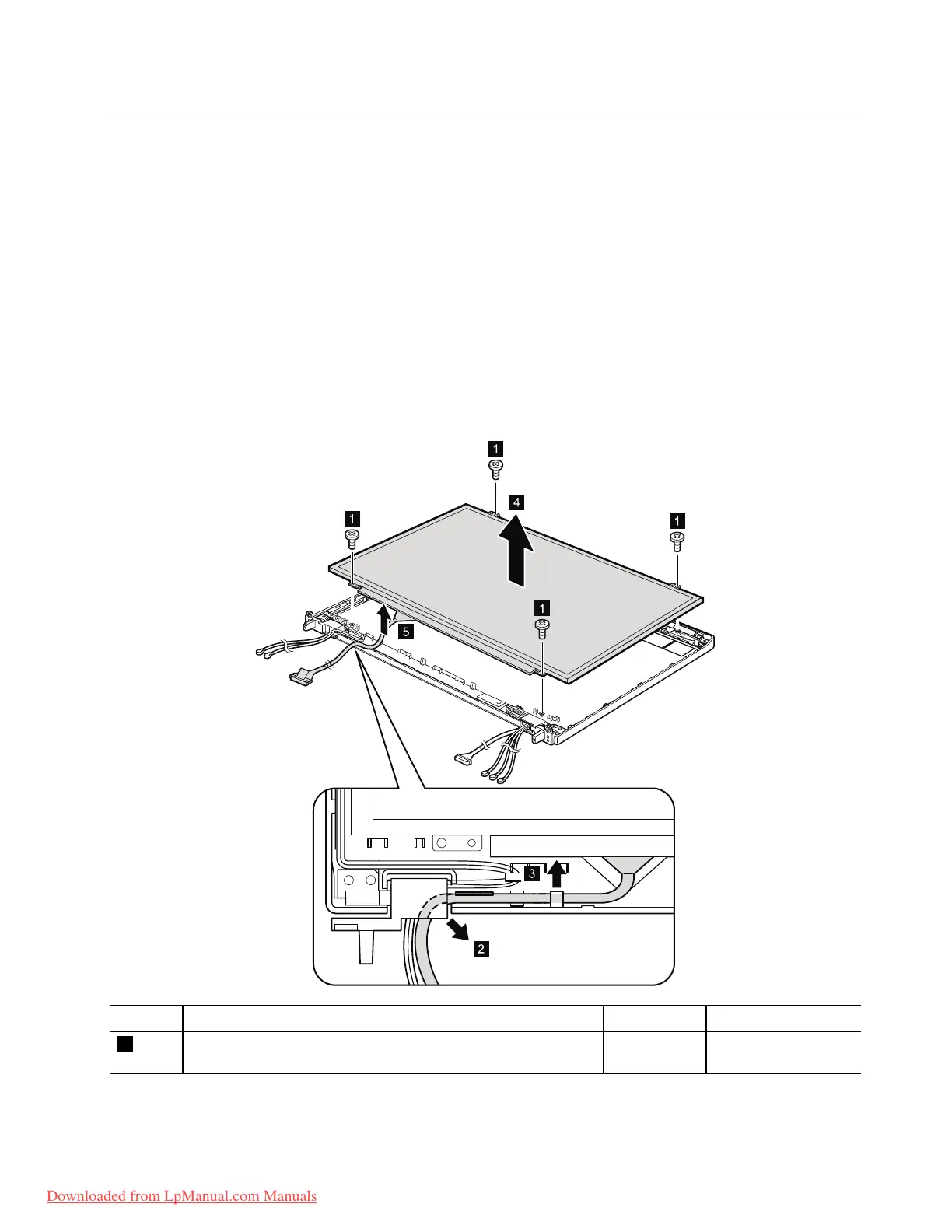
2040LCDpanelandLCDcable
Foraccess,removetheseFRUsinorder:
•“1010Batterypack”onpage67
•“1020ExpressCardblankbezel”onpage68
•“1050DIMMslotcover”onpage73
•“1070PCIExpressMiniCardforwirelessWAN”onpage75
•“1080Keyboard”onpage77
•“1110PCIExpressMiniCardforwirelessLAN”onpage85
•“1120Keyboardbezelassembly,FPCcable,andBluethoothdaughtercard”onpage87
•“1150Speakerassembly”onpage95
•“1160LCDunit”onpage97
•“2010LCDbezelassembly”onpage116
•“2020LEDboard”onpage117
•“2030Integratedcamera”onpage119
RemovalstepsofLCDpanelandLCDcable
StepScrew(quantity)Color
Torque
1
M2×3mm,wafer-head,nylon-coated(4)
Black0.181Nm
(1.85kgf-cm)
Wheninstalling:WhenattachingtheLCDpaneltothecover,gentlypresstheleftandrightedgescovered
withmetal.DOnotpressthesurfaceofthepanelorapplyanyexcessiveforcetothepanel.
Chapter8.RemovingandreplacingaFRU121
Downloaded from LpManual.com Manuals



 To Next Page