47
Please note that the guide will not be accessible if the TV input source is locked. You can
lock/unlock the input source by going to Live TV Settings > TV Options > Channel Options >
Parental Controls > Source Locked.
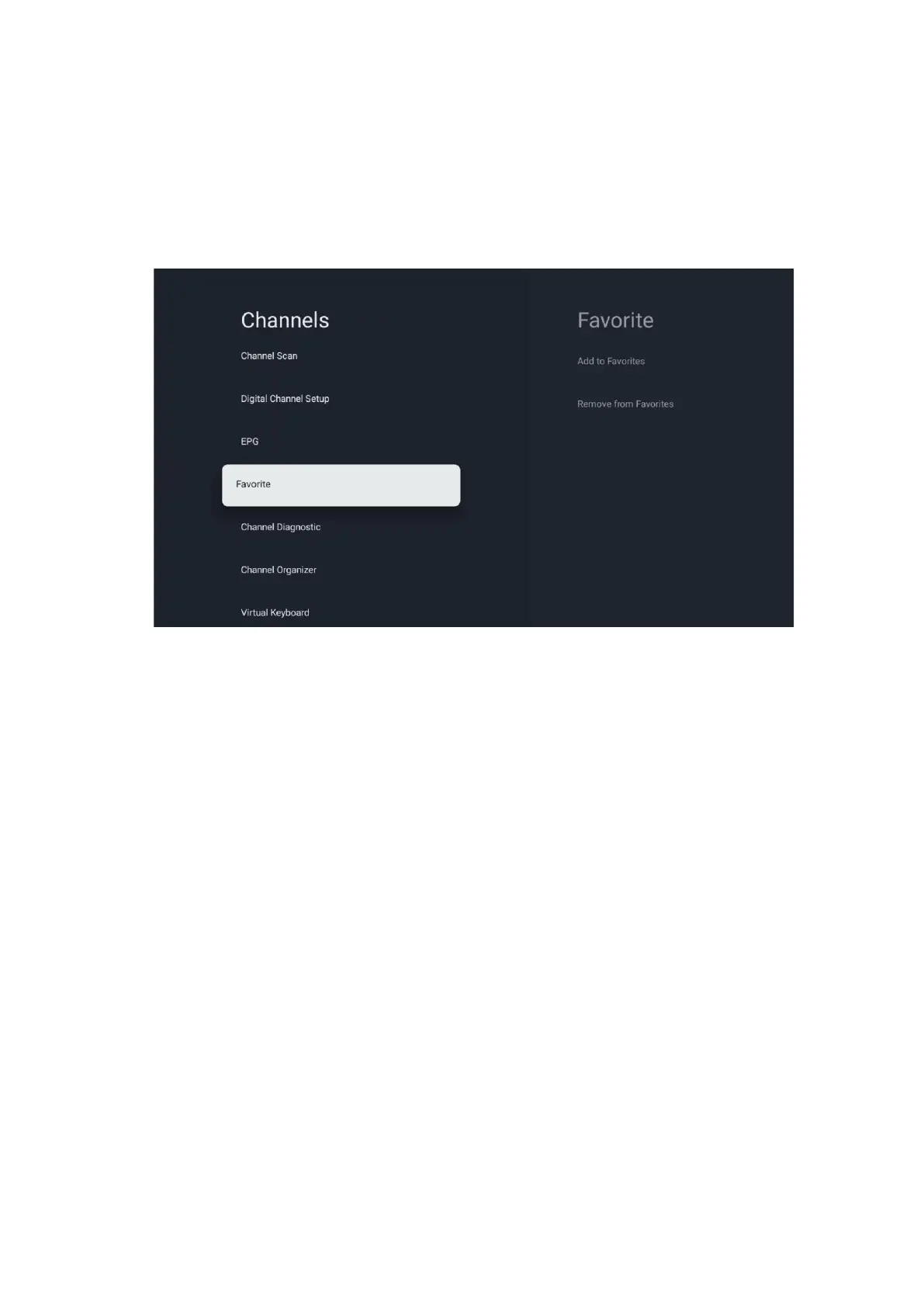
10.2.1.4 Favorite
10.2.1.4.1 Add to Favorites
Add your most viewed or favorite channels to your favorite list by following these steps:
• On the Home screen select the Live TV app and press OK to open it or press the Live TV
button on your remote control
• Select the channel you wish to add
• Press the Settings button on your remote control and proceed to Channels and inputs >
Channels > Favorite
• Select Add to Favorites and choose which list to add this channel to.
Alternatively, you can add channels to your favorite list in the Live TV app menu. Please, refer to
chapter 11.2.2.
Note: You can add the same channel to multiple favorite lists.
To see your favorite lists, please refer to chapter 11.2.4.
10.2.1.4.2 Remove from Favorites
Remove channels from your favorite list by following these steps:
• On the Home screen select the Live TV app and press OK to open it or press the Live TV
button on your remote control


 To Next Page