3 SpeedTouch™ Web Interface
E-SIT-CTC-20030306-0003 v3.0
53
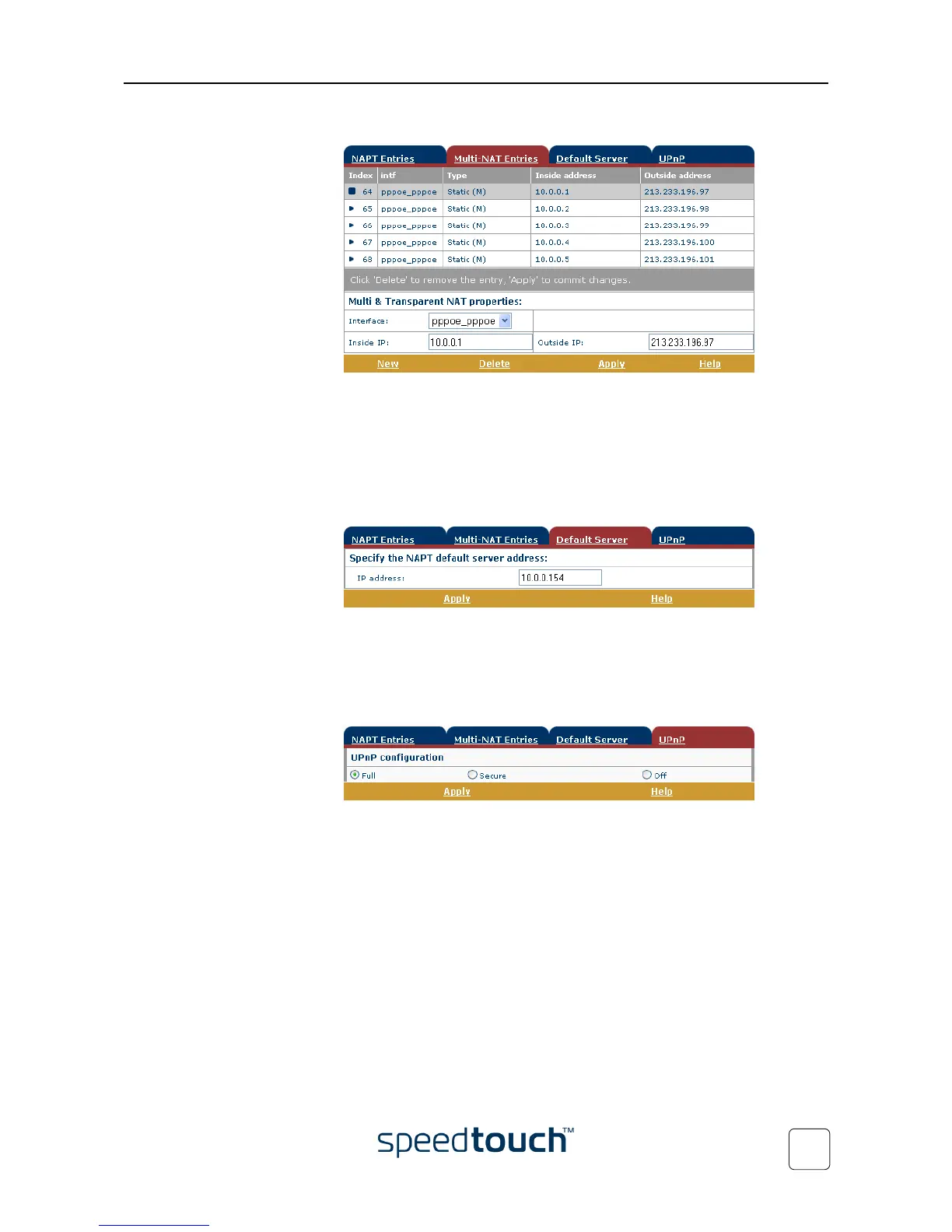
• View or add/delete Multinat Entries:
To add Multinat Entries proceed as follows:
4 Click New.
5 Specify the inside address and put the desired range between brackets e.g.
10.0.0.[1-10]. Specify the outside address and interface.
6 Click Apply.
• Define a default server:
By specifying a default server IP address, all incoming connections that don’t match
a specifically configured static NAPT entry will be forwarded to the device with
this IP address. This setting should be adequate for most server applications and
eliminates the need for specific static NAPT entries.
• Configure UPnP
The three UPnP configurations are:
• Full
The SpeedTouch™ is UPnP enabled, all local hosts are able to detect the
SpeedTouch™. Any local host is able to create port mappings for any local
device.
• Secure
The SpeedTouch™ is UPnP enabled, all local hosts are able to detect the
SpeedTouch™. A local host is allowed to make port mappings for its own,
i.e. a local host is not allowed to create port mappings for other local
devices.
• Off
The SpeedTouch™ is UPnP disabled, none of the local hosts is able to detect
the SpeedTouch™. Via UPnP no port mappings can be created.















 To Next Page