5 Troubleshooting
E-SIT-CTC-20030306-0003 v3.0
70
5.1 General
Configuration problems If you encounter DSL connectivity problems due to misconfiguration you might
consider a hardware reset to factory defaults as described in this chapter.
However, please note that resetting the SpeedTouch™ to its factory settings will revoke
all the changes you made to the configuration.
Dr SpeedTouch™ Dr SpeedTouch™ enables you to test your computer and SpeedTouch™ connectivity
via its Diagnostics wizard. The SpeedTouch™ Troubleshoot will report what is wrong
with your connection.
For more information on Dr SpeedTouch™ see “1.4 Dr SpeedTouch™ Installation” on
page 29.
Startup problems and
alert indications
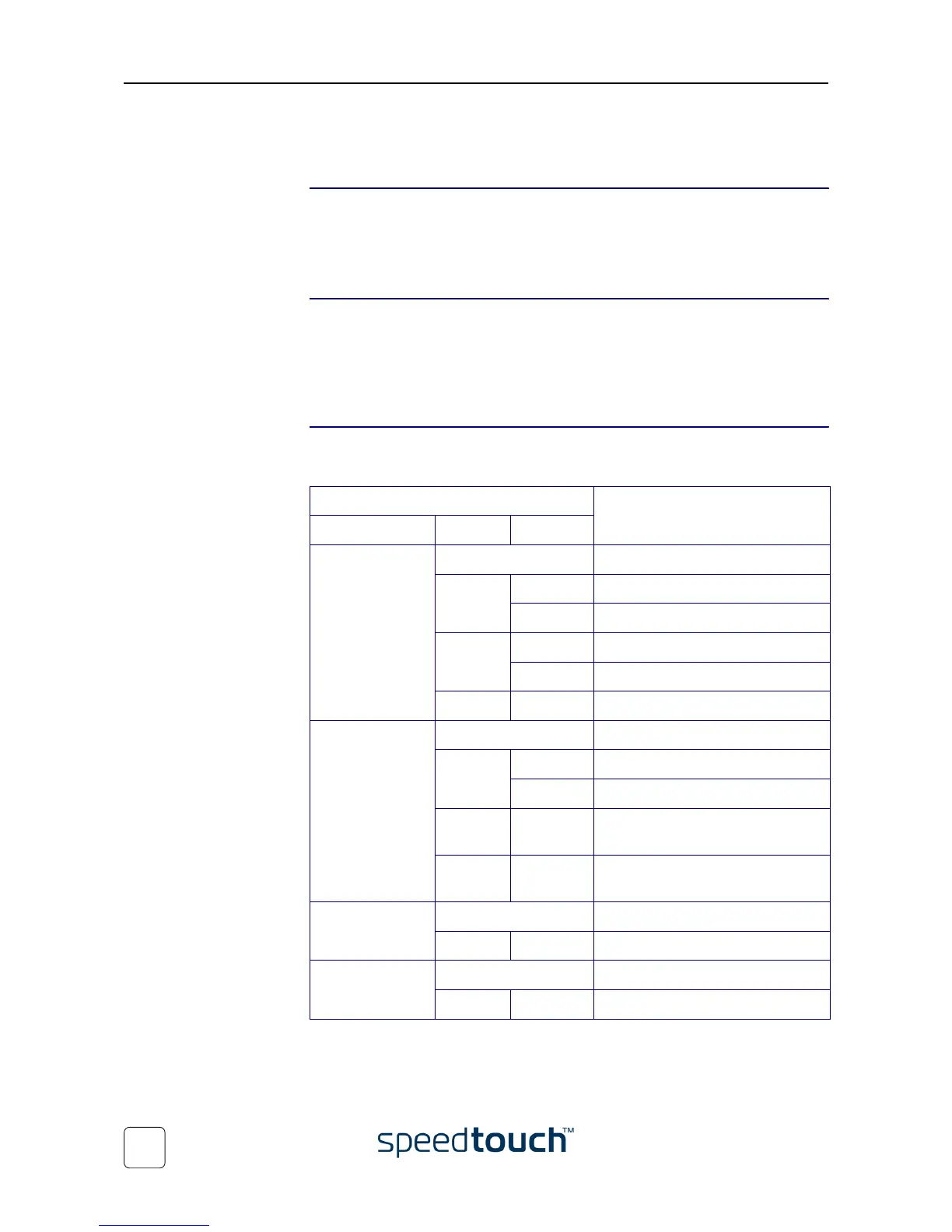
Via the LEDs you can check the status of the SpeedTouch™. Following table may help
you in case of problems starting up the SpeedTouch™:
(*) Power On Self Test (POST)
Indicator Description
Name Color Status
Power/System Off Power off.
Green On Power on, normal operation.
Flashing Power on, Back-to-Defaults status.
Amber Flashing Power-on, BOOTP status.
On Power on, POST(*) pending.
Red On Power on, POST(*) failed.
DSL/WAN Off No DSL line.
Amber Flashing DSL line synchronization pending.
On DSL line synchronized.
Amber
Green
Toggling DSL line synchronized and
end-to-end connection pending.
Green On DSL line synchronized and
end-to-end connection active.
LAN Off No Ethernet link.
Green On Ethernet link.
USB Off No USB link.
Green On USB link.















 To Next Page