1 SpeedTouch™ Installation
E-SIT-CTC-20030306-0003 v3.0
7
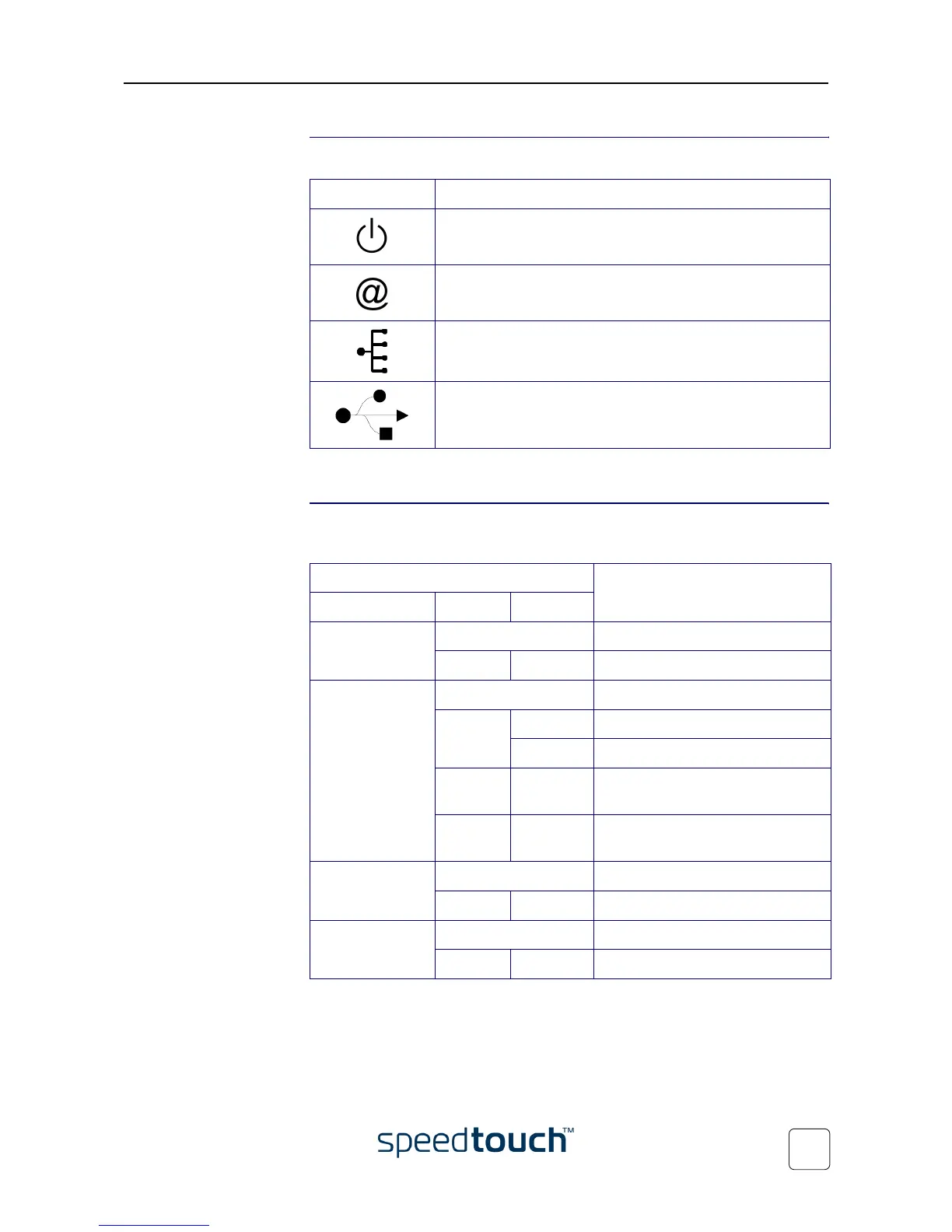
SpeedTouch™ LEDs A set of LEDs is provided to overview the SpeedTouch™ status:
The USB LED is available on SpeedTouch™ variants that offer USB connectivity.
LED functionality during
normal operation
The functionality of the LEDs during normal SpeedTouch™ operation is described in
the table below:
LED logo Description
Power/System LED
DSL/WAN LED
LAN LED
USB LED
Indicator Description
Name Color Status
Power/System Off Power off
Green On Power on, normal operation
DSL/WAN Off No DSL line
Amber Flashing DSL line synchronization pending
On DSL line synchronized
Green/
Amber
Toggling DSL line synchronized and
end-to-end connection pending
Green On DSL line synchronized and
end-to-end connection active
LAN Off No Ethernet link
Green On Ethernet link
USB Off No USB link
Green On USB link















 To Next Page