4 Wireless Connectivity
E-DOC-CTC-20030814-0001 v1.0
44
First-time wireless
client configuration
For a successful association the wireless client must be correctly configured for:
• the default WEP encryption
• the default Network Name.
As the SpeedTouch™ broadcasts its SSID to the wireless clients, you can select
the SpeedTouch™ wireless network (e.g. SpeedTouch012345) from a list of avail-
able networks.
Depending on your wireless client a wireless icon may become green or a
message similar to the following may pop up: “Successfully joined Wireless
network SpeedTouch012345".
Note Some wireless clients do not automatically join a wireless network. If
so, follow the instructions for the wireless client software to initiate
association.
First-time association
example
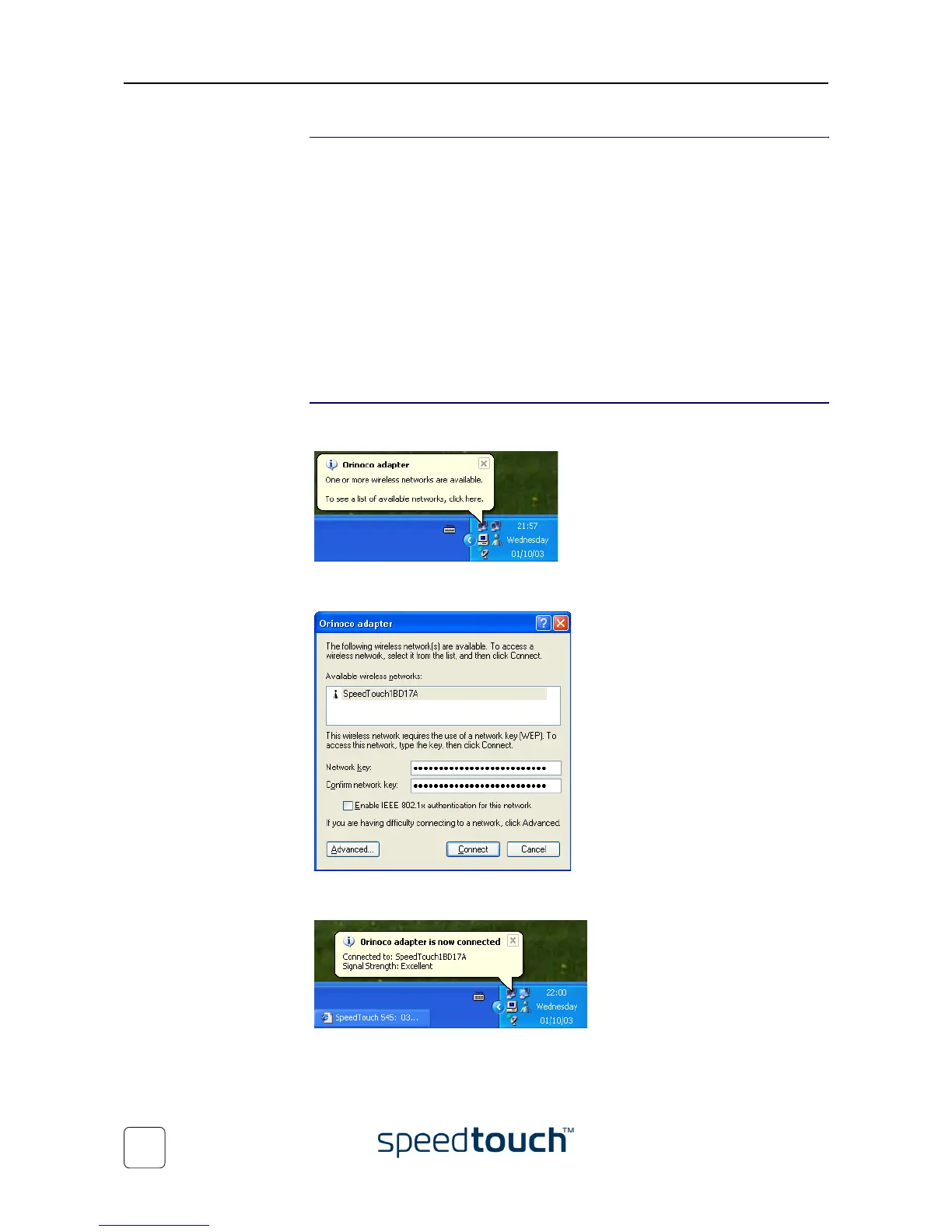
Below an example is provided, showing how the SpeedTouch™ wireless network is
presented towards an MS Windows XP system:
When clicking, the following window allows you to provide the WEP key (found on the
identification label located on the bottom of your SpeedTouch™):
Clicking Connect triggers the actual association. A successful association will be notified
as shown below:
Note For other Operating Systems the wireless client will in most cases be config-
ured via dedicated client managers.















 To Next Page