5 SpeedTouch™ Web Interface
E-DOC-CTC-20030814-0001 v1.0
50
5.1 Basic Topics Menu Links
System Information Click this link to display the System Information page. This page is also the Speed-
Touch™ home page.
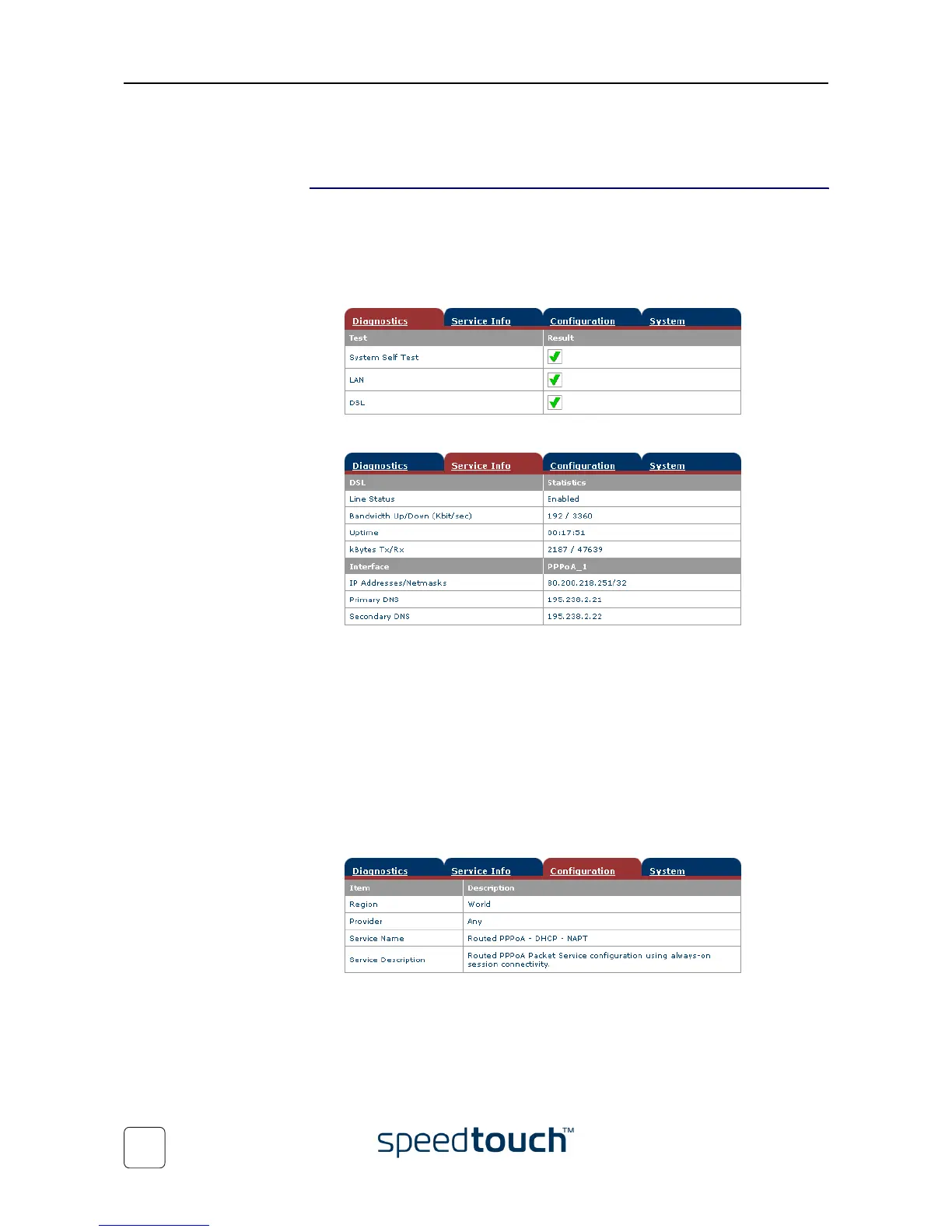
The System Information page consists of four sections:
• Click the Diagnostics tab to view the results of the System Self Test, LAN connec-
tivity and DSL synchronization test:
• Click the Service Info tab to view the current physical status of the ADSL line:
The DSL Statistics allow you to view:
• Line Status: this shows whether the DSL link is synchronized (Enabled) or
not (Initializing).
• Bandwidth Up/Down: the maximum available bandwidth of the DSL link in
both up- and downstream direction.
• Uptime: The duration of the current Enabled Line Status.
• kBytes Tx/Rx: the amount of kilobytes (kBytes) sent (Tx) and received (Rx)
since the establishment of the DSL link.
• Click the Configuration tab to view the configuration profile currently active on the
SpeedTouch™:















 To Next Page