TROUBLESHOOTING
P19
English
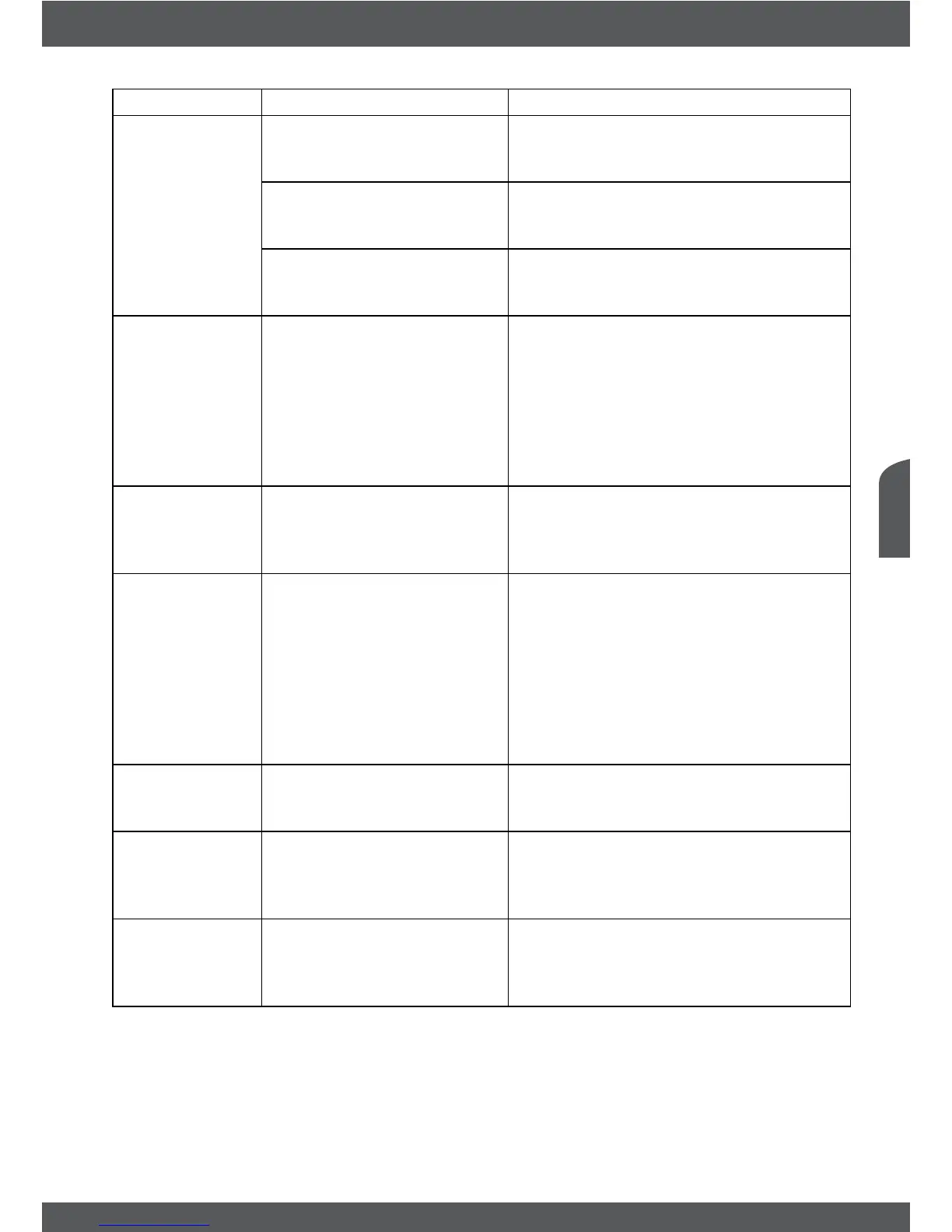
Symptom Cause Remedy
No picture The receiver can’t receive the
signal.
Check the antenna cable, replace
the cable, or connect the cable to the
receiver tightly.
Incorrect values of some
tuner parameters.
Set the values of tuner parameters
correctly in menu Installation – Antenna
Setup/Channel Search.
Wrong direction of the
antenna.
Check the signal with a spectrum
analyzer and adjust your antenna
correctly.
No access
to scrambled
services
Expired subscription.
Smart card awaiting new
authorisation.
No Subsciption for the
selected channel.
Check your actual subscription status
in Conditional Access – Irdeto Status –
Product List Status.
When receiver was powered off/
disconnected from signal for longer it can
take ~1-2h until a valid card is activated
again.
Switch to another channel.
The remote
control does not
work
The batteries of the remote
control are not inserted,
wrongly inserted or
exhausted.
Check whether the batteries are inserted
correctly or exhausted, if so replace the
batteries in the remote control.
The USB
storage device
is not working
properly.
Wrong formatted.
Bigger sized HDD
connected.
USB 1.1 device connected.
Format USB device by receiver in menu
Channel Manager – HDD Manager.
Format USB device in your computer to
FAT/FAT32.
Bigger size HDD or HDDs with more
partitions might need longer time to be
detected.
The receiver might not properly work with
such an USB device
The external
USB HDD does
not start.
Power consumption is too
high.
Connect an extra power supply adapter
to your USB HDD device (max. supported
5V/1A).
The receiver
switches
to Standby
automatically.
Auto Standby function is
activated and reached the
adjusted time (default 3h).
In the menu Timer – Time Adjust you can
adjust the Auto Standby time or disable it.
Message E44-
32 No Event
Information.
Enter PIN code.
Receiver block channel as
there is no parental rate
information broadcasted.
See 7.1.4 Parental Lock. Select
Not rated content and set setting to
Unblocked.



 To Next Page