P18
TROUBLESHOOTING
7.5.2 Set Timer
Timers can be used to schedule recordings or to switch to a certain channel at a desired
moment. It will help you not to miss your favourite events. Above the settings you will see the
current date and timer displayed.
Timer Number: Use
t/u to select one of the ten available timers or press OK to list up.
Channel: With OK you can list up the channel list in a new screen. Use
p/q or
PG+/- to select a channel and press OK again to apply this channel.
Timer Type: Choose between Once, Daily or Weekly.
Event Type: Set fixed to Turn ON.
Enable: Choose between Yes or No. You have to choose Yes if you want the timer
to start at the desired time.
Month: Only available when Timer Type is Once. Use
t/u to select the month.
Date: Only available when Timer Type is Once. Use
t/u to select the date.
Day: Only available when Timer Type is Weekly. Use
t/u to select the day.
Time: Use the 0~9 buttons to enter the time at which the timer should start.
Duration: Use the 0~9 buttons to digit the duration of the timer. For duration of 45
min, just enter 45 and press OK or for 1h 30min, just enter 130 and press
OK.
By pressing the YELLOW Summary button you can check the set timers and use the BLUE
button to delete a timer. With YELLOW or EXIT/SORTIE you can close this menu again.
Timers set Enable to Yes are automatically available in the Summary.
Once all settings are made, press EXIT/SORTIE to leave the menu. When returning to viewing
mode the receiver will inform with a message that it saves your settings.
NOTE: In case one timer is in conflict with another or if the set time has already passed, the receiver
will display a warning and ask how to solve the conflict.
8.0 TROUBLESHOOTING
There may be various reasons for abnormal operation of the receiver. Please check the receiver
according to the procedures shown below. If the receiver does not work properly after checking
it, please contact your local Serviceline or THOMSON dealer. Alternatively you can send a
support mail via our website: www.thomsonstb.net. NEVER open or disassemble your receiver.
This may cause a dangerous situation and will void the warranty.
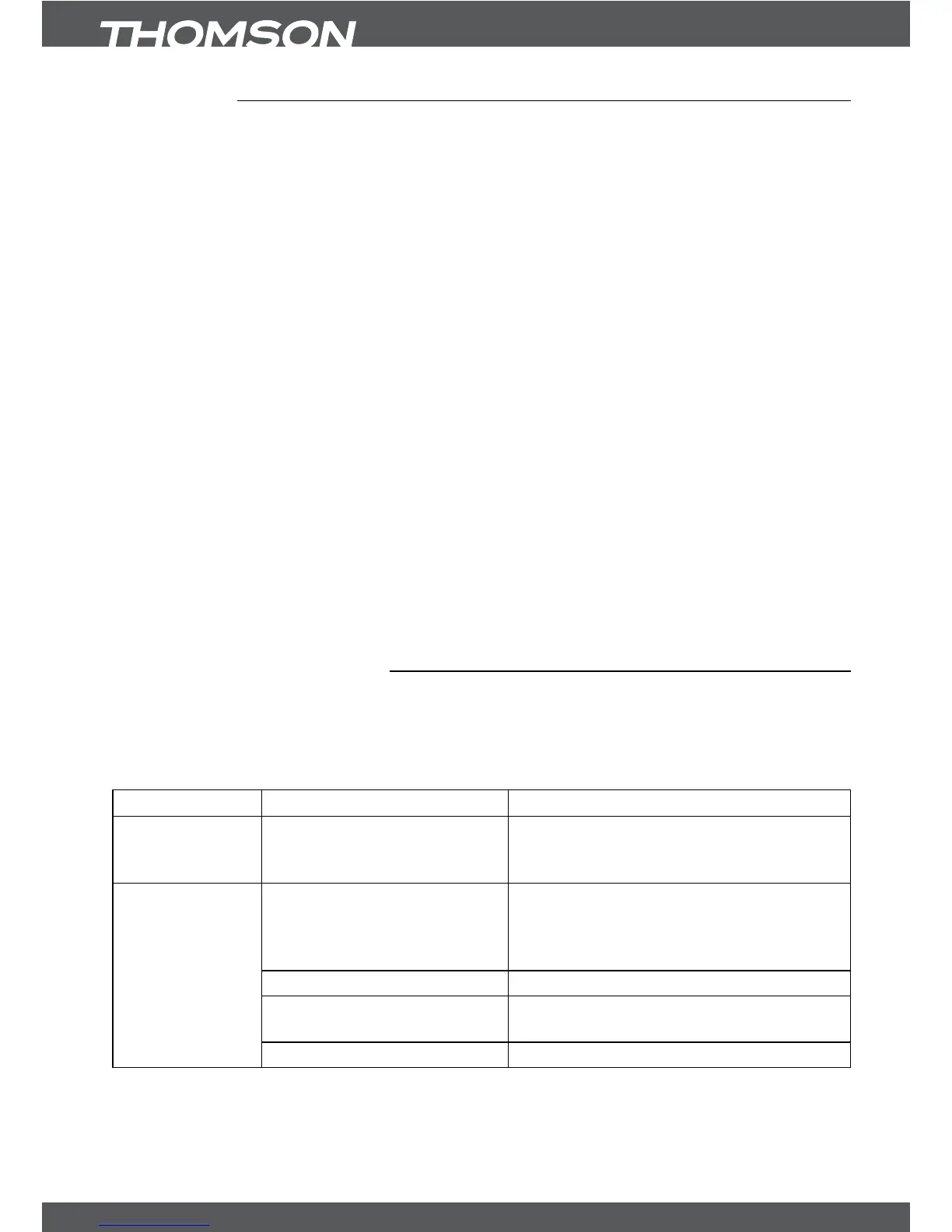
Symptom Cause Remedy
The display on
front panel does
not light up.
The power adapter is not
plugged in or power switch
OFF.
Check that the power adapter is plugged
in to the wall outlet. Make sure power
switch on rear panel is in ON position.
No picture or
sound
Wrong connection or setting
of the Audio/Video output of
the receiver to TV.
Connect the Audio/Video output of the
receiver to TV correctly and check the
adjusted settings in the menu Installation
– System Settings.
Audio muting. Press the MUTE button on TV or receiver.
Wrong resolution. Press the resolution button on your receiver
RCU.
TV power off. Turn TV on.



 To Next Page