15
Supporter Sections
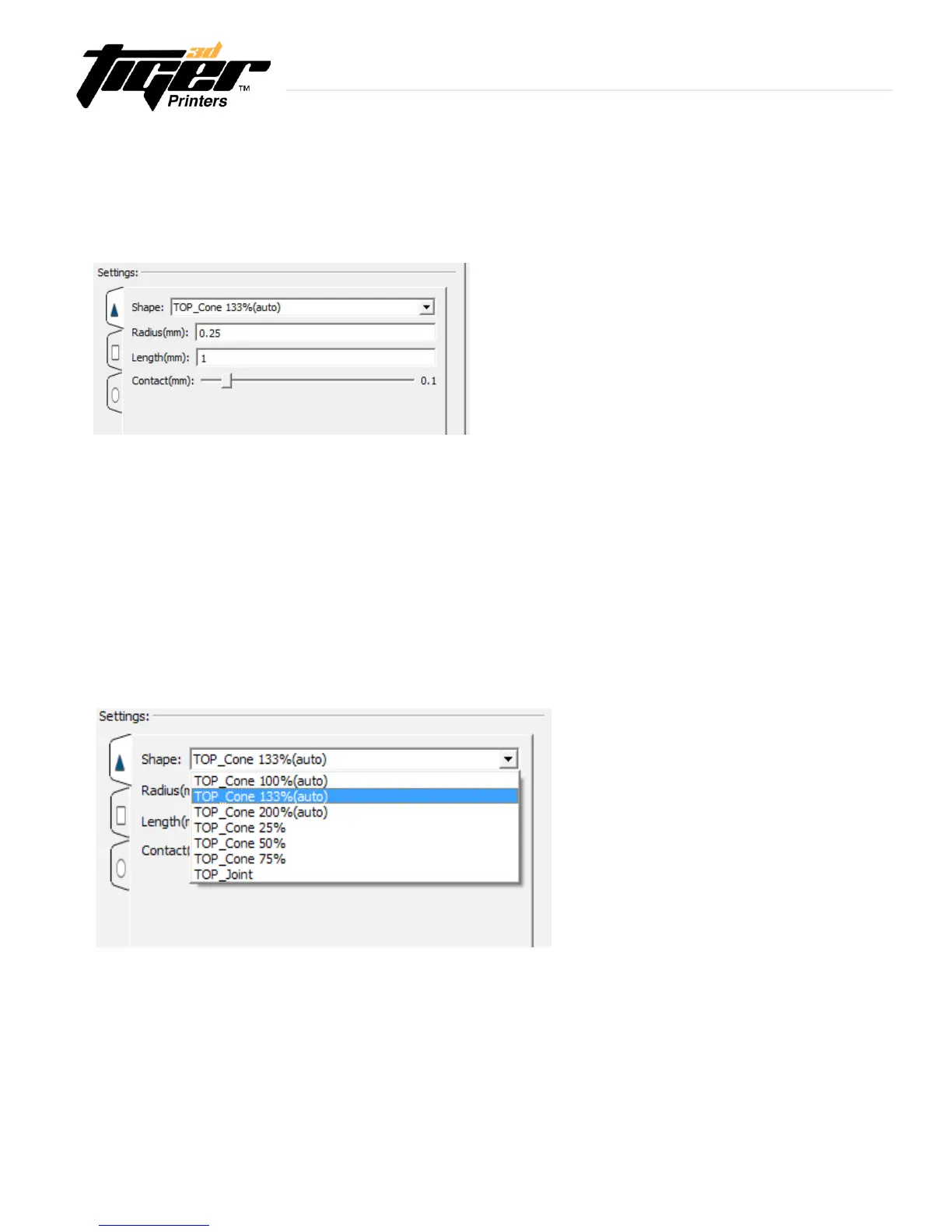
-Shape:Theshapeofthejoint.
-Radius:Theradiusofthejoint.
-Length:Thelengthofthejoint.
-Contact:Howfarthejointshouldextendpastitspositionandintotheobject.
Top Shapes are:
-TopCone:100%
-TopCone:133%
-TopCone:200%
-TopCone:25%
-TopCone:50%
-TopCone:75%
- Top Joint
Thesupporterismadeupwith3sections:Joint, Middle, and Bottom. These sections are accessible in the interface
byclickingonthecorrespondingsidewaystabintheinterface:
3.5 Supporter Mode - Software
Supporter Settings - Joint Shapes
PrinterTool incorporated 7 different shapes of the joint section. For a slight joint or stronger support, you can select
the shape of the top contact between the support and the model.
Explore Endless Creativity with Tiger 3D


 To Next Page