22
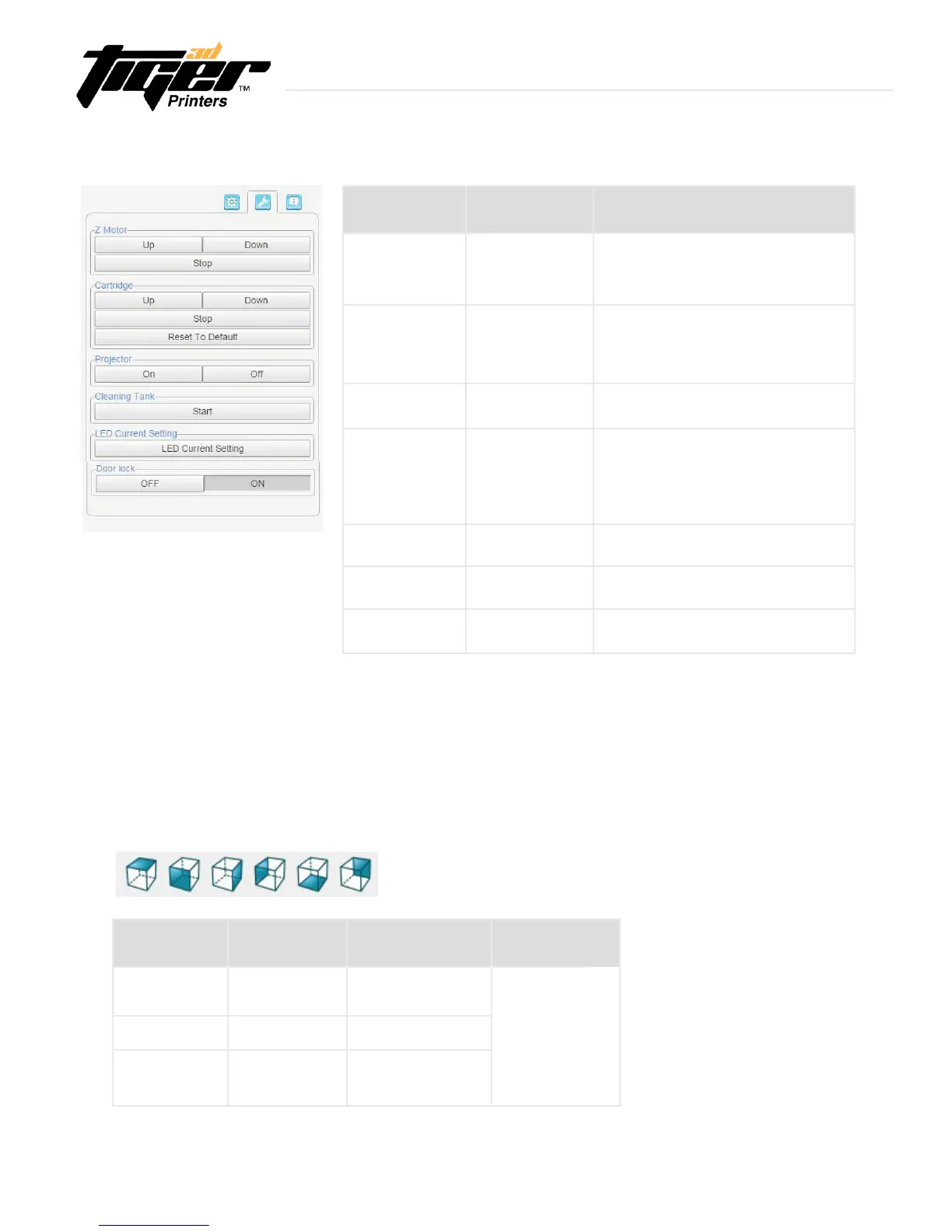
3.9 Engineering Mode - Software
Test Module
Z-Motor
Cartridge
Cleaning Tank
Projector
Setting
Door lock
LED Current
Up The Z-platform moves upwards.
Down The Z-platform moves downwards.
Stop The movement stops.
Up The cartridge moves upwards.
Down The cartridge moves downwards.
Stop The movement stops.
Reset The cartridge moves to default height.
Start (1) Project a complete pattern to tank, the
residue will be transformed into a solid layer.
(2) Using the scrape, scoop up one side of
the layer. Then carefullylift to remove the
layer from the tank.
On The projector turns on.
Off The projector turns off.
Current / Reset Reset LED current to default
On Door lock warning open.
Off Door lock warning close.
LED Change the current of optical engine,
range from 0.3A to 6A
Action Verifying Correct Module Behavior
Advanced Settings:
(1) Here you can set the actions of the cartridge and picker. The setting will be saved as one
motioncycle.Youcanrepeatforeverylayer.
(2)Startfromaction1,chooseobjectmodulerst,andchooseactionitem,thenchooseitsstep
and period.Keepaddinganewactionitemuntilonecycleisnished.
Object Module
Cartridge
Picker
Up Max.2500
Down Max.2500
Up Max.2500
Down Max.2500
1 Layer 1 Layer
Action Step (5um/step)
Stay
NA NA
Half step period
(micro second)
Min.800
Explore Endless Creativity with Tiger 3D


 To Next Page