3.5 Supporter Mode - Software
16
Explore Endless Creativity with Tiger 3D
PrinterTool Special Features
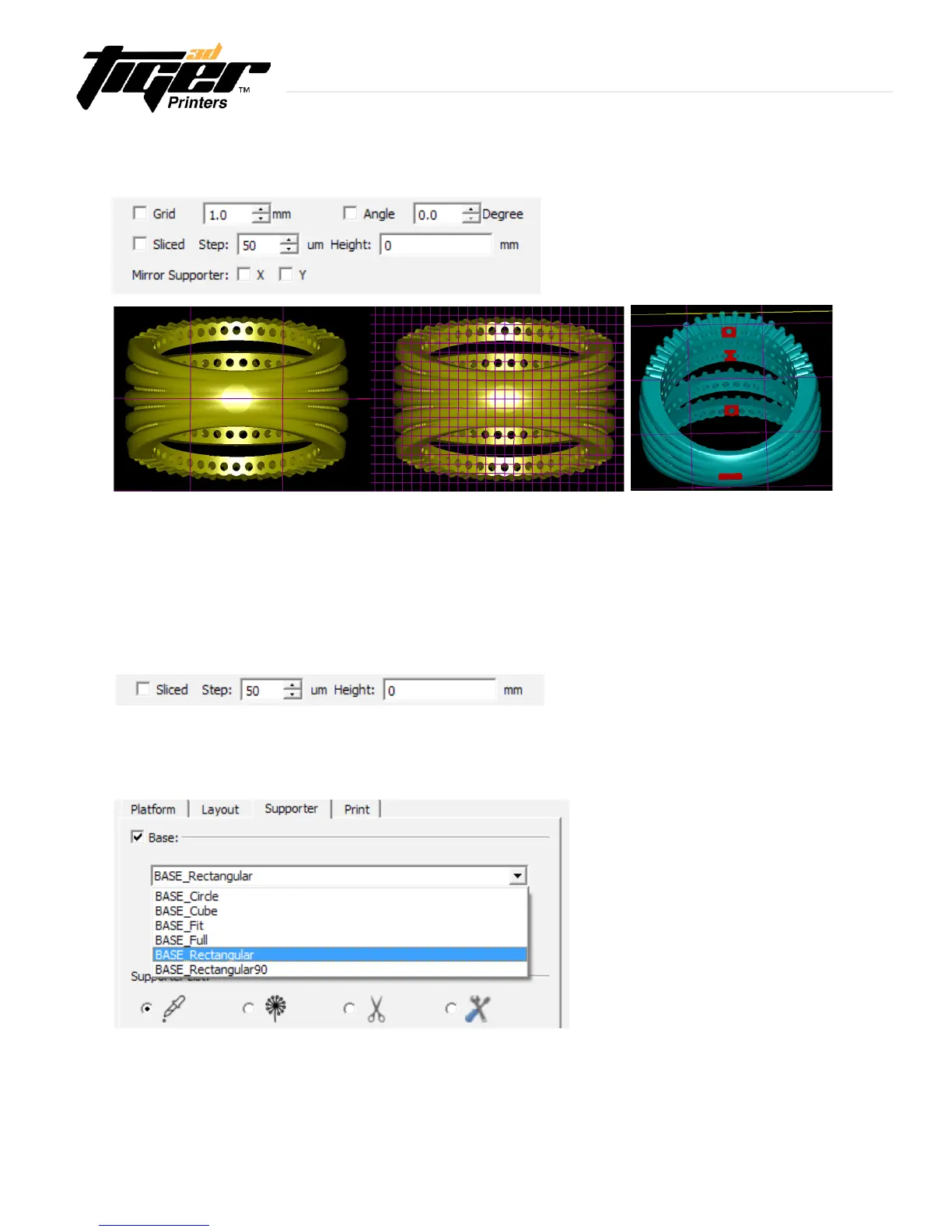
Grid : When enabled, shown is a grid over the plate.
Angle : Enables a visual indicator of the most common undercuts and overhangs.
PrinterTool will show in red the areas where supports might be needed.
- Hint : Use this tool to familiarize with the support structure concept. Try from 6 to 20 degrees.
- Disclaimer : Due to the variety of geometries and possibilites, always visually check for other areas
where supports must be carried.
Sliced: Enables the Slice Tool from the Platform Mode.
- Mirror Supporter: Creates mirror supports as two dimensional axis reference.
- Hint : Use this handy tool to quickly and accurately create supports in symmetric models.
Base: Creates a base at the bottom of the model. Use can select shape, thickness and size of the base.
- Hint : It is recommended to create a FULL BASE in one of the models of the build plate. This will generate a complete
base to all the models on the build plate. It is a good practice to extend the life expectancy of the foil of the tank and
cohesionthroughtherstprintedlayers.
- Hint : it is recommended to change the thickness of the base to 0.3mm.


 To Next Page