5
2. Setting up your 3D Printer - Hardware
2.1 Unpacking
WARNING: Do not attempt to unpack or move the Tiger3D printer without
assistance. Always use proper lifting techniques to avoid injury.
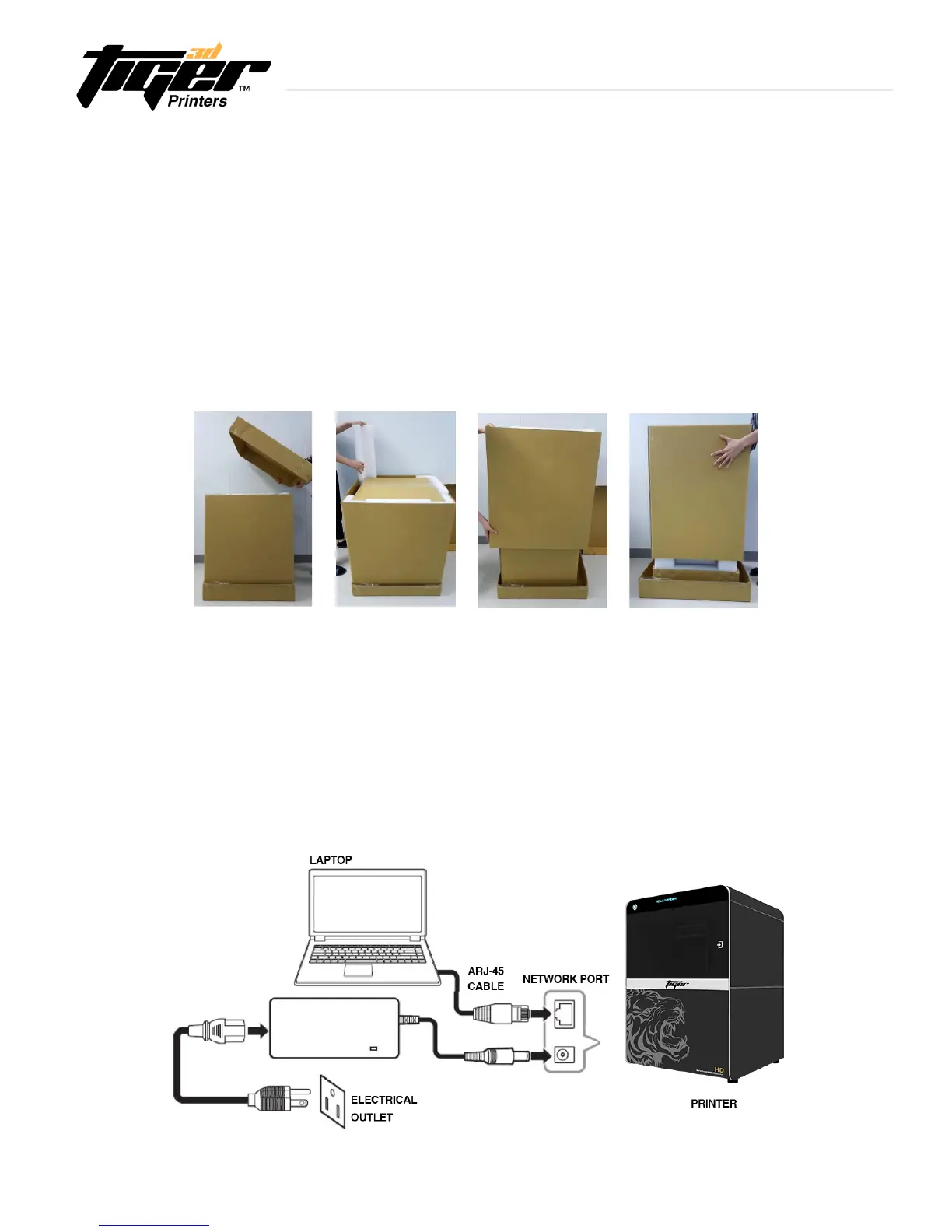
(1) Remove the top cardboard
(2) Remove the EPE inside the inner box
(3) Remove the side cardboard
(4) Remove the inner box
2.2 Connecting to the Power Adapter and Cable
(1) Connect the power cord and adapter to the printer before you plug it into an electrical outlet
(2) Connect the printer to your computer or laptop
-Basic:ConnectprintertolaptopwithRJ-45cable(Graph1.)[Initiatingtime;1minute]
-LAN:Connectbothprinterandlaptoptolocalareanetwork[Initiatingtime;afewseconds]
-IPsharer:ConnectbothprinterandlaptoptoIPsharer[Initiatingtime;afewseconds]
Explore Endless Creativity with Tiger 3D


 To Next Page