Surface Smoothing
Flip Image
Sharpness
Resin Shrinkage Compensation
Surface smoothing from Z axis, the greater number
means higher compensation from Z axis
FlipimagebyXaxisorYaxis
EnablingsharpnessfromXandYaxis
+→Sharpenanimage
─→Softenanimage
Compensate resin shrinkage
+0%to9.9%→Enlargeanimage
-0%to-9.9%→Shrinkanimage
Surface Smoothing
Print Setting
3.8 PrinterTool Features - Software
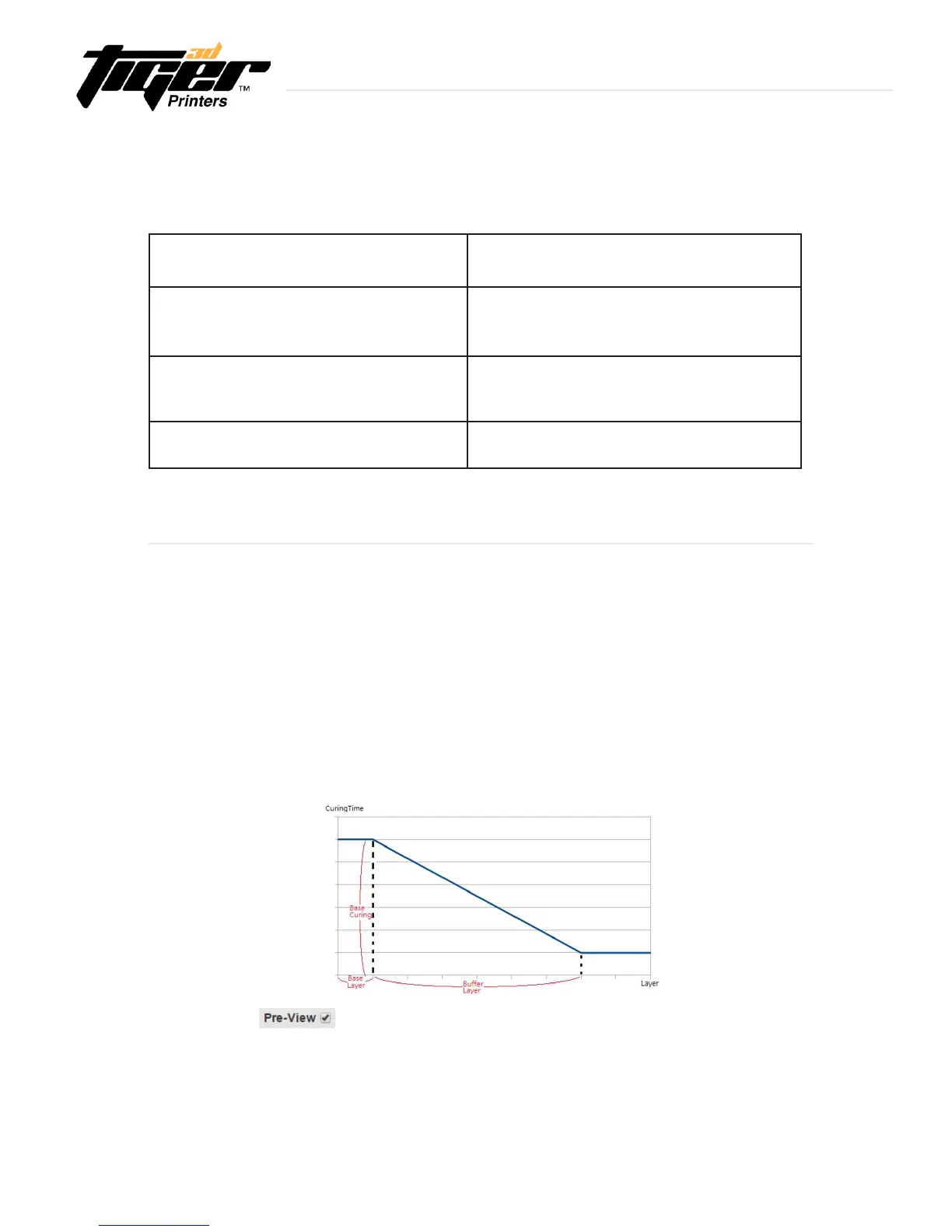
What is a buffer layer?
20
Selectle:Insertyour3Dimage(.EDP)
Thickness(um):Thicknessperlayer
CuringTime(s):TheamountoftimeforUVcuring(seconds)
Speed:Peelingspeed
GapAdj.(mm):Adjustthicknessoftherstlayer(Basicis0.2mm)
BaseLayers:Denenumberofbaselayers
BaseCuring(s):Curingtimeforbaselayers
BufferLayers:Setthenumberofbufferlayers
Explore Endless Creativity with Tiger 3D


 To Next Page