36 37
Other Foods/Bread/Cake
English
How to Make Cakes
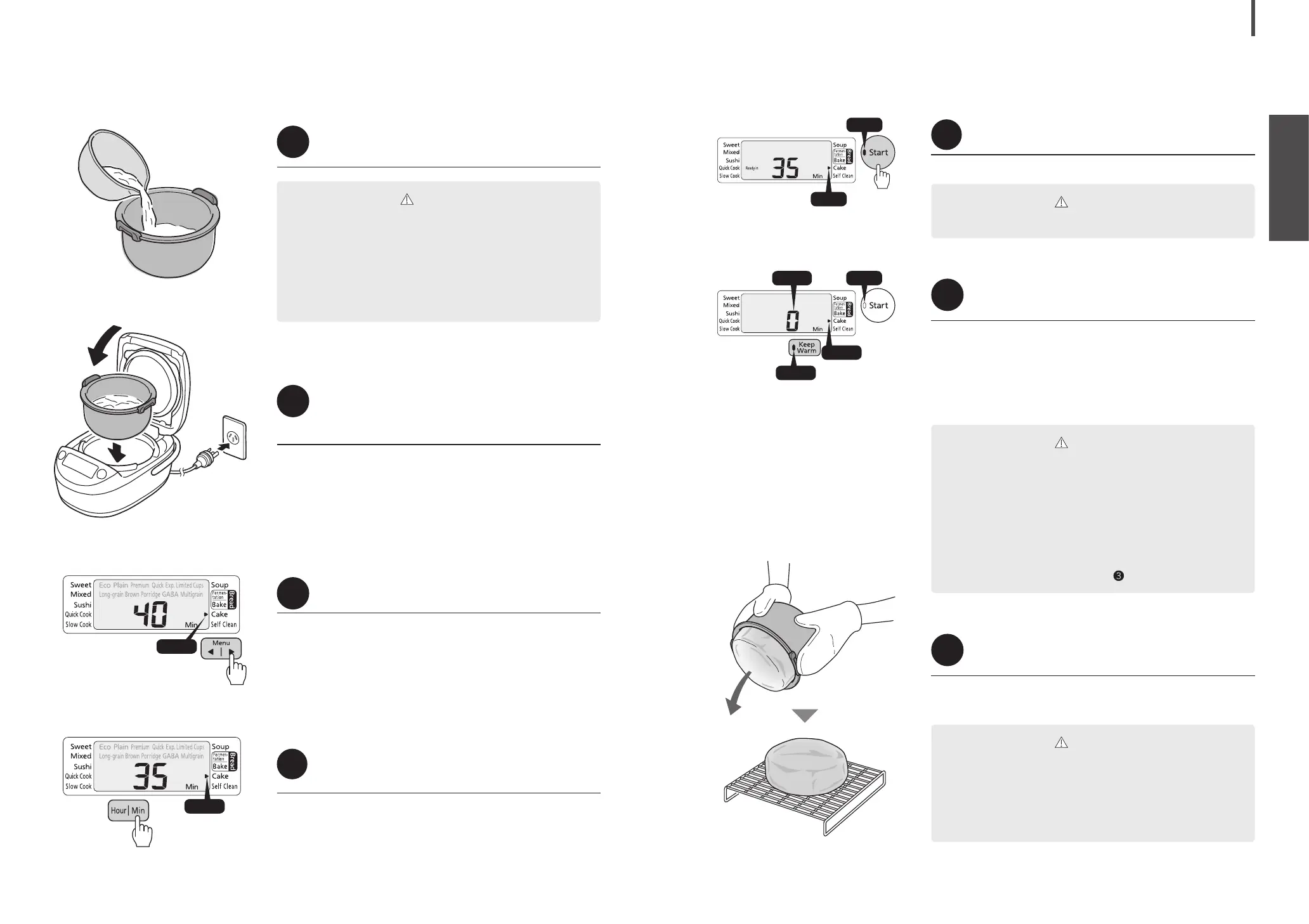
Prepare the ingredients, pour the batter into the
inner pot, and remove any air from the batter.
1
Place the inner pot into the rice cooker,
close the lid, and connect the power
plug to an outlet.
2
Press [Menu
|
] to select Cake.
The default setting is 40 minutes.
3
Press [Hour] or [Min] to set the desired
heating time.
The time can be set between 5 and 80 minutes in increments
of 5 minutes.
Pressing [Hour] increases the time by 5 minutes while
pressing [Min] decreases it by 5 minutes.
Hold down the corresponding key to change the time more
rapidly.
4
CAUTION
Caution should be exercised when making cakes other
than those described in Menu Guide, as they may boil over
or may not be cooked properly.
Remove any air from the batter by lifting the inner pot
about an inch from the counter and dropping it a couple
times. Be sure to place a cloth on the counter before doing
so to prevent deformation or damage to the inner pot.
(1)
(2)
(3)
Blinks
Blinks
Press [Start].
Heating starts.
5
CAUTION
Do not open the lid during cooking.
CAUTION
Do not press [Cancel] before extending additional
heating. Doing so causes the Keep Warm lamp to go out
and additional baking cannot be performed. If you have
mistakenly pressed the key, perform the following procedure
for heating.
(1) Remove the inner pot and set it on a wet towel or cloth.
(2) Leave the rice cooker lid open and cool down the rice
cooker and the inner pot for approximately 10 minutes.
(3) Place the inner pot back into the rice cooker.
(4) Repeat the procedure from step
on P. 36.
CAUTION
Do not handle the inner pot with bare hands. Be sure to use
oven mitts to pick up the inner pot. Otherwise, burns may be
caused by hot surfaces.
Remove the cake as soon as the cooking is nished. A cake
left in the rice cooker can become sticky as condensation on
the inner lid drips onto it.
When cooking is nished, open the lid and
insert a toothpick into the center of the cake.
When cooking is nished, the rice cooker beeps 8 times (long
beeps) and the Keep Warm lamp and 0 blink.
The cake is ready if the toothpick comes out clean.
If batter sticks to the toothpick, press [Hour] to set the
additional heating time with the Keep Warm lamp blinking and
press [Start]. (The time can be extended up to 15 minutes, a
maximum of 3 times.)
6
Remove the inner pot using oven mitts
and remove the cake to cool it.
After making a cake, press [Cancel] to remove odors. (How to
Self Clean → P. 48)
7
On
On
O
Blinks
Blinks
Blinks


 To Next Page