Tinius Olsen MP1200 Extrusion Plastometer Page 2-1
Operation Manual # 02002215
2 Section 2 - Model MP1200 Digital Controller/Timer
2.1 Introduction
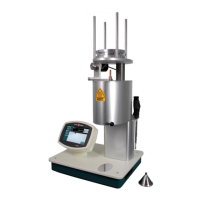
The MP1200 microprocessor-based Controller/Timer is fully interactive with the operator. It
features a LCD touch screen interface; high visibility display; USB port, serial
communications port (RS232); test parameter storage with power-up in last used
parameters; calibration information stored in flash memory; operating controls and other
related features.
2.2 MP1200 Controller/Timer
2.2.1 Touch Screen Keyboard
A touch-screen LCD display is provided for displaying software prompts and tests results.
Also used for entering required numerical test data and for activating specific functions and
features as required. The touch screen keyboard allows the operator to communicate with
the microprocessor in response to interactive prompts, which appear on the LCD display.
Testing parameters can be stored for recall or the necessary values can be entered at test
time. The Parameters can be set up for conducting flow rate tests under both Procedure A
(Manual Cut-off Procedure) and Procedure B (Automatic Timed Procedure). It also can be
used to obtain results for Procedures C & D of ASTM 1238.
CAUTION: Do not use a sharp object on the Model MP1200 Controller, as this
may puncture the touch screen.
2.2.2 Machine Display
2.2.2.1 Status
Indicates the operating condition of MP1200
2.2.2.2 Temperature
Indicates actual temperature of bottom zone of the furnace
2.2.2.3 Piston Height
Indicates the piston (bottom of piston foot) height, when using the PPDT
Automatic Timing switch, relative to the top of the die in the furnace
2.2.2.4 Heater Indicators
Indicators designate top, middle, and bottom heater operation.


 To Next Page