Tinius Olsen MP1200 Extrusion Plastometer Page 5-5
Operation Manual # 02002215
5.5 Updating the Firmware of the MP1200
Tinius Olsen provides a free of charge firmware upgrade that may be downloaded from
Tinius Olsen’s FTP site. To get the latest firmware upgrades, follow the instructions below.
5.5.1 To download this update, go to www.tiniusolsen.com/Lionhead/Login.cfm.
5.5.2 Enter the User Name: MP1200 and the Password: update.
5.5.3 Click on Software under Menu Listing.
5.5.4 Click on the file name Firmware.
5.5.5 Click on MP1200_USB Disk.zip and save on your hard drive or a USB thumbdrive.
(You may also click on and save MP1200 update instructions.doc but the content is
detailed below)
5.5.6 Copy MP1200_USB Disk.zip from your hard drive to a USB thumb drive
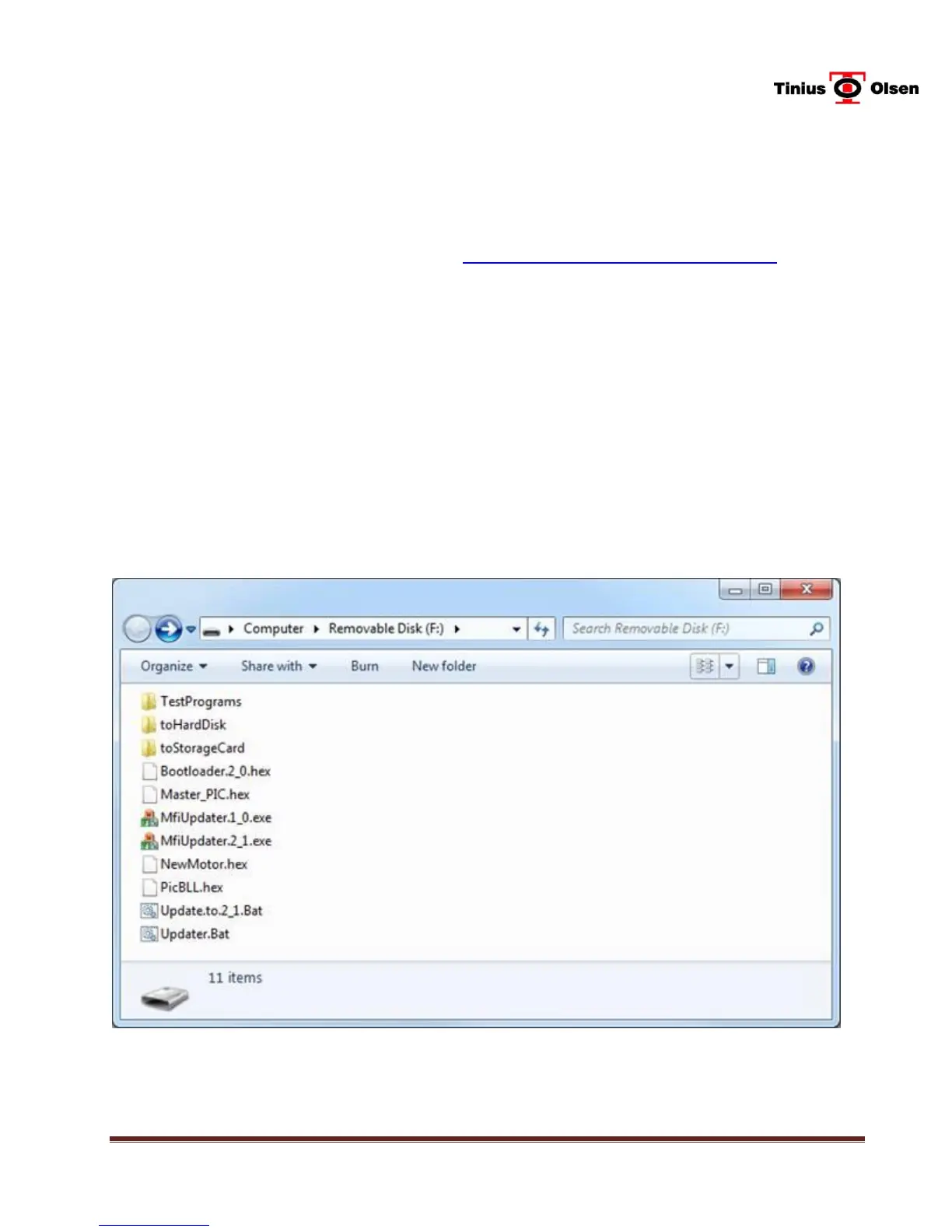
5.5.7 Unzip the file and put the contents onto a USB flash drive. Put them right on the
root directory, not into a folder:
5.5.8 Turn off the MP1200.


 To Next Page