Tinius Olsen MP1200 Extrusion Plastometer Page 10-6
Operation Manual # 02002215
10.4.2 Software Operation
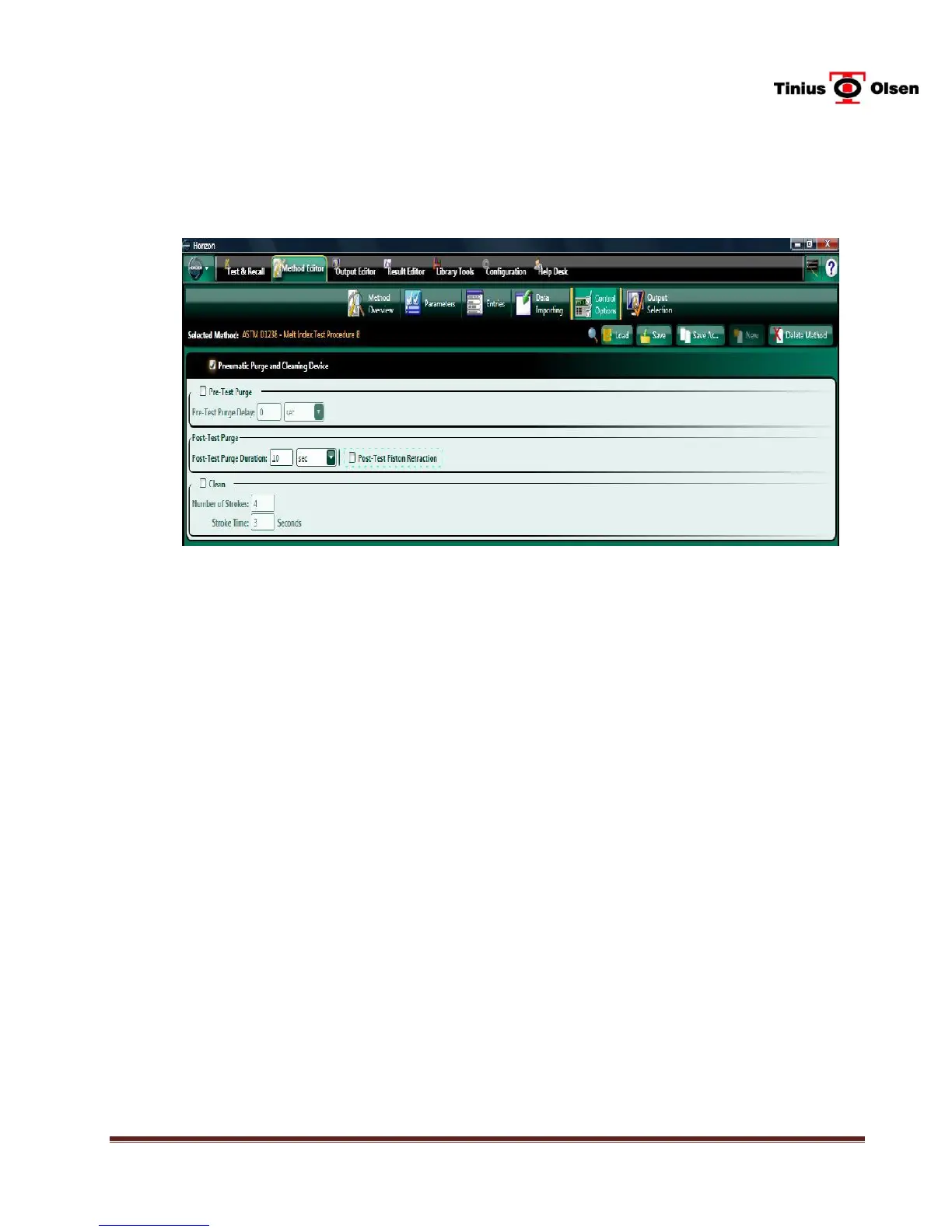
Go to the Machine Tab for the desired MP1200, then click on Method Editor, then Control
Options.
Check the box next to Pneumatic Purge and Cleaning Device.
Check the box next to Pre-Test Purge and enter the desired time period for the Pre-Test
Purge Delay, if desired. If activated, the Pre-Test Purge will activate automatically ten (10)
seconds after the WLD device has reached the programmed pre-test height and remain
activated until approximately seven (7) seconds are left in the programmed Release Time.
Enter a time for Post Test Purge Operation, if desired. The duration of the post-test purge
can be changed depending on the flow rate of the material. Typically, smaller times are used
for high flow rates and larger times for lower flow rate materials.
Check the box next to Post-Test Piston Retraction, if desired. If this box is checked, the
software will automatically return the WLD Platform up to its top position after the test and
extend the cleaning cylinder down for the Piston Extraction if enabled. The operator then
slides the open end of the extractor tool under the shoulder of the piston rod and inserts the
extractor tool handle into the cleaning cylinder end. Pressing the CLEAN key will retract the
cleaning cylinder, pulling the piston rod out of the bore. Then the operator would remove the
piston rod assembly and extractor tool.
Check the box next to Clean, if auto operation of the cleaning function is desired. Enter the
desired number of strokes and the stroke time. The number of strokes entry will determine
how many up & down cycles will be done, and the stroke time is the amount of time spent at
the bottom of the stroke between the extension and retraction actions.
Click on Save, the return to the Test & Recall tab.
Note: BEFORE using the Cleaning Feature, the WLD MUST be at its top position and
the end of the extended cleaning tool engaged in the barrel.


 To Next Page