Tinius Olsen MP1200 Extrusion Plastometer Page 12-9
Operation Manual # 02002215
12 Section 12 – User Settings
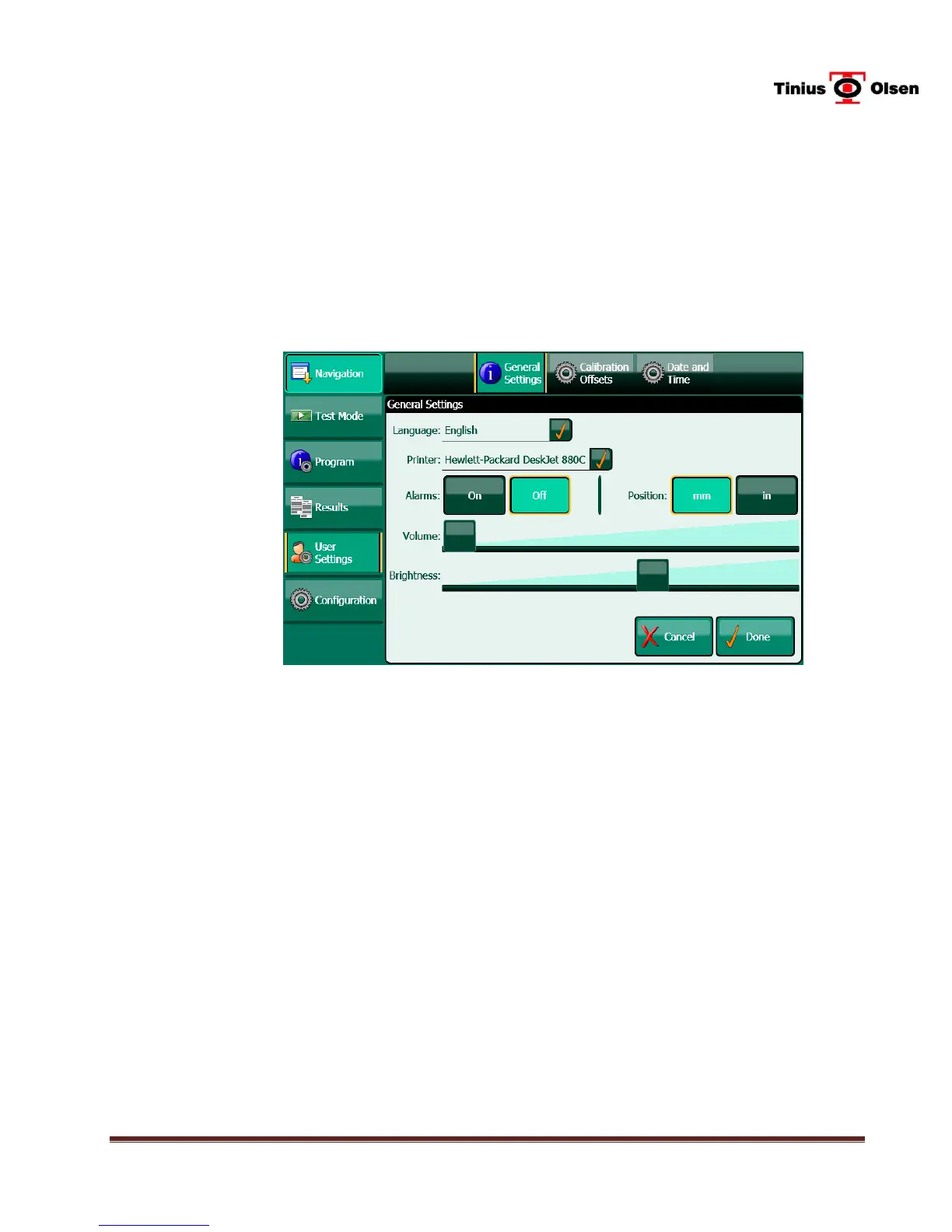
On the General Settings screen, the operator can select the optional printer, turn alarms on
and off, adjust the volume of alarms, select units, adjust the brightness of the screen and
adjust the Calibration Offsets. The operator can also send logs to a USB thumb-drive and
set the date and time.
To begin, use a finger to press the USER SETTINGS button on the left side of the Main
Screen, then enter the Program Access Code which is 8 3 4, in succession, then DONE.
12.1 General Settings - To access, press the GENERAL SETTINGS button at the top
of the screen.
12.1.1 Language – Press the box next to LANGUAGE and select the desired language.
12.1.2 Printer Selection – Press the box next to PRINTER and select the printer that is
connected to the MP1200, if any.
12.1.3 Alarms – Turn the alarms ON or OFF as desired.
12.1.4 Position (Units of Measure) – Select the desired units of measure, millimeters (MM)
or inches (IN).
12.1.5 Volume – Use the slider to adjust the volume of the alarms.
12.1.6 Brightness – Use the slider to adjust the brightness of the display.


 To Next Page