Tinius Olsen MP1200 Extrusion Plastometer Page 14-2
Operation Manual # 02002215
14.2 Creating a New Procedure B Program
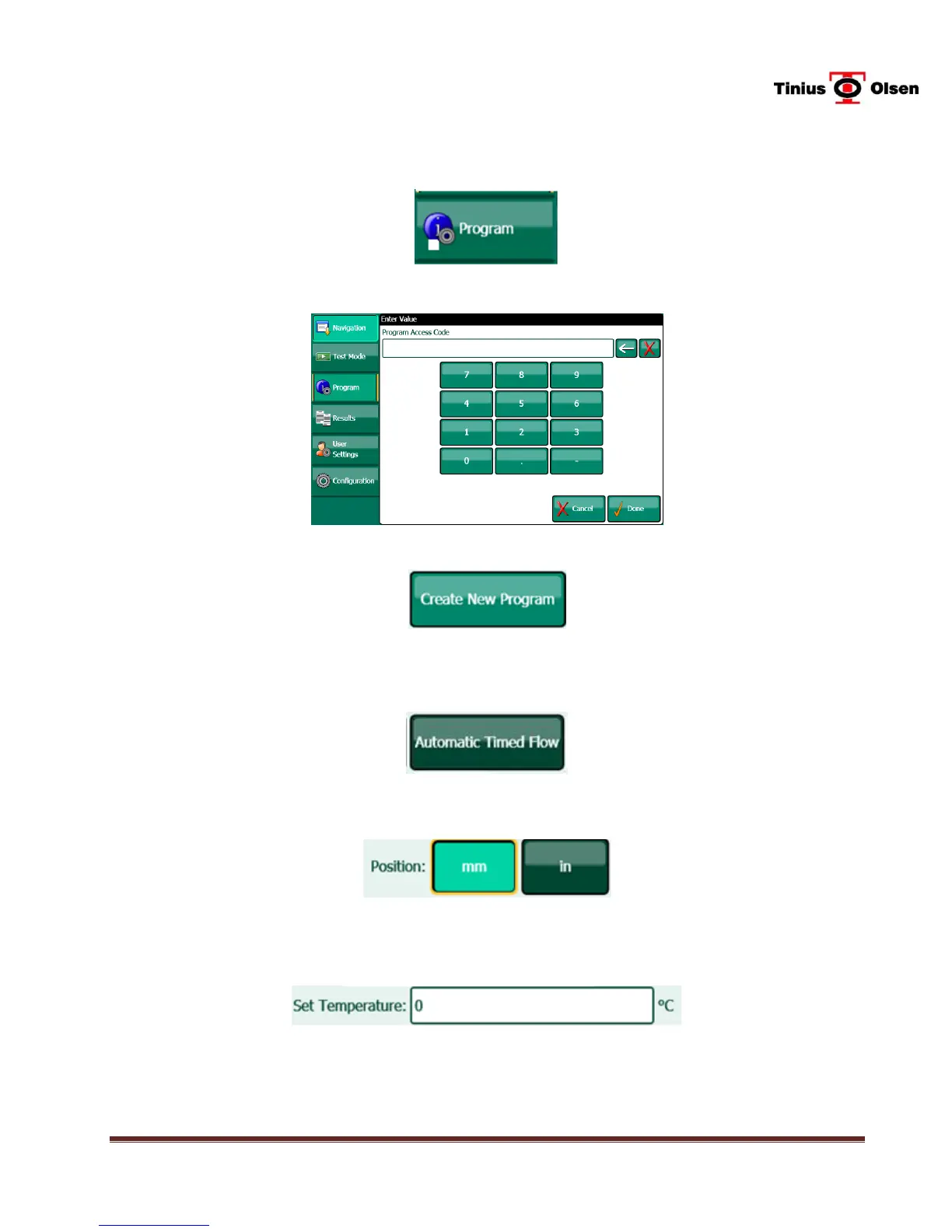
14.2.1 To begin, use a finger to press the PROGRAM button on the left side of the
LCD display.
14.2.2 Enter the Program Access Code which is 8 5 2, in succession, then DONE.
14.2.3 Press the Create New Program button.
14.2.4 For a Procedure B program, press AUTOMATIC TIMED FLOW on the
display.
14.2.5 Select the units, either millimeter or inches.
14.2.6 Press the Set Temperature box. A keypad is shown next. Enter a fixed
temperature between 0 and 450 C. Press the DONE button when finished.
TEST TIP: If the operator is unfamiliar with melt index testing procedures and machine operations,
it might be beneficial to turn off the heaters at this point. Enter a temperature near or
below the ambient temperature (or enter 0°) and then press the DONE button. A 0°
setting should also be entered when the Calibration Offset screens are displayed.


 To Next Page