Step 3: Install Desk/Table Top Phones
Installing Your System
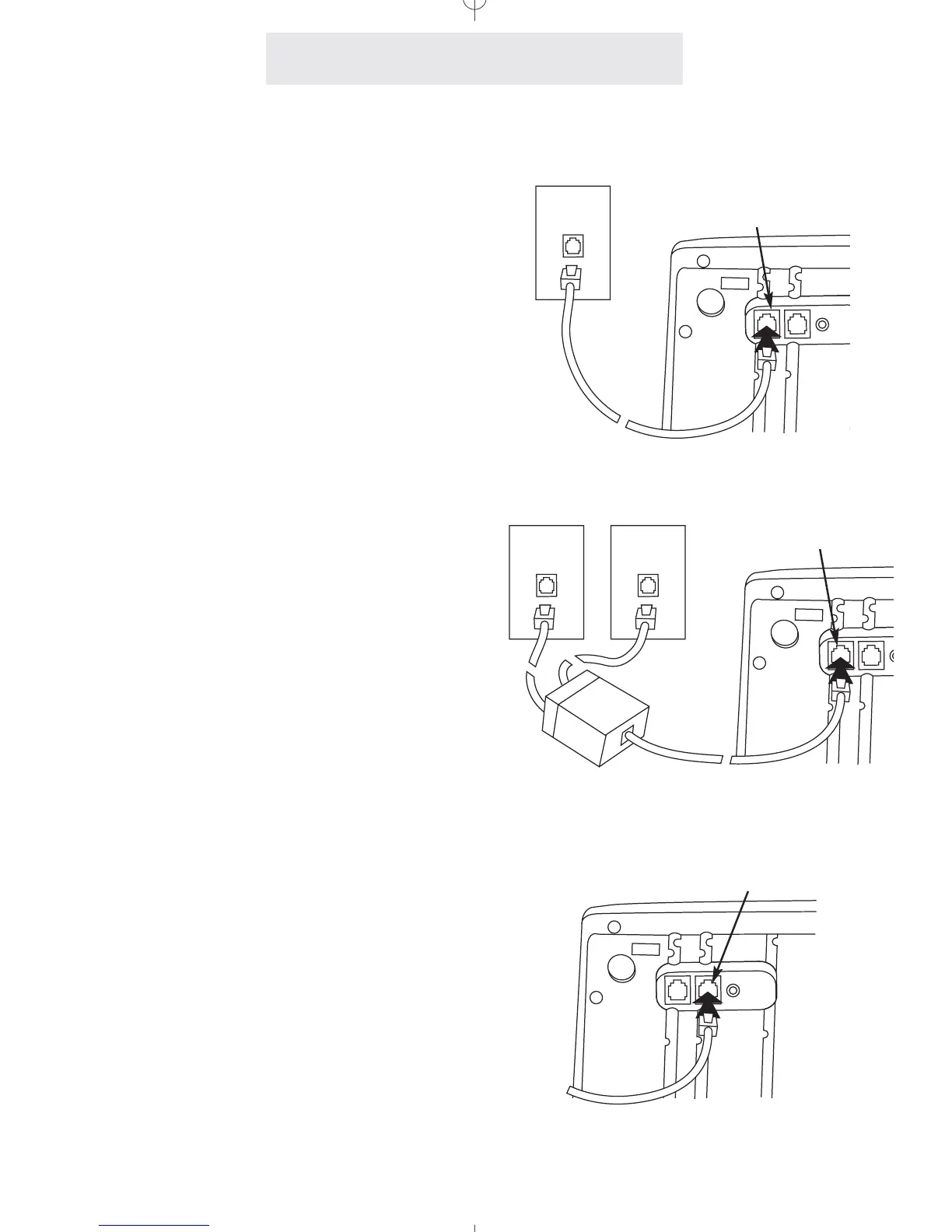
1 Connect First Line Cord
Connect one end of a long telephone line cord
to the jack on the bottom of the telephone
labeled L1/L2. Connect the other end to the
jack(s) labeled Lines 1 & 2 either:
directly to the wall jack if it is a two-line RJ14
jack
OR
to a two-line coupler (not provided) if you have
two single-line RJ11 jacks for lines 1 and 2.
Then connect the two cords of the coupler to
the corresponding wall jacks. Two-line cou-
plers are available many places, for example
Radio Shack (part #279-401).
2 Connect Second Line Cord
Connect one end of a long telephone line cord
to the jack on the back of the telephone labeled
L3/L4. Connect the other end to the wall
jack(s) labeled Lines 3 & 4 in the same manner
as described in the previous step.
Note: If you are installing a 3-line EPIC tele-
phone, or are connecting a 4-line telephone to
only 3 lines, connect the other end of the line
cord directly to the wall jack labeled Line 3.
1&2
Line 1
L1/L2
L1/L2
L3/L4
Line 2
Lines
4



 To Next Page