18
18
Operation
About This Receiver
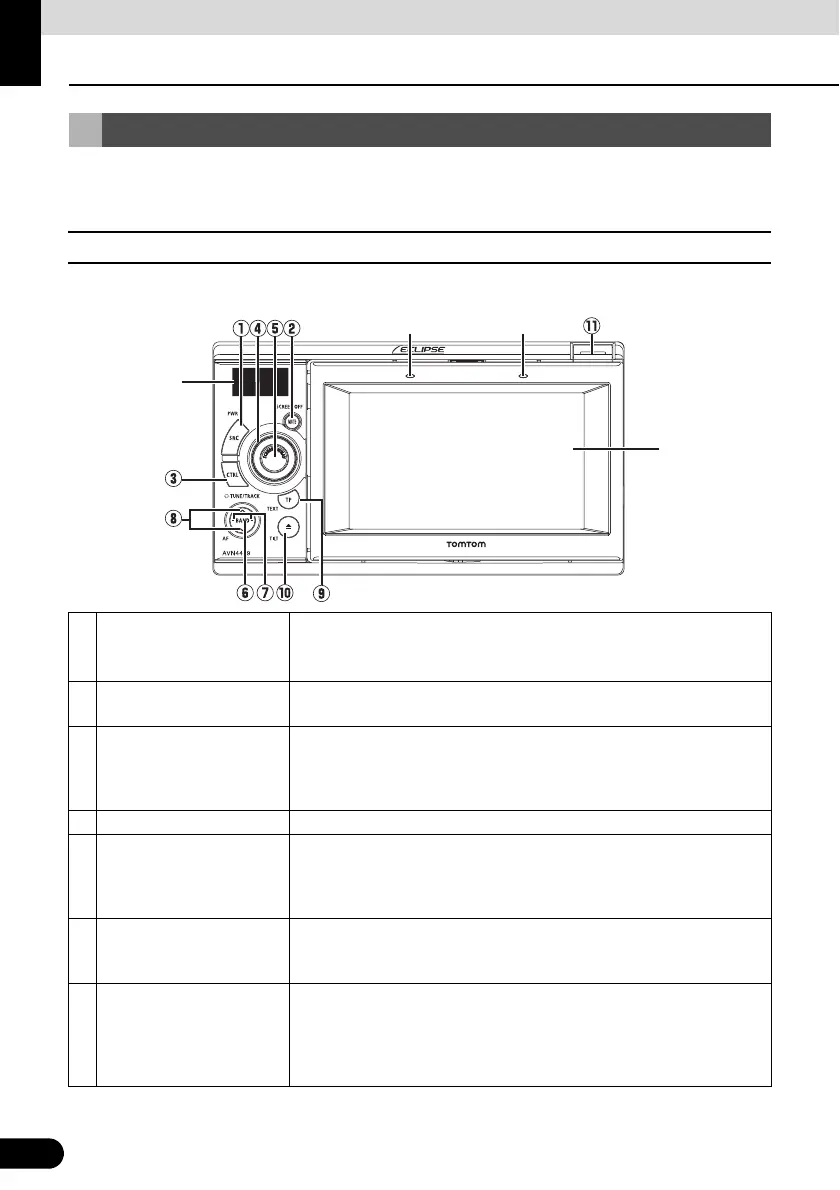
You can operate this receiver by pressing the panel buttons (panel switches) or by touching the
switches displayed on the screen (touch switches).
■ Panel Switches
Press each panel switch to operate it.
Control Names and Operations
a [SRC] button
Short press: Switches SOURCE.
Long press (more than one second): Turns the audio mode OFF.
Long press (more than 5 seconds): Turns the power completely OFF.
b [MUTE] button
Short press: Turns MUTE ON or OFF.
Long press: Turns the PND display OFF.
c [CTRL] button
Short press: Switches the audio controls.
Long press: Switches to the Adjustment screen while in the video mode.
You can switch to the setting mode when PND is connected and PWR
switch is OFF.
d [VOL] rotary knob Adjusts volume.
e [SCREEN AV/NAV] button
Short press: Switches between the NAVI screen and AV screen. Turns
the PND display ON when it is OFF.
Long press: Displays the CAMERA screen when a camera is
connected.
f [BAND] button (AF/REG)
Short press: Changes the band, or switches playback formats among
CD-DA, MP3 (WMA) and DivX.
Long press: Changes the AF and REG settings.
g
[SELECT (Right/Left)]
button
Short press: Tunes radio stations, selects CD/MP3/WMA, iPod and
USB tracks, selects DVD chapters, or selects DivX files.
Long press: Tunes preset radio stations, fast forwards or rewinds CD/
MP3/WMA, iPod and USB tracks, or fast forwards or rewinds a DVD/
DivX.
PND display
Sub-display
Microphone Light sensor



 To Next Page