@ToolkitRC 2024
the next battery, it will automatically start charging
according to the previous charging setting as last
battery.
Work complete: Determine whether to stop or trickle up
when charging is over
Balancing start voltage: Set the voltage at which the
battery starts balancing relative to the full voltage.
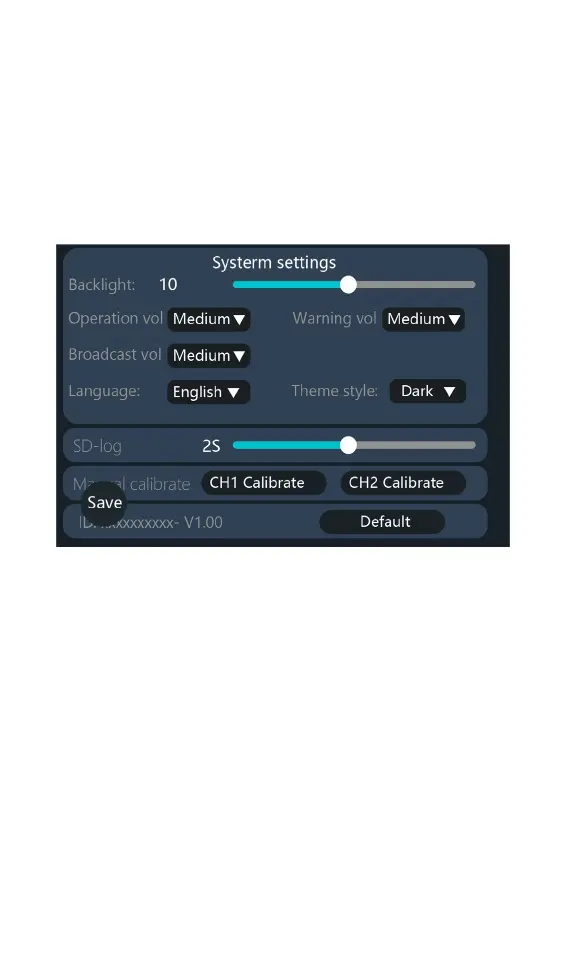
Backlight: the backlight brightness level of the display
can be set from 1 to 10 level.
Sound Volume: The speaker announces the volume,
which can be set to high, medium, low, and off.
Language: system display language can be changed
Theme style:two styles of Light and Dark can be selected
SD-log: Logging interval settings.
Manual Calibration: When the voltage display deviates
from the actual voltage of the battery, this function can
be selected to calibrate the voltage values of the two
channels.
Default: restore all settings to factory values.
ID: the unique ID of the device factory settings.



 To Next Page