22
6. SETTINGS FOR THE TOTAL STATION
6.1.2 Settings for Auto Pointing and Auto Tracking
• Auto Pointing model does not support Auto Tracking.
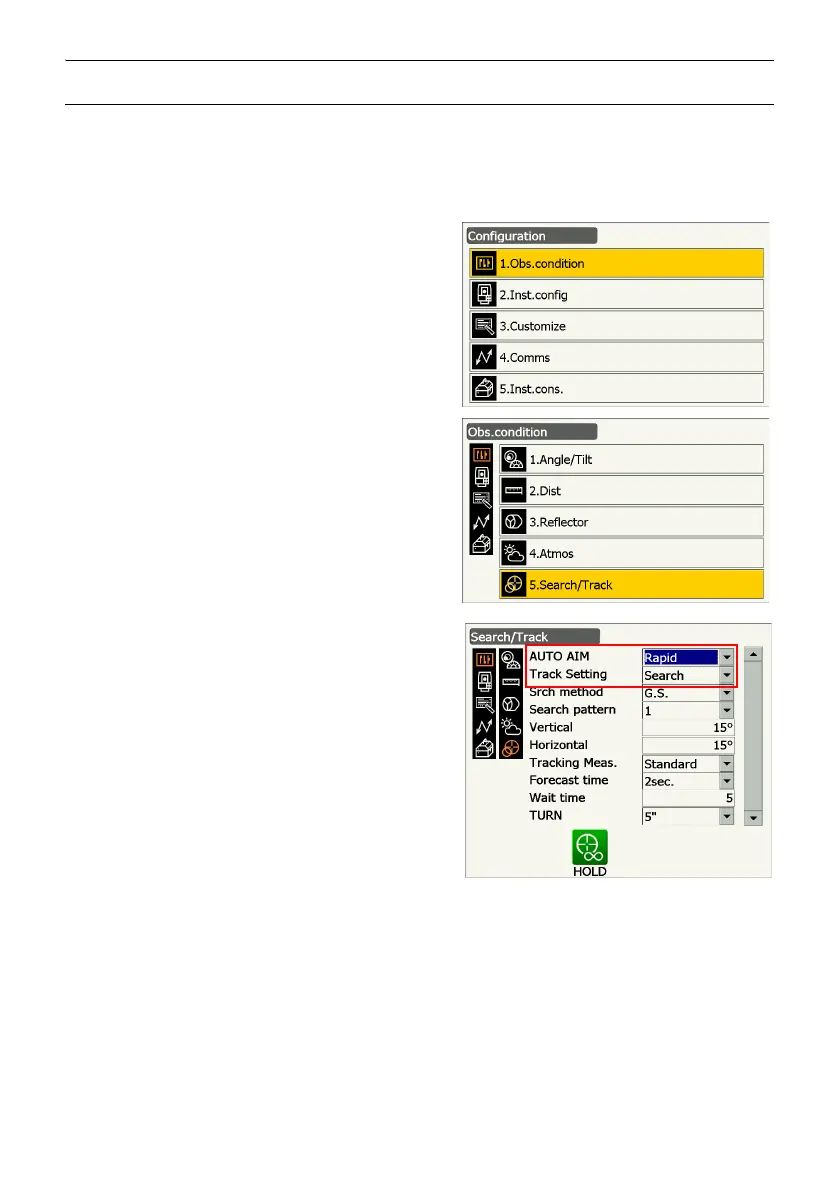
1. Select "Obs.condition" in Config. mode and select
"Search/Track" in <Obs.condition> to perform
Auto Pointing/Auto Tracking settings.
For Auto Pointing only set "Track Setting" to
"Search". For Auto Tracking, set "Track Setting" to
"Track" and "AUTO AIM" to "Fine".
Items set and options
(1) AUTO AIM
Fine/Rapid
(2) Track Setting
None/Search/Track
Auto AIM
When the target enters the field-of-view within
the set limit for Auto Pointing completion (the limit differs between "Fine" and "Rapid"), the
instrument starts acquiring data (the amount of data differs between "Fine" and "Rapid") then
completes the Auto Pointing by calculating the data.
Set to "Fine" for greater accuracy during Auto Pointing. Make sure that the prism is securely
mounted on a tripod etc.
Set to "Rapid" when supporting the pole by hand.
When "Fine" is set the instrument checks that the prism position is stable, then searches for the
prism direction. Once the instrument confirms that the prism is sighted at the approximate center



 To Next Page