13
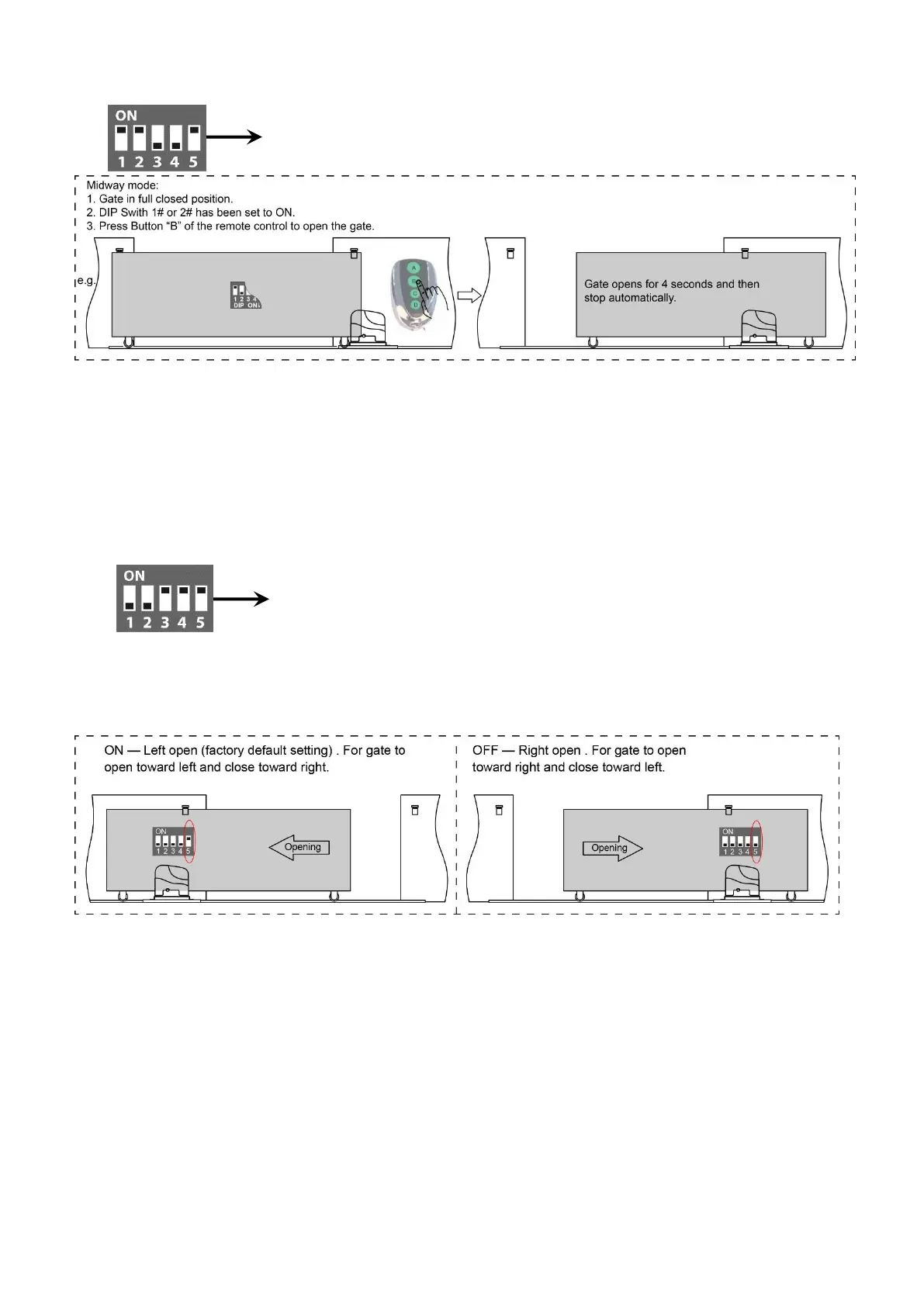
control when the gate is in the full closed position.
DIP Switch #3–#4: Auto close time of the gate opener
DIP Switch #3: ON – 30 Seconds OFF – 0
DIP Switch #4: ON – 60 Seconds OFF – 0
NOTE: The auto close function would be disabled if both dip switches are turned to off (factory
default setting).
DIP Switch #5: Left/Right open
ON – Left open (factory default setting).
OFF – Right open. Turn switch OFF to change the opening direction easy if necessary.
How to Program or Erase the Remote
The remote MUST be programed to the opener BEFORE OPERATING. Please follow the steps to
program the remote.
Activate the opener only when gate is in full view, free of obstruction and properly adjusted. No
one should enter or leave gate area while gate is in motion. DO NOT ALLOW CHILDREN to
operate push button or remote. DO NOT ALLOW CHILDREN TO PLAY NEAR THE GATE.
If you purchase additional remote controls, the gate opener must be programmed to accept the
new remote code.
If you lose one of any remote control, please erase and reprogram all other remote controls to
have a new code for safety.



 To Next Page