12
data and does not use the race result feature. Please note that coordinate format in the tool
cannot be space. For example: N 24”22’3 and the entry should be N024”22:03.
Data entry
There are some small TIPs for you to enter the data easier, such as well use of your key board
“Tab” Key and “Arrow keys”. For example, there are many fields to fill in. If you finished
one field and press Tab key, the cursor will move to the next field. If you enter multiple
column data such as coordinate, date, and time. You can move the column by press -> to
move to next column.
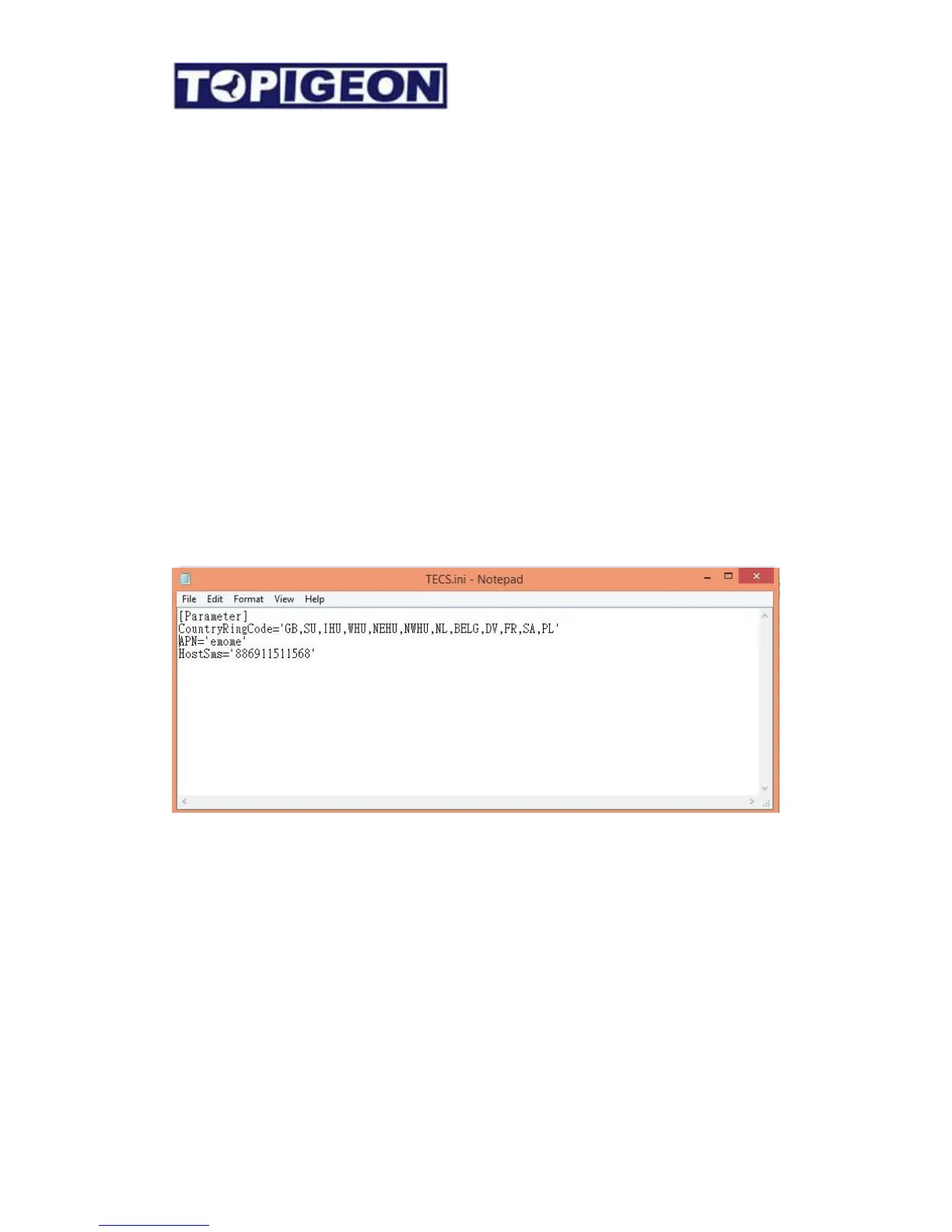
TECS .ini file setting
There are some vital parameters inside this initiate file before you run the club manager
system. You can find the TECS.ini file in your Program files (X86)/advancetech/ClubSys_V8
You can edit this file by Notepad.
CountryRing Code: The list inside is following the Europe Union/Association standard and
this will be your prefix of association number. You can edit it according to your Unions and
Associations.
APN: Access Point Name which is basic setting for the iPigeon timer 3G data. This will be
the default setting when you initiate a new iPigeon timer. In the iPigeon timer itself, the
fancier can also change the setting if they change a SIM card.
HostSMS: This is the SMS center phone numbers setting which fanciers are not allow to
change. The SMS center system can receive and send SMS of club race information to
fanciers mobile. This function can provide by either GSM module or HTC Mobile APP.
Please contact TOPigeon for more information.



 To Next Page