17
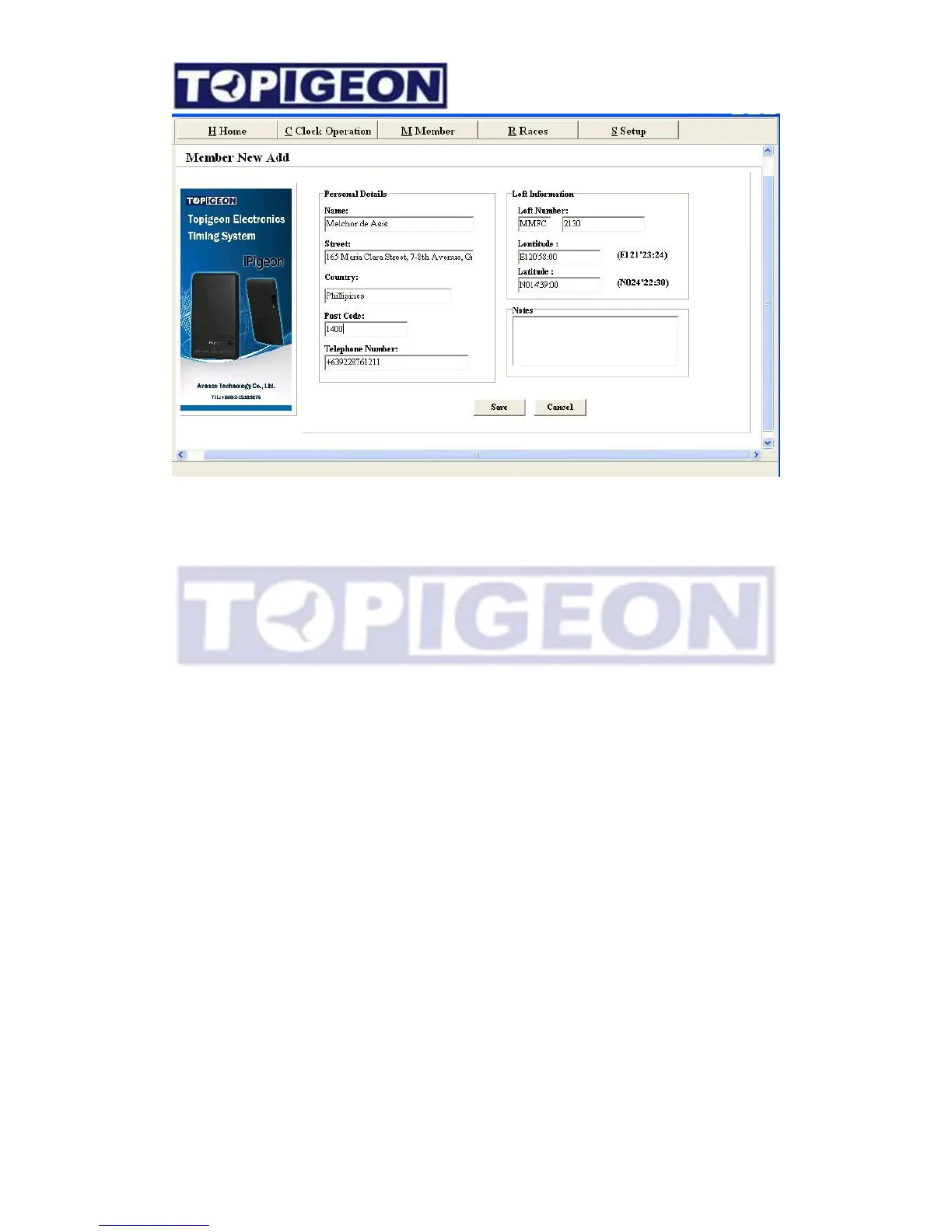
Enter your members details and loft information. Click Save when you have entered all the
information. Some important fields are,
Telephone Number: If you are using TOPigeon SMS Center system, the system will collect
this information as the member mobile number. The club can broadcast race information or
send the race result to the individual mobile phone via SMS.
Loft number: The first field will come with the Setup, Association. You can also edit this
field if this code is not correct. Please note this code will be update to the fancier timer
accordingly. The second field is the real Loft number, or called Loft ID which will update to
the fancier’s timer as well. This loft number will be the identifier for the loft in the backend
system.
Loft Coordinate: This Loft coordinate information is a fix value update to the Fancier
information in the timer which is different from the GPS coordinate from the Summary
Information in the timer. If you are using TOPigeon loft monitor system, the monitor system
will be alarm if these two coordinate are drifted over, say 300 meters (configurable), in order
to detect the fraud like changing loft location.
Editing members
S
e
l
e
c
t the
Members t
a
b a
li
s
t
of
a
ll
your
members
will
be
d
i
s
p
l
a
y
e
d.
H
o
l
d
mouse
over
member
you w
i
s
h
to
e
d
i
t
,
and then press
the
R
I
G
HT MOUSE BUTT
O
N
for further
op
t
i
on
s



 To Next Page