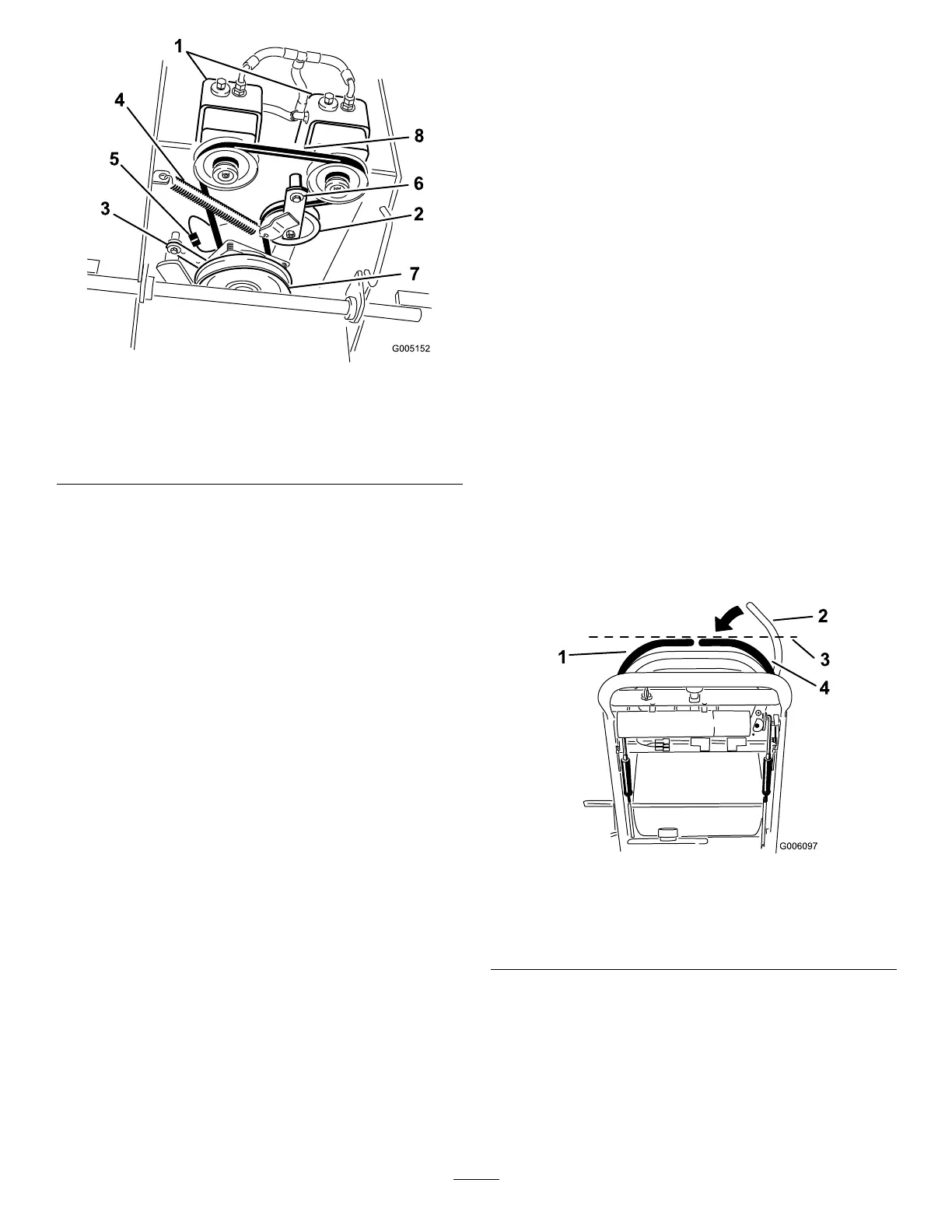
Figure53
1.Hydraulicpumps
5.Clutchwireconnector
2.Idlerpulley6.Pivotbolt
3.Clutchretainer
7.Drivepulley
4.Tensionspring8.Pumpdrivebelt
7.Unhooktheidlerspringfromtheframe(Figure53).
8.Installthenewbeltaroundclutchandthetwodrive
pulleys.
9.Installtheidlerspringbetweenidlerarmandframe
bracket(
Figure53).
10.Installtheclutchretainertotheenginedeck
(Figure53).
11.Connecttheclutchwireconnectortothewire
harness.
12.InstallthePTOdrivebelt.
ControlsSystem
Maintenance
AdjustingtheMotionControl
HandlePositions
AdjustingtheRightSideMotionControl
Lever
Ifthemotioncontrolleversdonotalignhorizontally,
adjusttherightsidemotioncontrollever.
Note:Adjustthehorizontalalignmentbeforethefront
tobackalignment.
1.DisengagethePTO,movetherightsidemotion
controllevertotheneutralpositionandsetthe
parkingbrake.
2.Stoptheengine,removethekey,andwaitforall
movingpartstostopbeforeleavingtheoperating
position.
3.Pushtherightmotioncontrolleverdownoutof
lockedneutralposition(
Figure54).
4.Checkifitalignshorizontallywiththeleftmotion
controllever(
Figure54).
Figure54
1.Leftmotioncontrollever3.Checkthehorizontal
alignmenthere
2.Rightmotioncontrollever
inneutrallockedposition
4.Rightmotioncontrollever
5.Toadjusttherightmotioncontrolleverhorizontally,
thecamneedstobeadjusted.
6.Removethecoverunderthecontrolpanel.
7.Loosenthenutandboltholdingthecam(
Figure55).
8.Adjustthecamuntilitalignswiththeleftmotion
controlleverandtightenthenutandboltforthe
cam.
40



 To Next Page