Controls
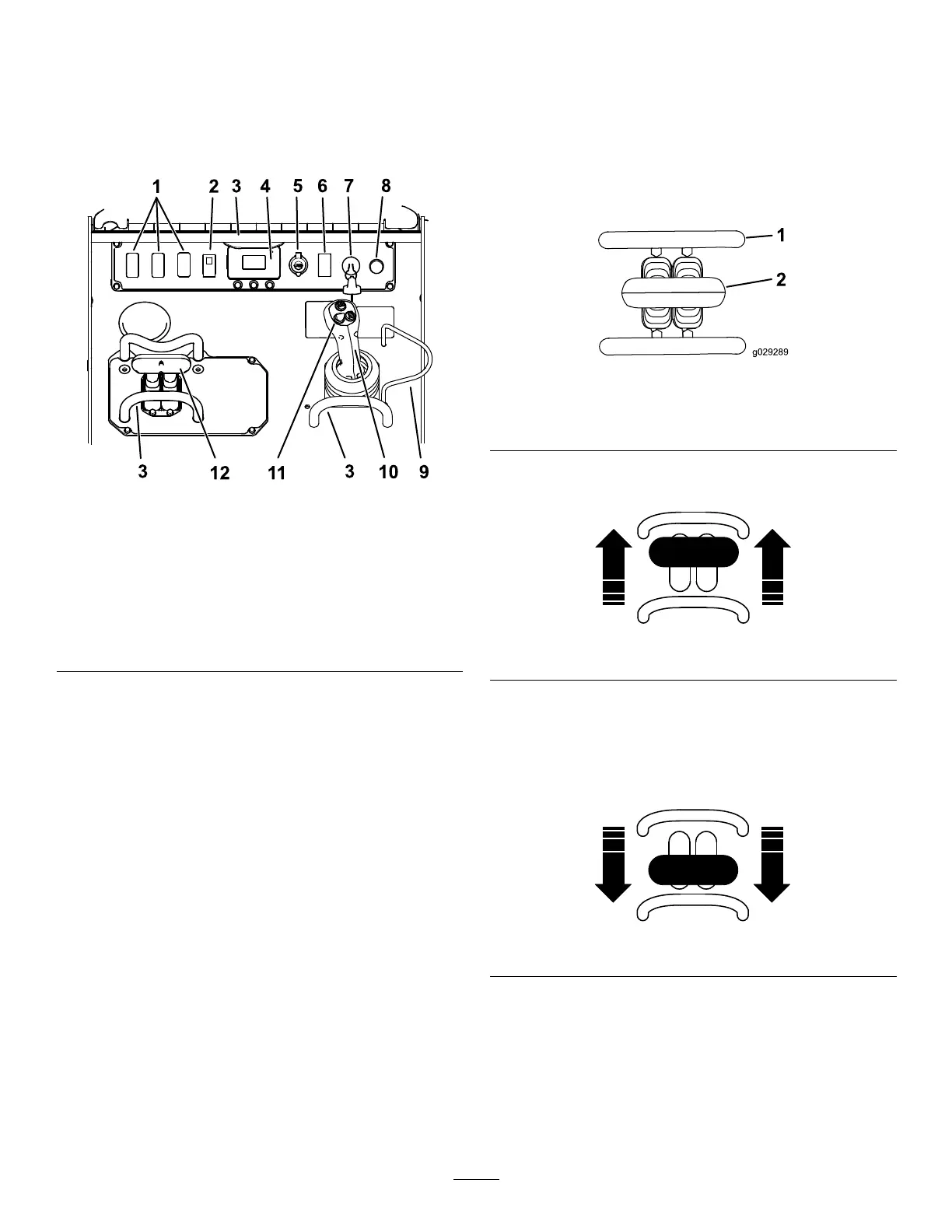
ControlPanel
Becomefamiliarwithallthecontrolsbeforeyoustart
theengineandoperatethetractionunit.
g318044
Figure4
1.Plugforoptionalkit
7.Keyswitch
2.Parkingbrakeswitch
8.Horn
3.Referencebar
9.Loader-valvelock
4.InfoCenterDisplay10.Loaderarm/attachment-tilt
lever
5.Powersocket11.Joystickcontrols
6.Throttleswitch12.Tractioncontrol
KeySwitch
Thekeyswitch,usedtostartandshutofftheengine,
has3positions:OFF,RUN,andSTART.
Parking-BrakeSwitch
Presstheparking-brakeswitchtoengageand
disengagetheparkingbrake.Theparkingbrakealso
engagesautomaticallywhenyoushutoffthemachine.
ThrottleSwitch
Holdtheswitchforwardfor2ormoresecondstoset
thethrottleatHIGHIDLE;holdtheswitchrearwardfor
2ormoresecondstosetthethrottleatLOWIDLE;
ormomentarilypresstheswitchineitherdirectionto
increaseordecreasetheenginespeedinsmaller
increments.
ReferenceBar
Whendrivingthetractionunit,usethereferencebar
asahandleandaleveragepointforcontrollingthe
tractioncontrolandthejoysticklever.Toensure
smooth,controlledoperation,donottakeyourhands
offthereferencebarswhileoperatingthemachine.
TractionControl
g029289
Figure5
1.Referencebar
2.Tractioncontrol
•Tomoveforward,movethetractioncontrol
forward.
g264830
Figure6
•Tomoverearward,movethetractioncontrol
rearward.
Important:Whenreversing,lookbehindyou
forobstructionsandkeepyourhandsonthe
referencebar.
g264831
Figure7
12


 To Next Page