ElectricalSystem
Maintenance
ElectricalSystemSafety
•Disconnectthebatterybeforemakinganyrepairs;
refertoUsingtheBattery-DisconnectSwitch(page
51).
•Chargethebatteryinanopen,well-ventilated
area,awayfromsparksandames.Unplugthe
chargerbeforeconnectingordisconnectingthe
battery.Wearprotectiveclothinganduseinsulated
tools.
•Batteryacidispoisonousandcancauseburns.
Avoidcontactwithskin,eyes,andclothing.Protect
yourface,eyes,andclothingwhenworkingwitha
battery.
•Batterygasescanexplode.Keepcigarettes,
sparks,andamesawayfromthebattery.
Usingthe
Battery-DisconnectSwitch
1.Parkthemachineonalevelsurface,engagethe
parkingbrake,andlowertheloaderarms.
2.Shutofftheengineandremovethekey.
3.Openthehood.
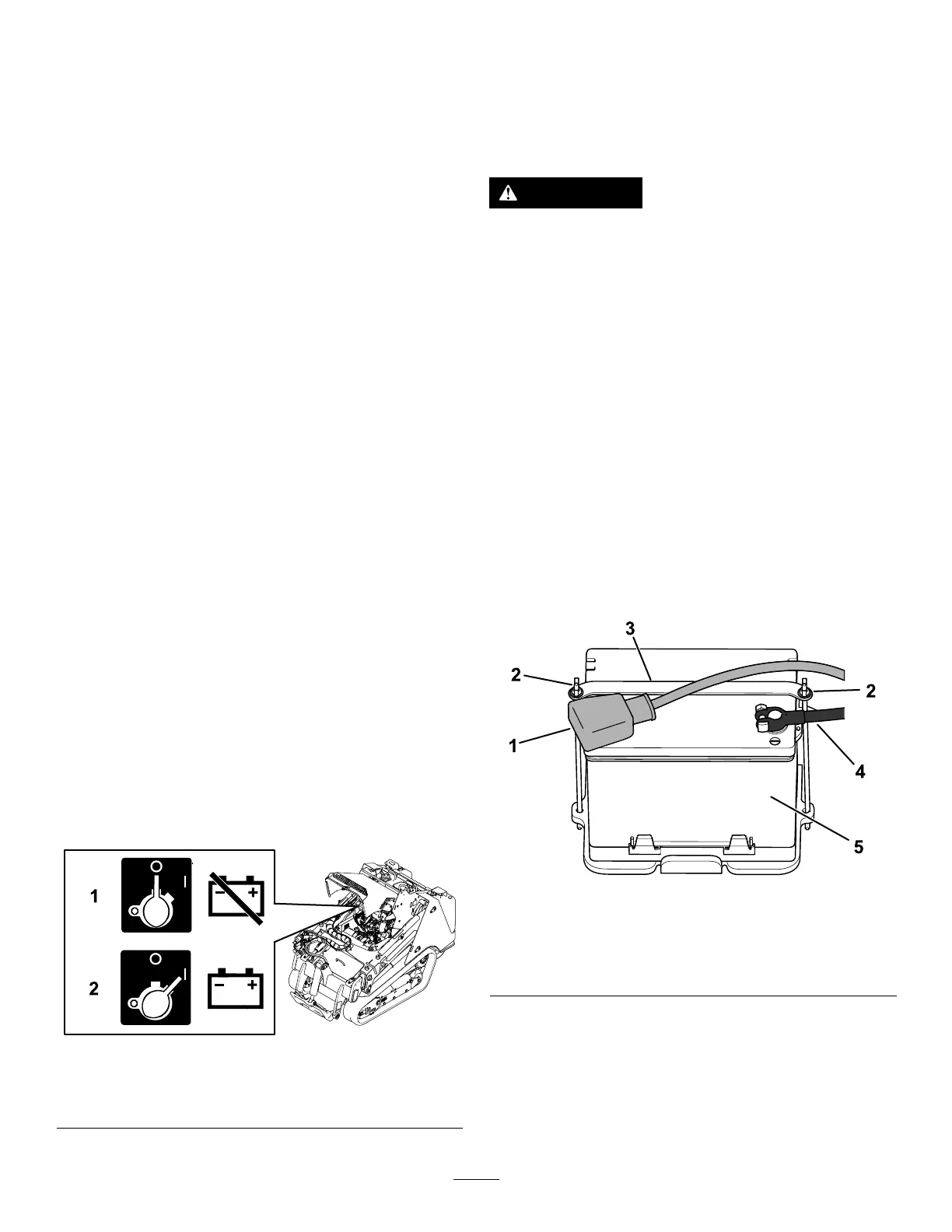
4.Turnthebattery-disconnectswitchtotheONor
OFFpositiontoperformthefollowing:
•Toenergizethemachineelectrically,rotate
thebattery-disconnectswitchclockwiseto
theONposition.
•Tode-energizethemachineelectrically,
rotatethebattery-disconnectswitch
counterclockwisetotheOFFposition.
g361175
Figure77
1.Battery-disconnect
switch—OFFposition
2.Battery-disconnect
switch—ONposition
ServicingtheBattery
ServiceInterval:Every50hours—Checkthebattery
condition.
RemovingtheBattery
WARNING
Incorrectbatterycableroutingcoulddamage
themachineandcables,causingsparks.
Sparkscancausethebatterygassesto
explode,resultinginpersonalinjury.
Alwaysdisconnectthenegative(black)
batterycablebeforedisconnectingthe
positive(red)cable.
1.Removeanyattachments.
2.Parkthemachineonalevelsurfaceandengage
theparkingbrake.
3.Raisetheloaderarmsandinstallthecylinder
locks.
4.Shutofftheengineandremovethekey.
5.Removethefrontcoverassembly;referto
RemovingtheFrontCoverAssembly(page45).
6.Disconnectthenegative(black)groundcable
fromthebatterypost.Retainthefasteners.
g361207
Figure78
1.Positivecable4.Negativecable
2.Wingnutandrod(2)
5.Battery
3.Strap
7.Slidetherubbercoveroffthepositive(red)
cable.
8.Disconnectthepositive(red)cablefromthe
batterypost.Retainthefasteners.
9.Removethewingnuts,rods,andstrap.
10.Removethebattery.
51


 To Next Page