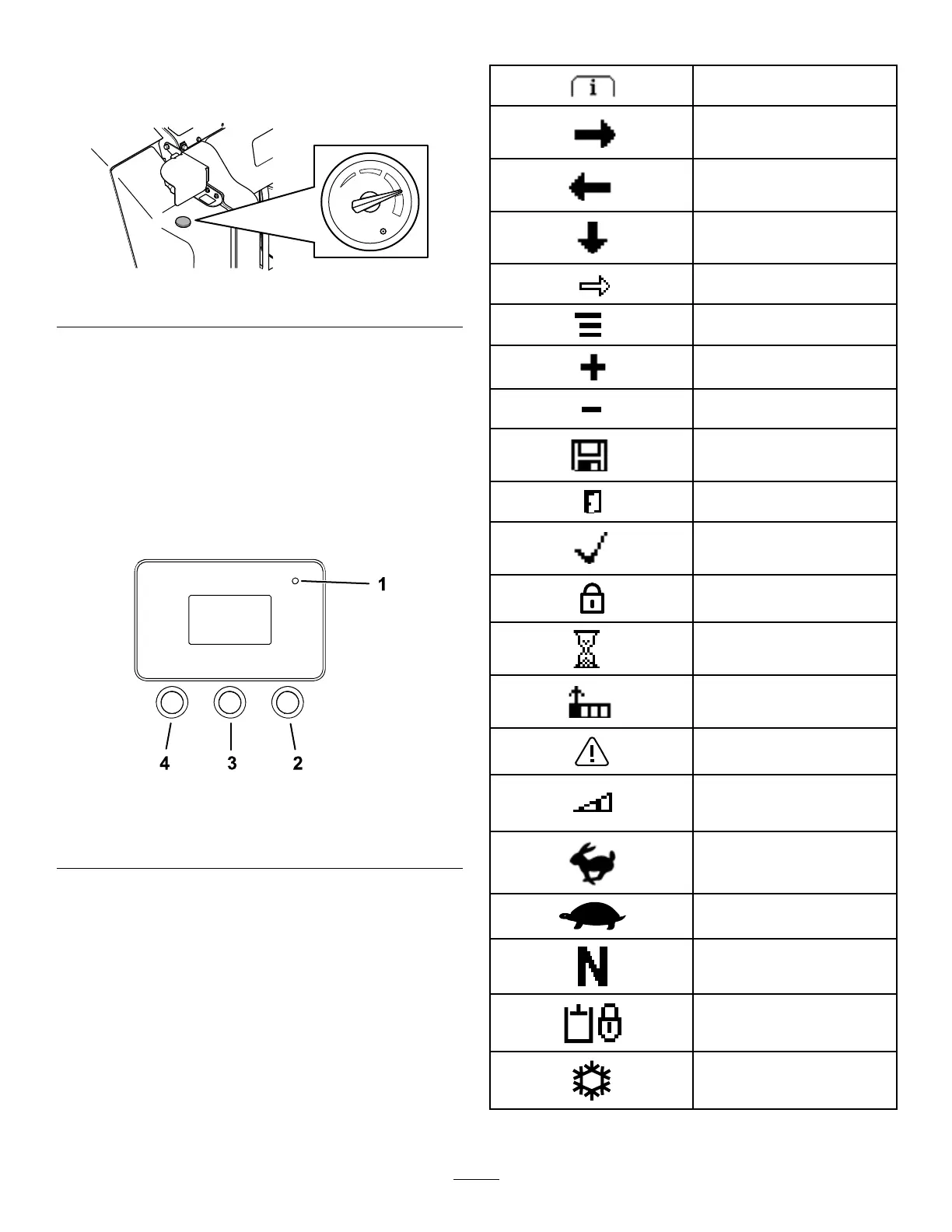
FuelGauge
Thisgaugemeasurestheamountoffuelinthefuel
tank(s).
g371278
Figure14
InfoCenterDisplay
TheInfoCenterLCDdisplayshowsinformationabout
yourmachine,suchastheoperatingstatus,various
diagnosticsandotherinformationaboutthemachine.
Thereisasplashscreenandmaininformationscreen
oftheInfoCenter.Youcanswitchbetweenthesplash
screenandmaininformationscreenatanytimeby
pressinganyoftheInfoCenterbuttonsandthen
selectingtheappropriatedirectionalarrow.
g264015
Figure15
1.Indicatorlight3.Middlebutton
2.Rightbutton
4.Leftbutton
•LeftButton,MenuAccess/BackButton—pressthis
buttontoaccesstheInfoCentermenus.Youcan
useittoexitanymenuthatyouarecurrentlyusing.
•MiddleButton—usethisbuttontoscrolldown
menus.
•RightButton—usethisbuttontoopenamenu
wherearightarrowindicatesadditionalcontent.
Note:Thepurposeofeachbuttonmaychange
dependingonwhatisrequiredatthetime.Each
buttonislabeledwithanicondisplayingitscurrent
function.
InfoCenterIconDescriptions
Menuaccess
Next
Previous
Scrolldown
Enter
Changethenextvalueinthe
list
Increase
Decrease
Savevalue
Exitmenu
Accept
Theoptionislocked.
Hourmeter
Adjustdigit
Warning
Transport-speedscreen
access
Fast
Slow
Neutral
Auxiliarylock
Coldstart
15


 To Next Page