3.[Registration] Tab Page
[Phone Book] Item list 25
[Registration] Tab Page
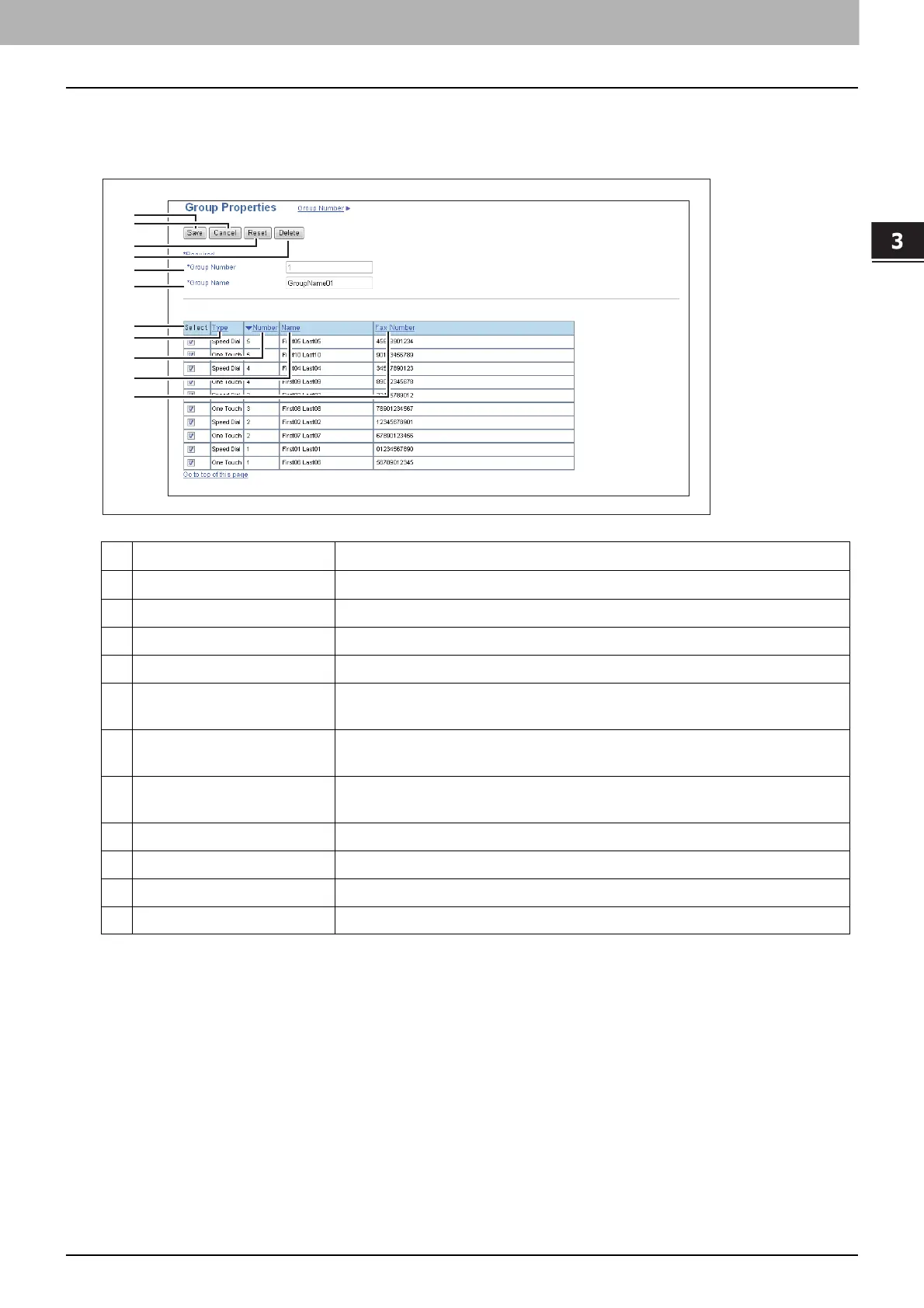
[Group Properties] screen
You can create groups that contain multiple recipients.
This enables you to specify a group as the destination when sending fax to multiple recipients.
Item name Description
1 [Save] button Registers the selected contacts as a group.
2 [Cancel] button Cancels the group registration.
3 [Reset] button Resets the contents.
4 [Delete] button Deletes the displayed group.
5 Group Number Group number is assigned automatically. Edit the value in the range from 1 to
20.
6 Group Name Enter the group name. You can enter up to 20 alphanumerical characters,
symbols (+ - . @ / _), and spaces.
7 Select Select the check box to register fax number into the group. You can select up
to 50 fax numbers.
8 Type Displays the dial type, Speed Dial or One Touch.
9 Number Displays the registered number.
10 Name Displays the registered name.
11 Fax Number Displays the fax number registered to the contact.
1
2
3
4
5
6
7
8
9
10
11






 To Next Page