8. REMOVAL AND REPLACEMENT OF RECEIPT/LABEL
8. REMOVAL AND REPLACEMENT OF RECEIPT/LABEL
8- 1
8. REMOVAL AND REPLACEMENT OF RECEIPT/LABEL
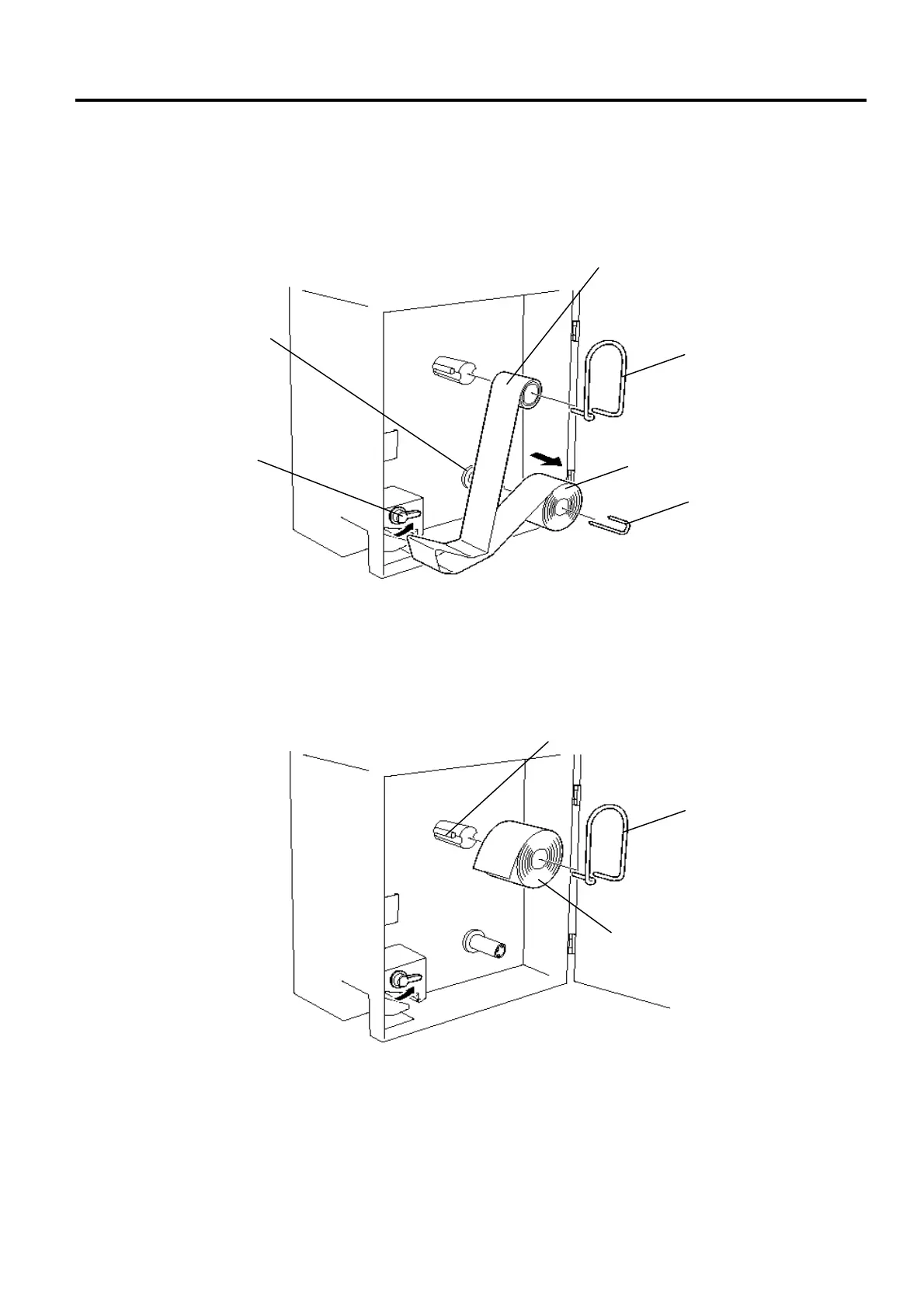
1. Open the printer cover and turn the head-up lever to the anti-clockwise.
2. Pull out the roll stopper and backing paper stopper, then remove the receip/label roll together with
the backing paper roll. You can loosen the backing paper roll by turning the take-up shaft anti-
clockwise.
3. Put a new receipt/label roll over the media shaft and fix it with the roll stopper.
Receipt/Label Roll
Roll Stopper
Backing Paper (Labels only)
Backing Paper Stopper
Take-up Shaft
Head-up Lever
Roll Stopper
Receipt/Label Roll
Media Shaft



 To Next Page