10. PROGRAMMING PROCEDURES
10.15 LON SYSTEM
10-24
10.15 LON SYSTEM
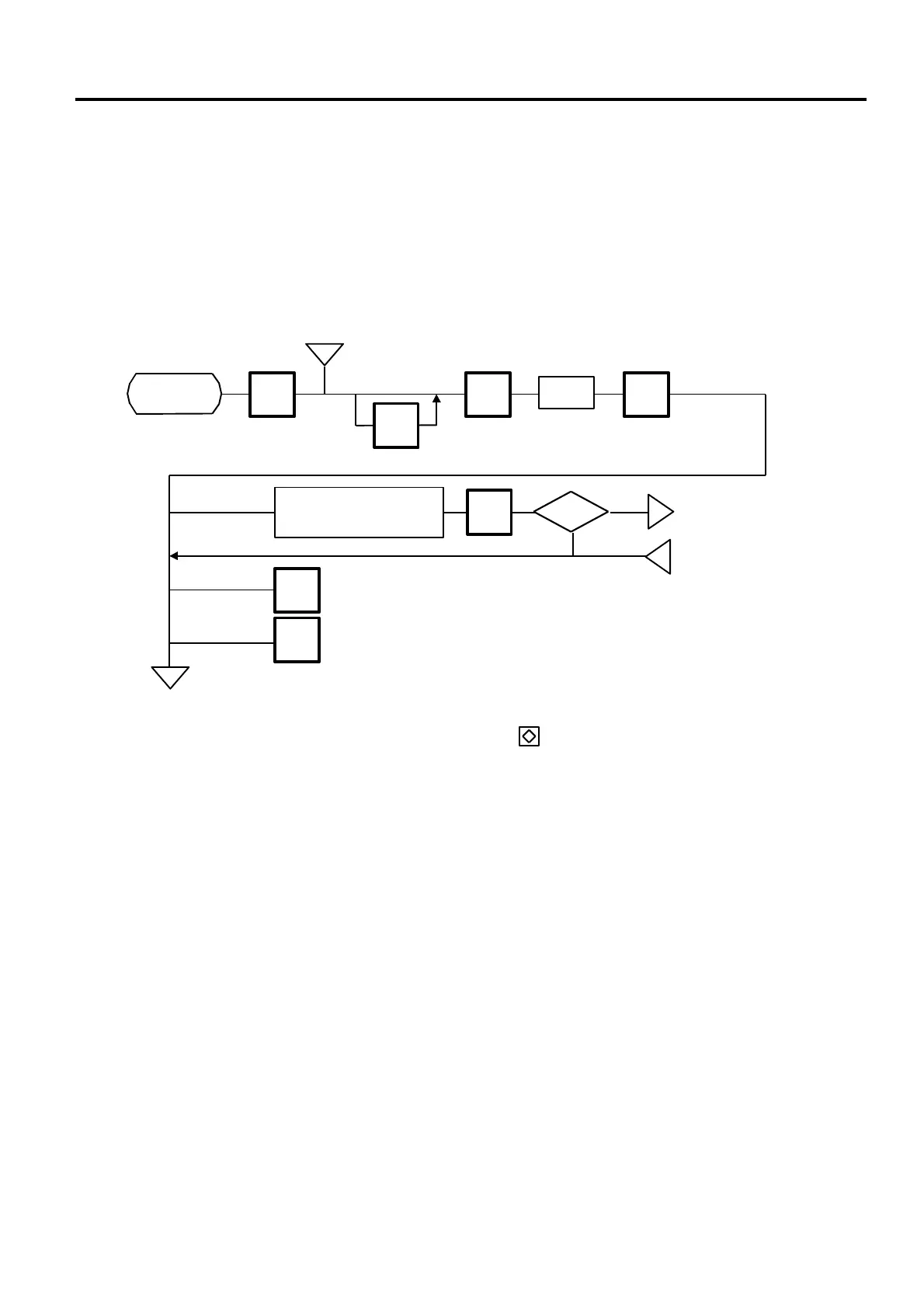
Menu Page: 2
Item No.: 4
The H-9100N scale printer which consists of a master, satellites, and a backup master is connected
with each other by the LON cable to transmit data such as PLU, ING., NUTRI, etc.
ID# 1 is reserved for the master terminal.
ID# 2 is reserved for the backup master terminal or satellite terminal.
ID# 3 to 32 are for satellite terminals.
Setting numbers other than the above results in an error.
4
PROG.
ESC.
Page 2
<MENU>
Yes
IN-LINE ↔ OFF-LINE
ENTER
ID #
Set the number of
scales in the system.
ENTER
ID#: 1
No
◇
CHANGE
PLU
NOTES:
1. Before starting the above procedure, press the key to enter IN-LINE mode.
2. When installing the backup master terminal, set the master scale’s initial status of #9-
1 to 1.
3. Set ID # to all scales in a LON system.
4. When the display power is turned on, the satellite terminal is ready to receive data from
the master terminal.
5. After setting the ID #, turn the power switch OFF and ON again.
m
DLL? n
p
m



 To Next Page