13. OPERATING PROCEDURES
13.11 BATCH PRINT MODE (with 30 Items Run Assignment)
13- 16
13.11 BATCH PRINT MODE (with 30 Items Run Assignment)
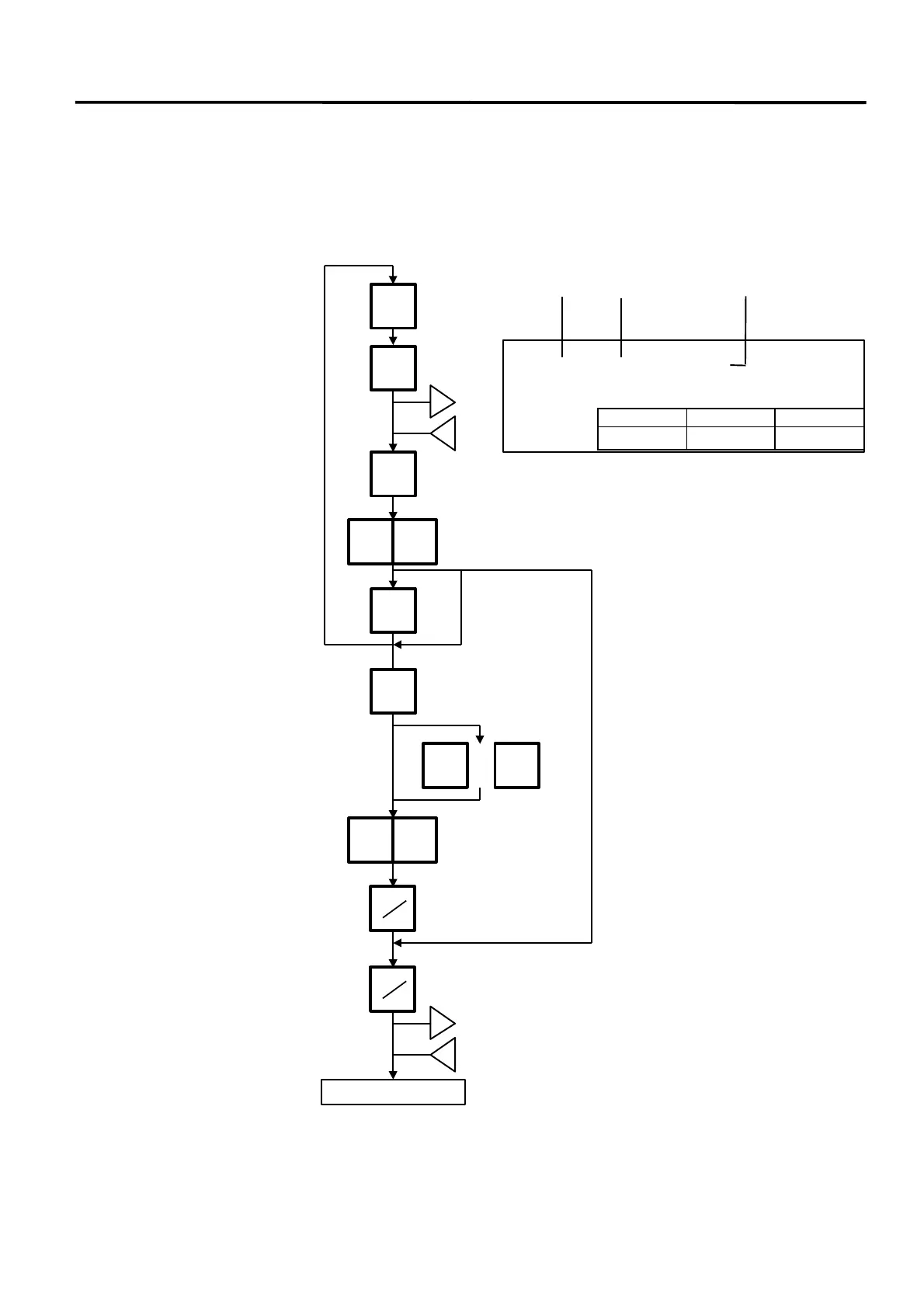
Menu: REG., M.DOWN, or REWRAP
Mode: FIX, or BY COUNT
Up to 99 labels per PLU can be issued in non-scale mode. Up to 30 items can be preset. (However,
if 0 is preset, issuing will be canceled.)
Enter the PLU #.
1
PLU
The label is issued.
Enter the number of labels to
be issued (max. 99)
<REG.> MENU BY-COUNT
ITEM#01 (000001) CNT= 0
Press:
Press:
x
y
PRESET
COUNT
NEXT
PLU
FOR
z
A
Register next preset item
Change or cancel the number of
labels to be printed (not functions
when an item is not registered.)
Next PLU:The next PLU is
recalled.
VOID: The previous PLU is
recalled.
Change the number of labels to
be issued (max. 99).
Press:
Press:
(The labels are issued in the
order of programmed PLU.)
Item#
(1 to 30) PLU# Preset number of labels
lb UNIT/$ TOTAL $
PRT
PRT
3 1
NEXT
PLU
VOID
or
1 0



 To Next Page