10. PROGRAMMING PROCEDURES
10.5 PLU VERIFYING LABEL
10-12
10.5 PLU VERIFYING LABEL
Menu Page: 1
Item No.: 4
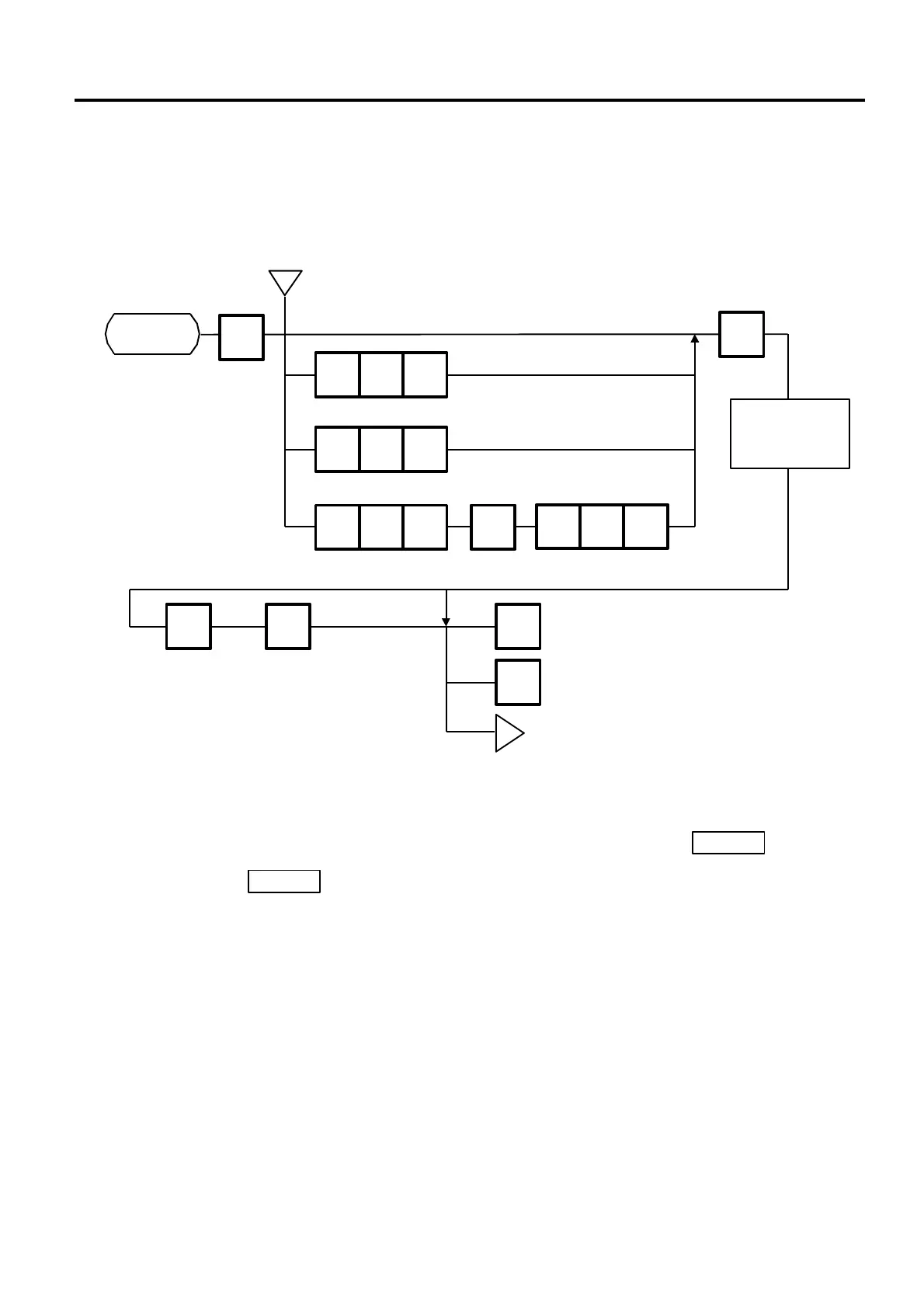
PLU data stored in the scale are verified in the following procedure.
NOTES:
1. Labels are printed in either batch mode or on-demand mode.
2. When no PLU is stored in the selected range, an error occurs when the key is
pressed.
3. Pressing the key releases the scale from the error mode and returns to the initial
status of this menu.
4. After clearing a paper jam error, the scale will wait for an entry of PLU# again.
ENTER
g
4
1 0 0
1
1 0 0
NEXT
PLU
ENTER
The verification
label is issued.
Set the entire PLU#.
Set the individual PLU#. (Ex. PLU #100)
Set the block PLU#. (Ex. PLU #100 to 199)
Set the zone PLU#. (Ex. PLU #100 to 108)
CLEAR ENTER PROG.
ESC.
label issue.
which has been interrupted.
Page 1
<MENU>
CLEAR
◇ ◇
g
Page 1
1 0 8



 To Next Page