16
Chapter 4 Congure the Router in Wireless Router Mode
• Set DNS server manually - If your ISP gives you one or two DNS addresses, select Set
DNS server manually and enter the primary and secondary addresses into the correct
fields. Otherwise, the DNS servers will be assigned automatically from your ISP.
• Host Name - This option specifies the name of the router.
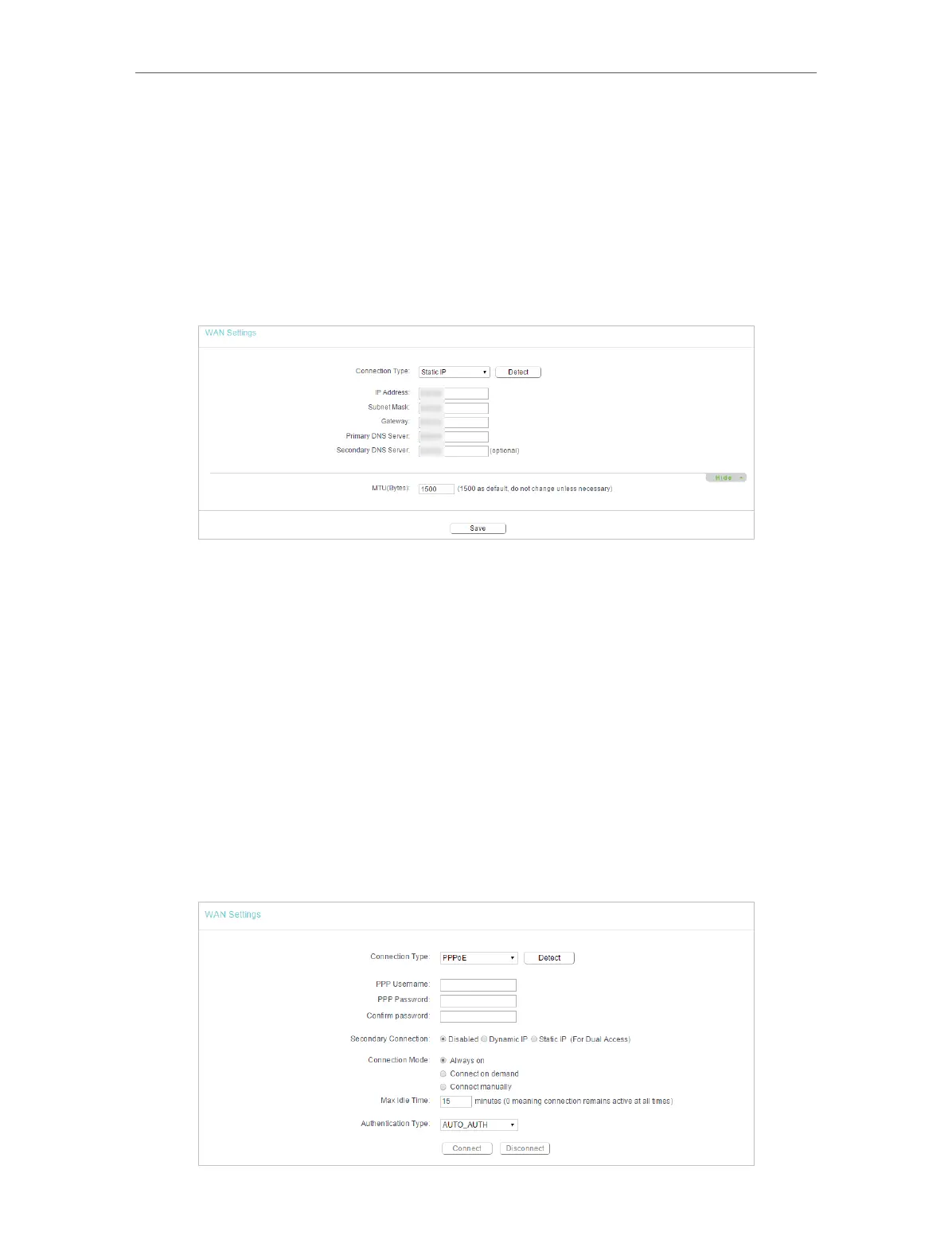
Static IP
If your ISP provides a static or fixed IP address, subnet mask, default gateway and DNS
settings, please select Static IP.
• IP Address - Enter the IP address in dotted-decimal notation provided by your ISP.
• Subnet Mask - Enter the subnet mask in dotted-decimal notation provided by your
ISP. Normally 255.255.255.0 is used as the subnet mask.
• Gateway - Enter the gateway IP address in dotted-decimal notation provided by your
ISP.
• Primary/Secondary DNS Server - (Optional) Enter one or two DNS addresses in
dotted-decimal notation provided by your ISP.
• MTU (Bytes) - The normal MTU (Maximum Transmission Unit) value for most Ethernet
networks is 1500 Bytes. It is not recommended that you change the default MTU size
unless required by your ISP.
PPPoE
If your ISP provides PPPoE connection, select PPPoE.













 To Next Page