14
Create Scenes
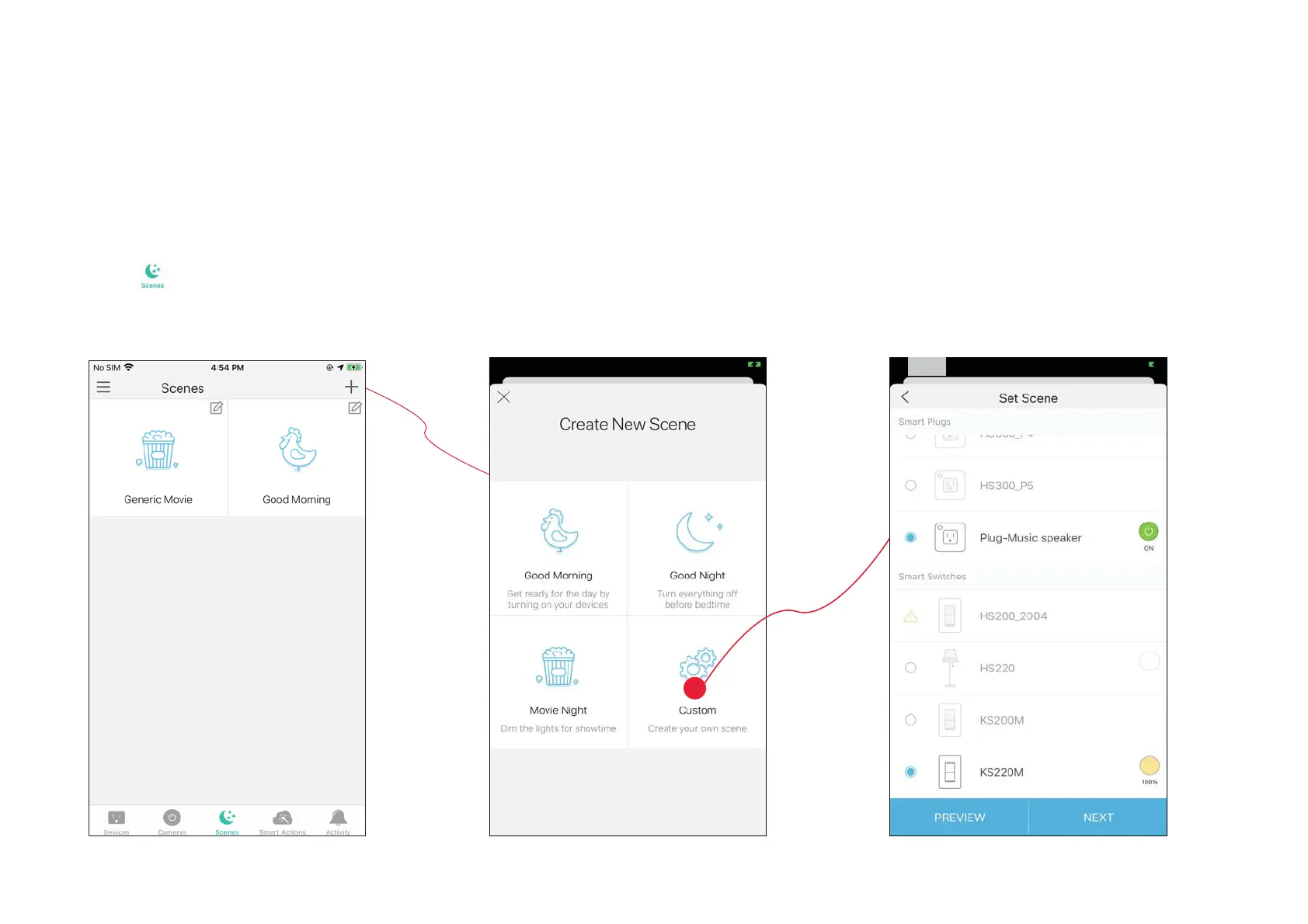
A scene is a preset group of smart devices that can be programmed, customized and activated simultaneously at the touch of a button from your
VPDUWSKRQHRUWDEOHWDOORZLQJ\RXWRHDVLO\VHW\RXUPRRGDFWLYLW\RUƮWDQ\VSHFLDORFFDVLRQ7RFUHDWHDVFHQHZLWK\RXU6PDUW/LJKW6ZLWFK\RX
need other Kasa smart devices, a smart plug for example.
1. Tap
at the bottom, then tap + at the
top right corner.
2. Select a scene or create your own scene.
For example: I want to turn on the light and the
the speaker simultaneously in the morning
ZLWKMXVWDWDSLQWKH.DVD6PDUWDSS
2. Select devices for the scene to work on
and set their status respectively.







 To Next Page