00Mbps Wireless N Gigabit ADSL2+ Modem Router User Guide
23
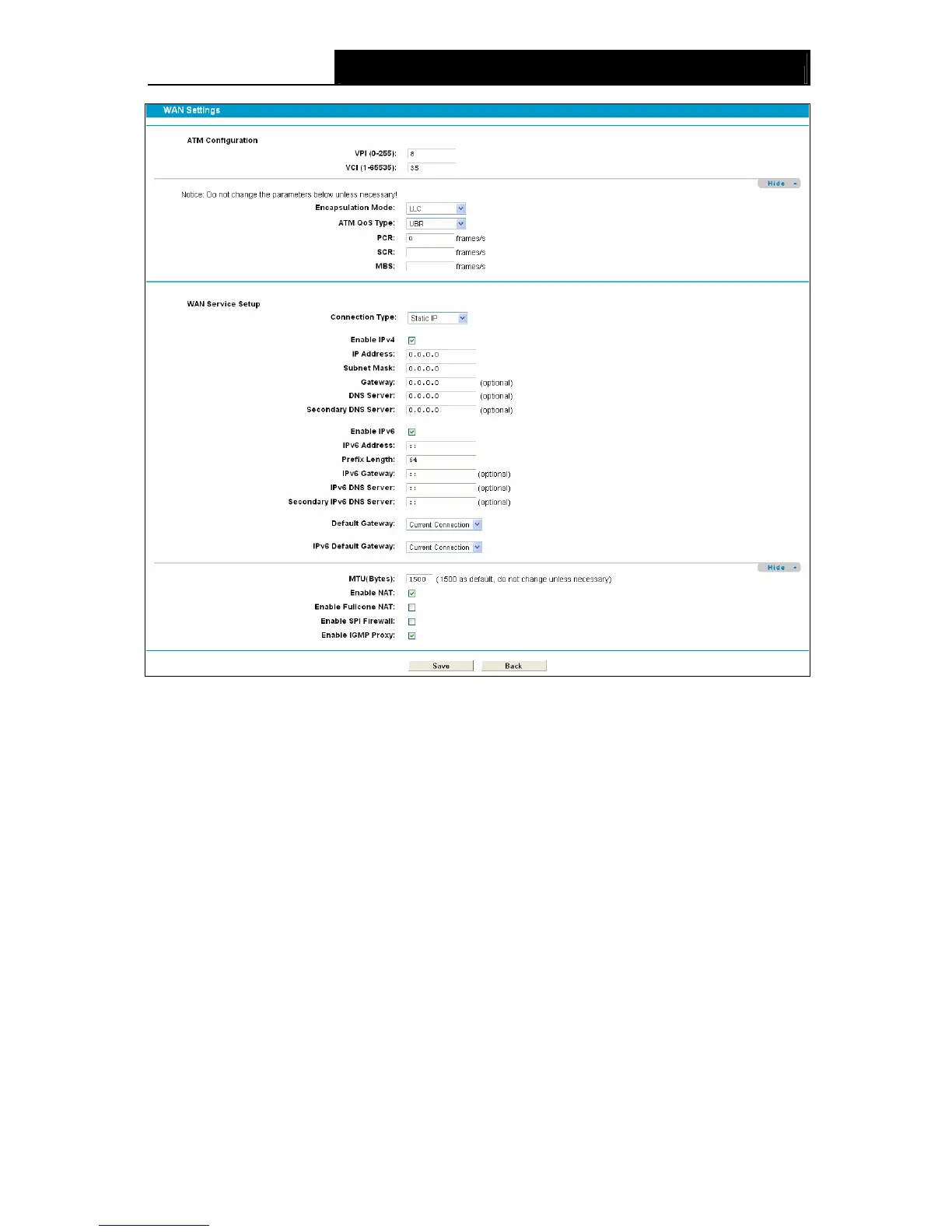
Figure 4-5
ATM Configuration:
¾ VPI (0~255): Identifies the virtual path between endpoints in an ATM network. The valid range
is from 0 to 255. Please input the value provided by your ISP.
¾ VCI (1~65535): Identifies the virtual channel endpoints in an ATM network. The valid range is
from 1 to 65535 (1 to 31 is reserved for well-known protocols). Please input the value
provided by your ISP.
Click Advance, advanced selections of ATM Configuration can be shown.
¾ Encapsulation Mode: Select the encapsulation mode for the Static IP Address. Here you
can leave it default.
¾ ATM Qos Type: Select ATM Qos Type provided by ISP, and the type is UBR by default.
WAN Service Setup:
¾ Enable IPv4:Check the box to enable IPv4.
¾ IP Address: Enter the IP address in dotted-decimal notation provided by your ISP.
¾ Subnet Mask: Enter the subnet Mask in dotted-decimal notation provided by your ISP,
usually is 255.255.255.0.
¾ Default Gateway (Optional): Enter the gateway IP address in dotted-decimal notation
provided by your ISP.









 To Next Page