8
Chapter 2
Connect the Hardware
2. 2. 2. Repeater/Bridge Mode
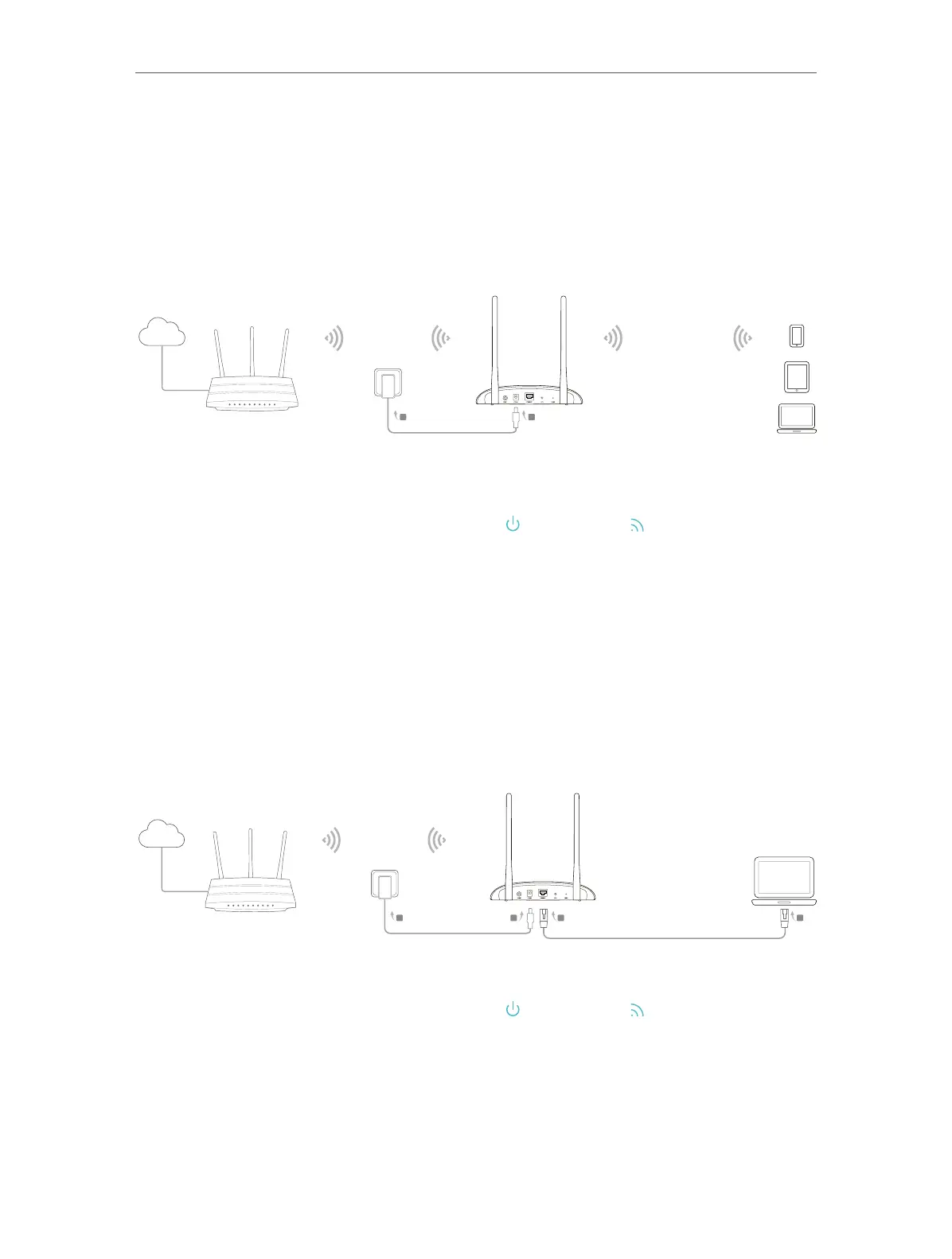
In Repeater/Bridge mode, the access point extends the range of an existing Wi-Fi
network. This mode is suitable when you are in a Wi-Fi dead-zone or a place with weak
wireless signal, and you want to have a larger effective range of the wireless signal
throughout your home or office.
Internet
Host AP’s SSID
A
B
Host AP’s SSID
or
TL-WA801ND’s SSID
1. Connect the access point according to Step A and B in the diagram.
2. Power on the access point , wait until the Power (
) and Wireless ( ) LEDs are lit and stable,
and use the default SSID and Password printed on the label of the access point to join its
Wi-Fi network.
2. 2. 3. Client Mode
In Client mode, the access point connects your wired devices to a wireless network.
This mode is suitable when you have a wired device with an Ethernet port and no
wireless capability, for example, a smart TV, media player, or game console and you
want to connect it to the internet wirelessly.
Internet
Host AP’s SSID
A
B
D
C
1. Connect the access point according to Step A to D in the diagram.
2. Power on the access point , wait until the Power (
) and Wireless ( ) LEDs are lit and stable,
and use the default SSID and Password printed on the label of the access point to join its
Wi-Fi network.



 To Next Page