1-12
f:tec\manuals\Service\SERVICEv5.indd - V6-0615
SERVICE MANUAL
TIREBOSS
TM
Tire Pressure Control
OPERATOR CONTROL UNIT (OCU)
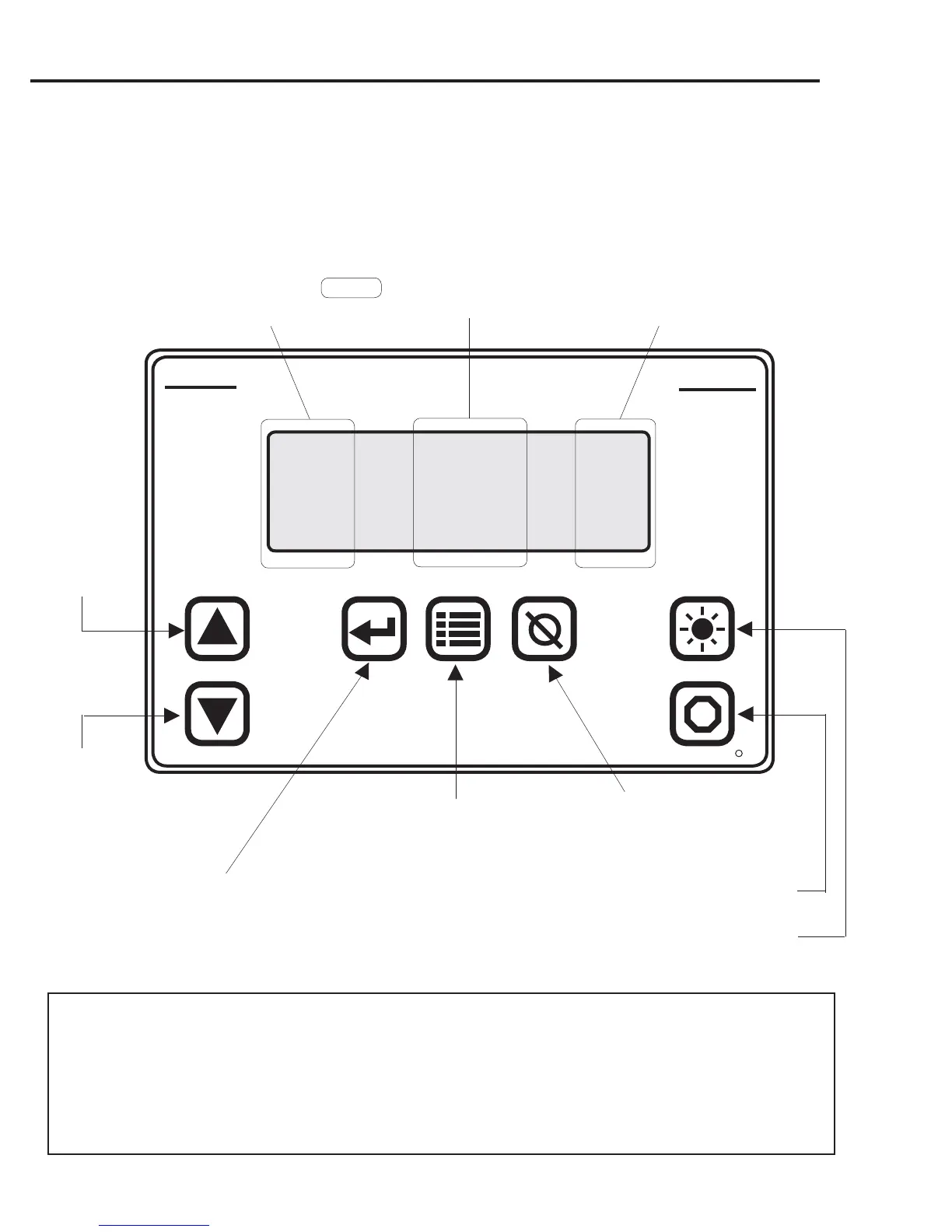
BUTTONS AND SCREEN DESCRIPTIONS
STOP
DIM
CANCELMENUENTER
SELECT
TPC
INTERNATIONAL
ELTEK
R
TIREBOSS
TM
Tire Pressure Control
AXLE STATUS PSI
Steer INF 70
Drive DEF 40
Trailer O.K. 30
Will dim LED display and
white lettering on OCU will
illuminate
Will re-enable disabled
trailer circuit when held
for 2 seconds
Allows Operator to enter MENU options..
-push menu once and Application screen
will appear (push ENTER for different
Application Screens)
Will allow Operator to..
- cancel an alert
- exit a menu option screen
Will allow Operator to..
- enter/apply settings
- enter/apply applications
- enter/apply menu options
Shows axle group being
controlled. (If steer or trailer
is not TIREBOSS equipped,
that axle group, status and
pressure will not appear)
Displays each axle group status
INF - Infl ation cycle active
DEF - Defl ation cycle active
O.K. - within programmed pressure tolerances
****
- trailer axles only disabled
BLANK - A warning has appeared and
function has been suspended
Displays actual axle group
pressure/s (can be
displayed in PSI or KPA)
Will allow
Operator to..
- scroll up
through se-
lections
Will allow Op-
erator to..
- scroll down
through selec-
tions
TRAILER CIRCUIT OVERRIDE FUNCTION
This function is used only when pulling a trailer that is not equipped with
TIREBOSS Tire Pressure Control or when not pulling a trailer.
Non-equipped or non-connected trailers will cause the TRAILER “AIR FLOW RESTRICTION” alert to activate.
Push & Hold the ‘CANCEL’ button for 2 seconds until a single beep is heard.
The alert stops & the trailer circuit will be de-activated (trailer STATUS fl ashes ****).
To resume normal operation, Push & Hold the ‘STOP’ button for 2 seconds.


 To Next Page