SERVICE MANUAL
TIREBOSS
TM
Tire Pressure Control
OPERATOR CONTROL UNIT (OCU)
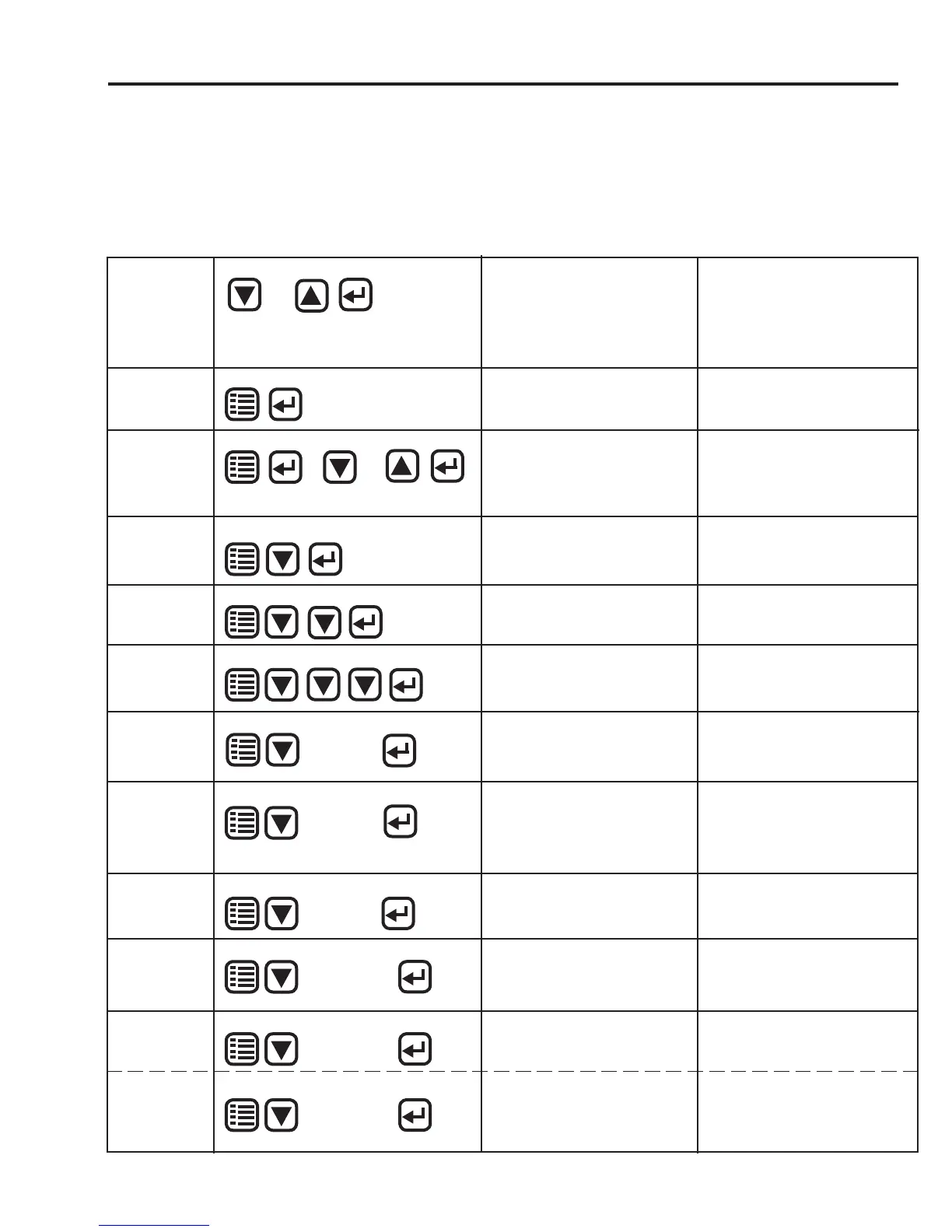
SELECTION SEQUENCES
The following information and selection screens can be accessed by using the
following selection sequences....
1-13
f:tec\manuals\Service\SERVICEv5.indd - V6-0615
TO ACCESS...
PUSH...
DETAILS...
NOTE...
SPEED FREQ.
SET-UP
MENU
ENTER
DOWN
...will display number of hertz being
sensed by system
...should read 0 Hz when vehicle is
stationary
CAB SET-UP
FILE
MENU
ENTER
DOWN
...will display customer/system se-
rial number
(ie. M-tboss00000.ca)
...screen will return to normal view
after 30 seconds
CAB PROGRAM
VERSION
MENU
ENTER
DOWN
...will display cab fi rmware program
version number (ie. CabV301)
...screen will return to normal view
after 30 seconds
DOWN
DOWN DOWN
APPLICATION
MENU
ENTER
...will display Application Name and
Number currently in use
CHANGING
APPLICATION
MENU
ENTER
...will change application number
...pushing up or down will scroll
through applications. Stop on
desired application and push and
hold ENTER.
DOWN
or
... always keep current Application
Pressure Setting Cab Card in front in
sleeve for easy operator reference
ENTER
UP
CHANGING
SETTING within
an APPLICATION
...will change Setting number
within an application
DOWN
or
...pushing up or down once will indi-
cate current setting and pushing up or
down more than once will scroll set-
ting. Stop on desired setting. System
will change automatically in
5 seconds or push ENTER for immedi-
ate activation
UP
ENTER
VALVE
PROGRAM
VERSION
MENU
DOWN
...will display valve fi rmware pro-
gram version number
(ie. ValV202)
...screen will return to normal view
after 30 seconds
TPC SYSTEM
SERIAL NUM-
BER
MENU
ENTER
DOWN
...will display TPC Serial Number of
Valve Box (ie. MigBCA00J0000)
...screen will return to normal view
after 30 seconds
...this number MUST match the serial
number inside the valve box on VCM
bracket.
TIREBOSS
VERSION
MENU
ENTER
DOWN
...will display software version num-
ber (ie. 2.0.8.1 405)
...screen will return to normal view
after 30 seconds
six times
fi ve times
ENTER
four times
HEATER INFO
**(not available
with all software
versions)
MENU
ENTER
DOWN
...used to display heater Volts and
Watts
... used for testing heaters
...screen will return to normal view
after 30 seconds
...refer to OCU “Heater Info” Screen in
this manual for more details
seven times
PROGRAM
MODE
MENU
ENTER
DOWN
...used to program Operator Control
Unit
...done by factory authorized personal
only.
eight times
PROGRAM
MODE
**(versions with-
out ‘heater info
screen’)
MENU
ENTER
DOWN
seven times
...used to program Operator Control
Unit
...done by factory authorized personal
only.


 To Next Page