8
Make an Audio Recording
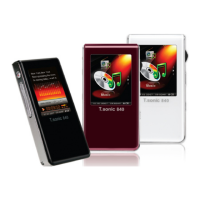
The T.sonic 650 records using is its built-in microphone located on the face of the unit.
z Press and hold the
button for 2 seconds in any mode (except the FM Radio mode) to activate the
T.sonic 650’s built-in microphone and begin recording.
z Press and hold
for 2 seconds again to finish the recording.
z Recorded audio files can be found in the Record mode.
A-B Repeat: Repeat a Section of a Track
z While listening to a song or recording in the Music or Record modes, press the button once to mark the
beginning of the portion you wish to repeat.
z Press the button again to mark the end of the section you wish to repeat.
z The marked section of the track will playback the marked A-B section in a continuous loop.
z Press the button once more to stop the A-B repeat function.
Hold
When the switch enabled, all of the T.sonic 650’s buttons will be disabled, and cannot accidentally be
pressed while in your pocket.
Reset the T.sonic 650
You can reset the unit by pressing and holding the “Reset” button for 3 to 5 seconds.


 To Next Page